How to Replace the Thermal Fuse on a GE GTD33EASKWW Electric Dryer
If you’re dealing with a GE GTD33EASKWW electric dryer that runs but produces no heat, this guide is for you. I’ll walk you through diagnosing a blown thermal fuse, understanding the reasons behind its failure, and how to replace it to get your dryer running smoothly again.
Understanding the Thermal Fuse in Your GTD33EASKWW
What Does the Thermal Fuse Do?
The thermal fuse is one of the most critical safety components in your GE GTD33EASKWW dryer. This single-use device is designed to protect your dryer from catastrophic overheating. When the internal temperature exceeds approximately 340°F (170°C), the thermal fuse melts permanently, cutting off the electrical power to the heating element. This prevents fires and damage to the drum and cabinet.
Located on the exhaust duct inside your GTD33EASKWW, the thermal fuse plays a vital role. If airflow becomes restricted or the cycling thermostat fails to properly regulate the heating element, the temperature can rise dangerously. The thermal fuse senses this condition and sacrifices itself to shut down the heater before damage occurs. Remember, once blown, it must be replaced; it cannot be reset.
Why the Thermal Fuse Blows: Root Cause Analysis
Critical Point: If you replace the thermal fuse without identifying why it blew, you’re likely to face the same issue again, often within just a few drying cycles. The thermal fuse is a symptom, not the primary problem. It’s essential to inspect and address the underlying cause.
Here are some common reasons the thermal fuse fails on the GTD33EASKWW:
- Clogged exhaust vent: This is the most frequent cause. Lint accumulation in the dryer vent hose, vent cap, or ducting restricts airflow, causing heat to build up inside the dryer cabinet and exhaust duct area.
- Damaged or kinked vent hose: A crushed or improperly routed dryer vent hose reduces airflow and traps heat.
- Failed cycling thermostat: This component controls the heating element’s operation. If it fails, the heating element may remain on continuously, leading to excessive heat buildup.
- Restricted lint trap: A heavily soiled lint filter forces air through restricted pathways, contributing to increased internal temperature.
- Faulty heating element: In rare cases, an element that stays energized longer than intended can overheat the dryer.
Symptoms of a Blown Thermal Fuse on the GTD33EASKWW
If the thermal fuse in your GTD33EASKWW has failed, you’ll notice these specific symptoms:
- The dryer motor runs and the drum rotates normally, but no hot air is produced.
- Clothes come out cold or barely warm, even when set to high heat.
- The dryer may run the full cycle time, but clothes remain completely damp.
- The blower wheel pushes cool air through the drum.
- No burning smell or visible damage inside the dryer cabinet.
This symptom pattern—drum turning but no heat—is a classic indicator of a blown thermal fuse on the GTD33EASKWW. It’s crucial not to confuse it with a heating element failure, which can produce similar symptoms but requires a different repair approach.
Confirming the Thermal Fuse is Blown: Multimeter Test
Before you take apart your GTD33EASKWW, confirm that the thermal fuse is indeed the issue by performing a continuity test with a digital multimeter.
Multimeter Continuity Testing Steps
- Unplug the GTD33EASKWW from the electrical outlet and allow it to cool down for at least 30 minutes.
- Locate the thermal fuse on the exhaust duct. You’ll find it once you remove the back panel (instructions below).
- Set your digital multimeter to the continuity setting (usually marked with a sound wave symbol or Ω resistance mode).
- Touch one multimeter probe to each thermal fuse terminal without disconnecting the wires yet.
- Check the multimeter reading: A functional thermal fuse shows continuity (the meter beeps or displays near 0 ohms). A blown fuse shows no continuity (the meter displays “OL” for over limit or infinite resistance).
If your multimeter confirms no continuity through the thermal fuse, you’ve verified that it’s blown and needs to be replaced on your GTD33EASKWW.
⚠️ Safety Warning for GTD33EASKWW Thermal Fuse Replacement
Electric shock hazard: The GTD33EASKWW is a 240-volt electric dryer, so always unplug it from the wall outlet before starting any repair work. Don’t rely on the control panel power switch—this does not disconnect power from all internal components.
Burn hazard: Even after unplugging, internal components can remain hot. Wait at least 30 minutes for the dryer to cool completely before touching any parts inside the cabinet.
Proper grounding: To prevent damaging electronic controls, ground yourself by touching a bare metal part of the dryer frame to discharge any static electricity before touching internal components.
Gas-safe operation: This guide is specific to the GTD33EASKWW electric model. Do not attempt this repair on gas dryers, as they require different safety procedures.
Parts and Tools You’ll Need
Replacement Thermal Fuse for GTD33EASKWW
OEM Part Number: WE4M519
This is the exact thermal fuse designed for the GE GTD33EASKWW. It’s a ceramic thermal fuse with two male spade terminals that connect via push-on wire connectors. It’s crucial to use the OEM part number WE4M519 or a verified equivalent to ensure proper temperature rating and safety compliance. Avoid universal thermal fuses of different amperage or temperature ratings, as they may not work correctly.
Tools Required
- Phillips head screwdriver
- Nut driver or socket set (10mm and 5/16″ sockets)
- Digital multimeter with continuity setting
- Needle-nose pliers (optional, for removing wire terminals)
- Flashlight or work light
- Shop towels and a small container for fasteners
- Vacuum with hose attachment for lint cleaning
Step-by-Step Disassembly of the GTD33EASKWW
Step 1: Prepare the Dryer
- Unplug the GTD33EASKWW from the electrical outlet completely.
- Move the dryer away from the wall far enough to access the back panel—aim for about 12-18 inches of clearance.
- Disconnect the vent hose from the back of the dryer by loosening the hose clamp or duct tape securing it.
- Allow the dryer to cool for at least 30 minutes before proceeding.
Step 2: Remove the Back Panel
To access the thermal fuse, you’ll need to remove the back panel of your GTD33EASKWW.
- Locate the fasteners securing the back panel. The GTD33EASKWW back panel is held with 10mm hex head bolts positioned at the top two corners and bottom two corners of the cabinet.
- Using a 10mm socket or nut driver, remove all four fasteners and place them in a small container to avoid losing them.
- Carefully lift and remove the back panel. Since it’s metal and weighs around 8-10 pounds, support its weight to prevent it from dropping.
- Set the back panel aside in a safe spot where it won’t get damaged or become a tripping hazard.
Step 3: Locate the Thermal Fuse on the GTD33EASKWW
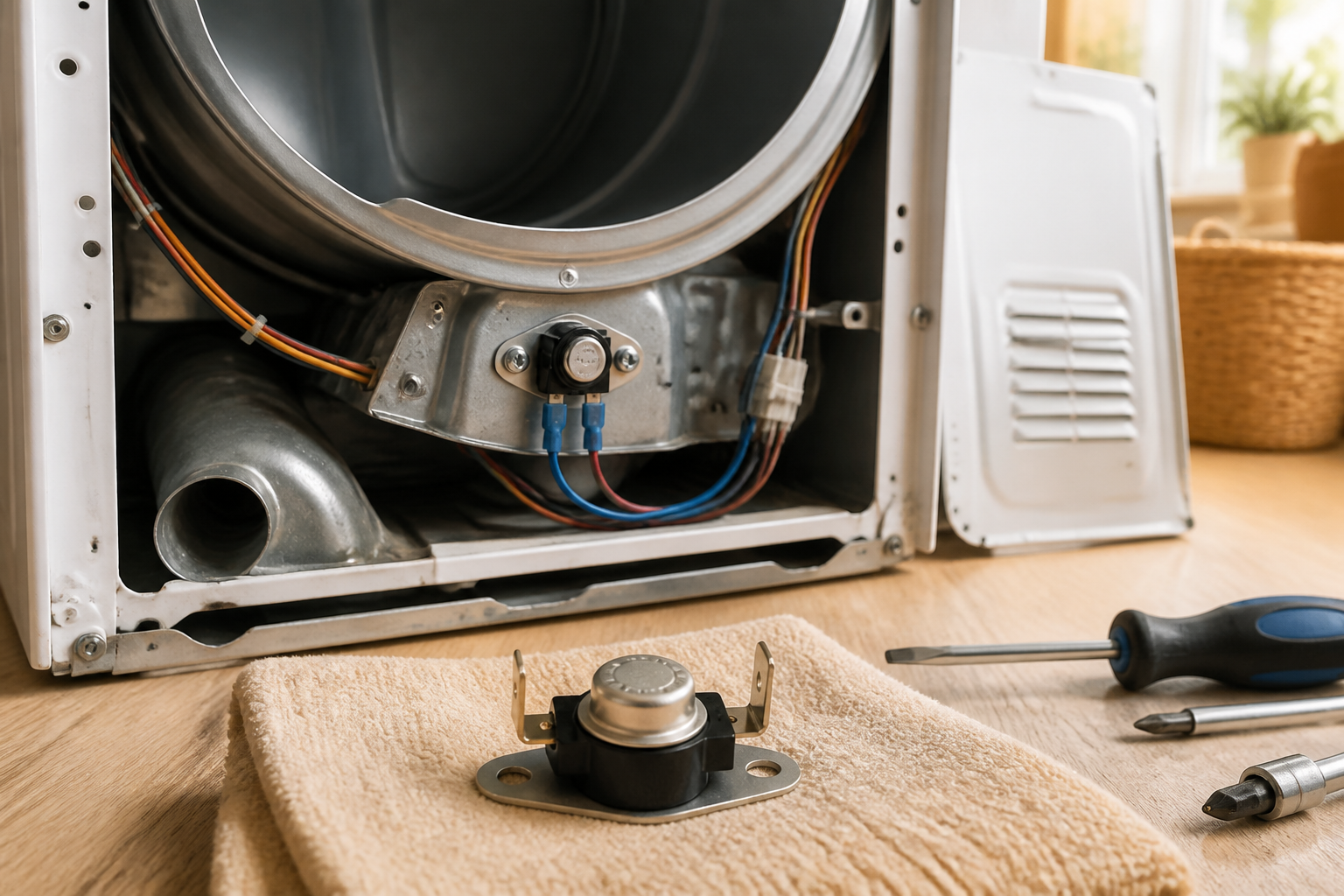
Once the back panel is off, look toward the bottom rear of the dryer cabinet. The thermal fuse is mounted on the exhaust duct assembly—a curved metal tube that directs hot air from the blower toward the vent hose connection. The thermal fuse is positioned on the outside of this duct to sense the temperature of the exiting hot air.
On the GTD33EASKWW, the thermal fuse is a small ceramic cylinder approximately 1.5 inches long and 0.5 inches in diameter, featuring two male spade terminals sticking out from one end. Two wire harness connectors push onto these terminals and are secured with a metal bracket or clip.
Removing and Replacing the Thermal Fuse
Step 4: Document Wire Connections
Before disconnecting anything from the thermal fuse, take a photo of the wire configuration with your phone. This picture will be your guide when reconnecting the new fuse. Note the color of each wire and which terminal it connects to.
Typically, the thermal fuse on the GTD33EASKWW has two wires: one black (hot) and one white (neutral). However, your model may vary, so this photograph is crucial for correct reconnection.
Step 5: Disconnect the Old Thermal Fuse
- Firmly grasp the first wire connector (the cylindrical push-on terminal) with your fingers or needle-nose pliers.
- Pull the connector straight off the thermal fuse spade terminal. Avoid twisting or rocking the connector to prevent damaging the terminal.
- Repeat this process for the second wire connector.
- Once both wires are disconnected, identify the mounting bracket or clip holding the thermal fuse to the exhaust duct. If it uses a clip, remove it; if it uses a screw, take it out with the appropriate screwdriver.
- Remove the old thermal fuse and set it aside. Don’t discard it until you confirm the new fuse is working properly; you may need it for a warranty claim.
Step 6: Inspect the Thermal Fuse Location
Before installing the new thermal fuse, inspect the exhaust duct area for lint, debris, or corrosion. This step is critical, as lint buildup around the thermal fuse is a common reason for its premature failure.
- Use a shop vacuum with a hose attachment to carefully clear any lint or debris from the exhaust duct area surrounding where the fuse mounts.
- Check the duct for dents, kinks, or damage that might restrict airflow.
- If you find heavy corrosion or damage on the duct surface, make a note of this as a potential root cause of the fuse failure and plan to address it later.
Step 7: Install the New Thermal Fuse
- Unpack the new WE4M519 thermal fuse for your GTD33EASKWW and verify that the part number matches.
- Position the thermal fuse on the exhaust duct in the same location as the old fuse. Ensure the two spade terminals are pointing upward or toward the wire connections.
- Secure the thermal fuse with its bracket or mounting clip using the fastener you removed earlier. Tighten it firmly, but avoid overtightening to prevent cracking the ceramic body.
- Check that the fuse is stable and doesn’t rock or move when gently pushed.
Step 8: Reconnect the Wire Terminals
- Refer back to the photograph you took earlier for the original wire configuration.
- Push the first wire connector (usually the black wire) firmly onto the corresponding spade terminal of the new thermal fuse. Push straight on until you hear a click.
- Attach the second wire connector to the remaining terminal of the new fuse.
- Gently tug on each wire to ensure the connectors are fully seated and won’t pull off easily.
- Visually inspect both connections to confirm they’re clean, free of corrosion, and fully engaged on the spade terminals.
Addressing Root Causes Before Reassembly
Step 9: Inspect and Clean the Exhaust Vent System
With the back panel off your GTD33EASKWW, it’s the perfect opportunity to address the most common cause of thermal fuse failure: a clogged vent system. If you don’t clear the blockage, the new thermal fuse is likely to fail again within a few cycles.
- Inspect the vent hose connection: Look at where the vent hose attaches to the back of the GTD33EASKWW. Check for crushed sections, kinks, or other damage that might restrict airflow.
- Check the exhaust duct inside the dryer: The metal exhaust duct should have a clear airflow pathway. Use your flashlight to look through the duct from the blower side toward the vent connection. If you see a significant lint blockage, use a long brush or vacuum hose to clear it.
- Inspect the blower wheel: The blower wheel, visible near the back of the dryer drum, should spin freely with no lint buildup. A heavily blocked blower restricts airflow and can cause heat to build up.
- Plan for external vent cleaning: While the back panel is off, consider cleaning the external vent hose and outdoor vent cap with a dryer vent cleaning kit. A clogged external vent is a leading cause of thermal fuse failure on the GTD33EASKWW.
Step 10: Check the Cycling Thermostat
The cycling thermostat is another common cause of thermal fuse failure on the GTD33EASKWW. With the back panel removed, you can visually inspect it and perform a basic continuity test.
- Locate the cycling thermostat: It’s a cylindrical component mounted on or near the exhaust duct, resembling the thermal fuse but typically larger and with an adjustable temperature setting dial or screw on top.
- Visually inspect the thermostat: Look for corrosion, burnt contacts, or any visible damage to the component or its wire connections.
- Perform a continuity test: Using your multimeter set to continuity mode, touch the probes to the thermostat’s two terminals. The thermostat should show continuity (beep or near 0 ohms) when cold. If it shows “OL” or infinite resistance when the dryer is cool, it’s faulty and should be replaced.
- Note the thermostat condition: If it appears burnt or fails the continuity test, plan to replace it during this repair. A faulty thermostat will lead to repeated thermal fuse failures.
Step 11: Clean the Lint Filter Area
While you have access to the back of your GTD33EASKWW, clean the lint filter slot area to ensure proper airflow through the filter.
- Access the lint filter from the front of the dryer (or rear, depending on your model).
- Remove the lint filter and inspect it for damage, tears, or permanent lint buildup that can’t be cleaned.
- Wash the filter with warm water and a soft brush to remove all lint and buildup.
- Use a shop vacuum to clean the filter slot and surrounding area inside the dryer cabinet to eliminate lint that has bypassed the filter.
- Reinstall the clean filter, ensuring it sits fully in its slot.
Reassembling the GTD33EASKWW
Step 12: Reinstall the Back Panel
- Carefully position the back panel against the rear of the GTD33EASKWW cabinet, aligning the four mounting holes.
- Insert the four 10mm fasteners (the bolts you removed earlier) into the mounting holes at the top and bottom corners.
- Tighten each fastener firmly with your 10mm socket or nut driver. Apply enough force to create a secure seal, but avoid overtightening to prevent stripping the threads or bending the panel.
- Ensure the back panel is flush against the cabinet with no gaps.
Step 13: Reconnect the Vent Hose
- Reattach the vent hose to the back of the dryer, securing it with the hose clamp or duct tape as necessary.
Recommended Parts & Tools
GE WE4M315 Thermal Fuse for Dryer
This is the direct replacement thermal fuse for the GTD33EASKWW dryer model. Having the correct OEM part ensures your dryer functions safely and reliably.
Nut Driver and Screwdriver Set
You’ll need various drivers to remove the lint trap housing, blower wheel, and thermal fuse assembly during this repair. A quality multi-bit screwdriver or driver set makes the job faster and reduces the risk of stripping fasteners.
Lint Trap Cleaner and Dryer Vent Brush
While you have your dryer disassembled for the thermal fuse replacement, cleaning out lint buildup in the vent system is essential to prevent future thermal fuse failures. This brush kit helps remove accumulated lint that restricts airflow and causes overheating.
The Exact Thermal Fuse That Stops the GTD33EASKWW No-Heat Problem
When a GTD33EASKWW dryer runs but produces zero heat, nine times out of ten it’s this fuse that’s blown. You need the OEM part number match—the WE4M315 is the correct replacement for this model, and ordering the wrong thermal fuse means another trip back into the dryer cabinet.
What works
- Exact OEM part number fit—no adapter needed, no guessing whether it’ll seat properly in the blower housing
- Comes with the correct amperage rating (258°F trip point), which prevents nuisance blows and premature failures from recurring airflow blockages
- One-time use design means once you install it correctly and clear the vent blockage that likely caused the original failure, you won’t see this part again for years
What doesn’t
- Only solves the symptom if you’ve actually diagnosed the root cause—a clogged vent or lint trap will blow this fuse again within weeks, so cleaning must happen first
- Won’t help if your dryer’s heating element is the real problem; the fuse protects against overtemp, so if you’re not getting heat after replacement, the element itself may be dead
The most common mistake I see is customers ordering a generic thermal fuse or the wrong GE part number, then having to disassemble the dryer a second time. Before you buy, verify this is the WE4M315 and also commit to cleaning out your vent line—I’ve replaced this fuse on the same dryer twice in one week because the homeowner ignored the blockage. Get the GE WE4M315 Thermal Fuse for Dryer and do the vent cleaning at the same time.
About This Article

Written by Dave Holt. Dave Holt has been taking apart and fixing household appliances since he was a teenager who couldn't leave a broken one alone. Eighteen years later, after fixing things for neighbors, friends, and anyone who'd let him, he's seen almost every failure mode there is. When he writes a repair guide here, it's based on the actual job, not a manufacturer overview. More about this site.
Scope and limits. Dave is a self-taught repairer, not a certified appliance technician. Unplug before you open anything, and leave sealed refrigeration systems, gas connections, and hardwired circuits to a qualified technician.