Where Is the Thermal Fuse Located on a Samsung Dryer?
Samsung dryers have two separate thermal safety devices that homeowners often collectively refer to as “the thermal fuse,” and this distinction is critical for diagnosis. The blower housing thermal fuse and the heater box thermal cut-off serve different functions and are located in completely different areas of the dryer. Understanding which one has failed will tell you whether your dryer won’t start at all or runs without heat. If your Samsung dryer suddenly stopped working or produces cold air, one of these devices has likely tripped or burned out, and this guide will show you exactly where to find both and how to test them.
The Two Thermal Safety Devices in Your Samsung Dryer
Thermal Fuse on the Blower Housing
The blower housing thermal fuse is a small, single-use safety device mounted directly on the blower fan housing. On most Samsung electric dryer models in the DV42H, DV45H, DVE45, and DVE50 series, this component is accessible by removing either the front panel or the lower front access panel, depending on your specific model. The blower housing itself is the cylindrical metal chamber that contains the fan wheel responsible for pulling air through the drum and pushing it out through the vent duct.
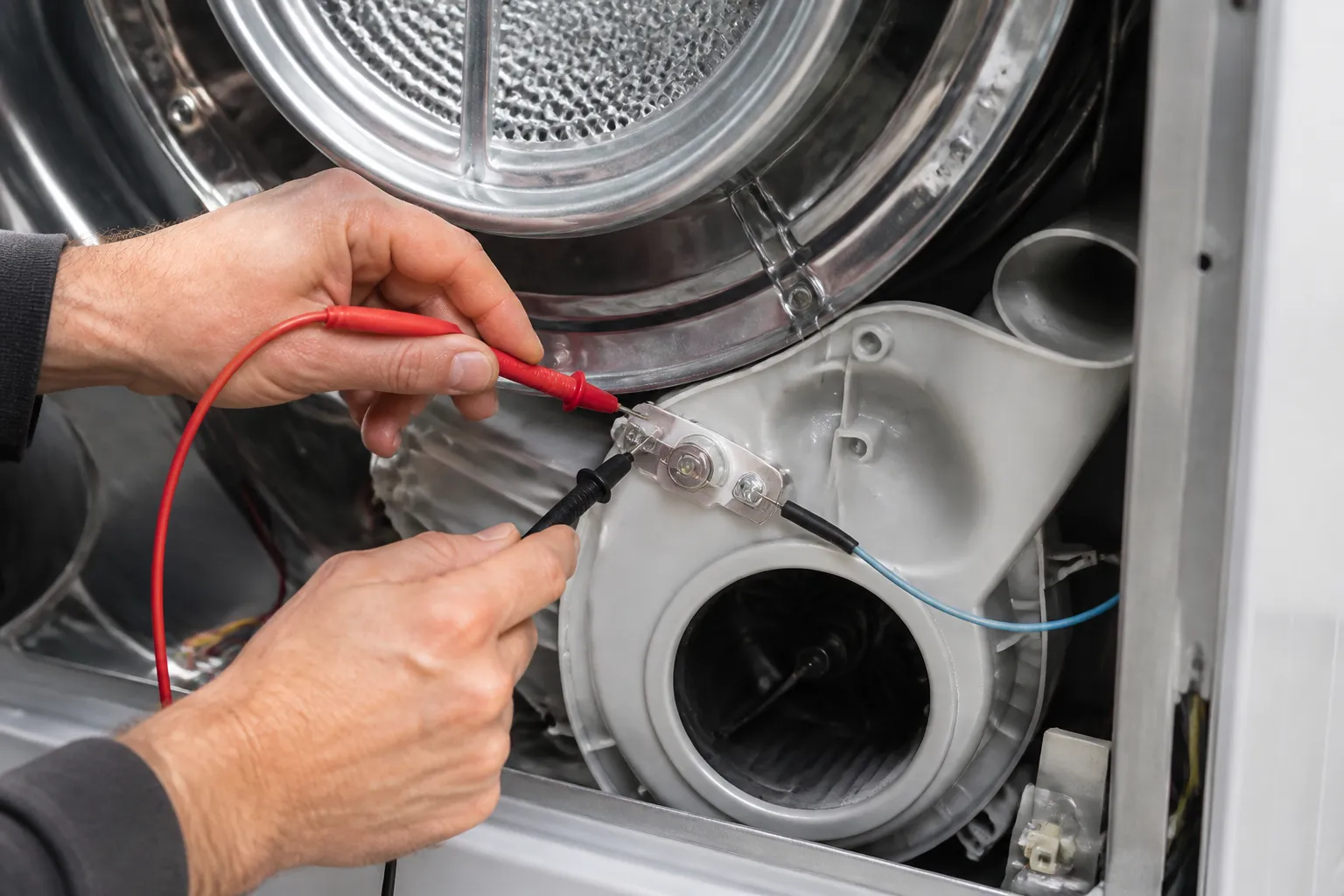
The thermal fuse on this housing looks like a small rectangular or cylindrical component with two wire terminals. It is mounted on the blower wheel housing itself—if you can see the blower assembly, you can locate this fuse by following the wires that connect to it. When the air temperature inside the blower chamber exceeds a safe threshold (typically around 300°F to 350°F, though the exact setpoint varies by model), this fuse melts internally and breaks the electrical circuit. Once blown, a thermal fuse cannot be reset; it must be replaced.
Thermal Cut-Off on the Heater Box
The second thermal safety device is the thermal cut-off mounted on the heater housing at the rear of the dryer. To access this component, you must remove the rear panel of the dryer. The heater box is a long, rectangular metal enclosure located in the back-right corner of most Samsung dryers. It contains the heating element (electric models) or the gas valve and burner assembly (gas models), along with two additional thermal safety devices: the high-limit thermostat and the thermal cut-off.
The thermal cut-off is typically mounted on the side of the heater housing using a mounting bracket. Like the blower fuse, it has two wire terminals. This device protects against excessively high temperatures in the heating chamber itself. If the exhaust duct becomes severely clogged with lint, or if the high-limit thermostat fails, the thermal cut-off will trip at approximately 350°F to 380°F (exact temperature varies by model).
Access and Location: Step-by-Step
Accessing the Blower Housing Thermal Fuse
- Unplug the dryer from the wall outlet. This is essential before opening any panels.
- Remove the front panel or lower front access panel. On most Samsung models, the front panel is secured by clips along the top and sides. Open the dryer door, locate the clips, and carefully pull the panel away from the body. Some models have a lower access panel instead; consult your specific model manual for the exact clip locations.
- Locate the blower wheel housing. Once the front is open, you will see the blower assembly on the left side (when facing the dryer from the front). It is a cylindrical or fan-shaped housing directly beneath the drum.
- Identify the thermal fuse. The fuse is mounted on the outer wall of the blower housing. It has two wire terminals and is approximately 1.5 inches long. Follow the wires back to confirm you have found it.
Accessing the Heater Box Thermal Cut-Off
- Unplug the dryer from the wall outlet.
- Remove the rear panel. The rear panel is typically secured by four to six screws. Use a Phillips head screwdriver to remove them, then carefully pull the panel away.
- Locate the heater housing. The heater box is the long, horizontal metal enclosure in the back-right corner of the dryer. On electric models, you will see the heating element inside; on gas models, you will see the burner assembly and gas valve.
- Find the thermal cut-off on the heater housing. The cut-off is mounted on the side of the heater box, usually held in place by a single screw or bracket. It has two wire terminals and is similar in size to the blower fuse.
Samsung Dryer Thermal Fuse Part Numbers
The following part numbers are commonly used across Samsung dryer models, but you must verify these against your full model number before ordering. Your model number is printed on a label inside the door or on the rear panel.
- DC47-00016A – Thermal fuse for the blower housing. This is the most frequently used blower fuse across DV42H, DV45H, DVE45, and DVE50 series dryers. Verify against your model number before purchase.
- DC96-00887A – Thermal cut-off kit for the heater box. This kit is commonly sold as a unit and usually includes the high-limit thermostat (see below). Verify model compatibility.
- DC47-00018A – High-limit thermostat (260°F setpoint) mounted on the heater housing. This is a separate component from the thermal cut-off but is often replaced at the same time because both devices protect the heating circuit.
These part numbers span multiple Samsung dryer models but are not universal. Before ordering, search your specific model number plus “thermal fuse” to confirm the correct part numbers for your appliance. If you are uncertain, contact Samsung customer support with your model number, or consult the parts diagram on the manufacturer’s website.
Symptoms: Which Thermal Device Has Failed?
Blower Housing Thermal Fuse Failure
If the blower housing thermal fuse has blown, your Samsung dryer will exhibit one or more of these symptoms:
- Dryer does not start at all—pressing the start button produces no response.
- Dryer hums or tries to start but shuts off immediately.
- No power to the display panel or control board.
- The thermal fuse broke the main power circuit, so the entire dryer is dead.
Heater Box Thermal Cut-Off Failure
If the heater box thermal cut-off (or high-limit thermostat) has failed, you will observe:
- Dryer starts and runs normally, but produces no heat.
- Clothes come out cold or damp after a complete cycle.
- The drum turns and the blower runs, but the heating element does not activate.
- No unusual smells or smoke, just an absence of heat.
This distinction helps you diagnose which thermal device you need to address. A completely dead dryer points to the blower fuse; a cold-running dryer points to the heater assembly.
How to Test a Samsung Dryer Thermal Fuse with a Multimeter
Testing for Continuity
A multimeter will tell you definitively whether a thermal fuse or thermal cut-off has failed. Here is the correct procedure:
- Unplug the dryer completely from the wall outlet. Do not rely on the control panel to disconnect power.
- Locate the thermal device you wish to test (blower fuse or heater cut-off, following the access steps outlined above).
- Disconnect both wire terminals from the fuse or cut-off. Gently pull or unplug the spade terminals. Note which wire goes to which terminal if you wish, though for this test, order does not matter.
- Set your multimeter to the continuity or resistance (ohms) setting. On most meters, this is marked with an ohm symbol (Ω) or a beeping symbol for continuity mode.
- Touch one multimeter probe to each terminal of the fuse. If the fuse is good, the meter will read near 0 ohms or will beep (depending on your meter’s continuity mode). This indicates the circuit is complete.
- If the meter reads “infinity” or shows no continuity beep, the thermal fuse has blown and must be replaced. An open circuit reading means the internal metal has melted, and the fuse can no longer conduct electricity.
Write down your meter reading. A good thermal fuse or cut-off will show nearly 0 ohms of resistance. Any reading in the thousands of ohms or a display of “OL” (open loop) or “∞” (infinity) means the device has failed and requires replacement.
The Critical Point: Thermal Fuses Blow for a Reason
Before you replace a thermal fuse on your Samsung dryer, understand this fundamental principle: a blown thermal fuse is a symptom of an underlying airflow or heating problem, not the root cause itself. If you replace the fuse without addressing why it blew, it will blow again—sometimes within days.
Why Thermal Fuses Blow
- Clogged exhaust duct – Lint buildup in the vent hose or duct restricts airflow, causing heat to accumulate inside the blower housing or heater chamber. This is the most common cause.
- Blocked blower wheel – Lint trapped around the blower fan housing reduces air circulation through the drum.
- Stuck or blocked vent flap – The vent flap at the outside of your home may be stuck closed or blocked by lint, preventing exhaust air from escaping.
- Restricted drum seals or idler – Internal friction can cause drum resistance, leading to heat buildup.
- Faulty high-limit thermostat – A thermostat that fails to cycle off allows the heater to run continuously, eventually overheating and blowing the fuse.
Before Replacing the Fuse
- Inspect the entire exhaust duct from the rear of the dryer to the outside vent. Disconnect the duct and use a flashlight to look for lint blockages. Use a vent brush or shop vacuum to clean the interior.
- Check the outside vent flap. Go outside to the vent opening and ensure the flap opens freely. If it is stuck, clean or replace it.
- Clean the blower housing thoroughly. Remove visible lint from the blower wheel and housing walls using a soft brush or vacuum.
- Verify the dryer is level and installed on a proper surface. Improper installation can cause airflow issues.
If you address these issues before replacing the thermal fuse, you may find that the fuse is not actually blown—it tripped as a safety response and will reset. However, if testing confirms the fuse is open (no continuity), you must replace it. After replacement, clean the duct again to prevent recurrence.
How to Replace a Samsung Dryer Thermal Fuse
Replacing the Blower Housing Thermal Fuse
- Unplug the dryer from the wall outlet.
- Remove the front or lower front panel following the access steps above.
- Disconnect both wire terminals from the old thermal fuse by gently pulling them straight out.
- Remove the old fuse. It may be held in place by a small clip or screw; carefully uninstall the fastener or slide the fuse out of its bracket.
- Position the new thermal fuse (part number DC47-00016A or your verified replacement) into the mounting location on the blower housing.
- Secure the fuse with the clip or screw. Ensure it is held firmly in place.
- Reconnect both wire terminals to the new fuse. Match the wire colors or positions if you noted them earlier.
- Reinstall the front panel. Align the clips and press firmly until you hear or feel them snap into place.
- Plug the dryer back in and test the start button. The dryer should respond to power.
Replacing the Heater Box Thermal Cut-Off
- Unplug the dryer from the wall outlet.
- Remove the rear panel by unscrewing all fasteners.
- Disconnect both wire terminals from the old thermal cut-off on the heater housing.
- Remove the mounting screw or bracket holding the cut-off to the heater box.
- Slide the old thermal cut-off away from the heater housing.
- Position the new cut-off (part number DC96-00887A or your verified replacement) against the heater housing in the same location.
- Install the mounting screw or bracket to secure the new cut-off. Do not over-tighten; the device should be held firmly but not crushed.
- Reconnect both wire terminals to the new cut-off, matching the original wire positions.
- Reinstall the rear panel and secure all screws.
- Plug the dryer in and run a test cycle to verify the heating function has been restored.
After replacing either thermal device, run your dryer on a test cycle without clothes. Listen and feel for proper airflow from the outside vent, and ensure the drum heats up. If the dryer still exhibits the original problem, the underlying cause (such as duct blockage) has not been resolved, or a second thermal device has also failed.
Model-Specific Example: Samsung DVE45R6100W
For detailed instructions on a specific Samsung model, see our companion guide on thermal fuse replacement on the Samsung DVE45R6100W. That model uses the same general component locations described here but has specific panel removal and bracket configurations. Consulting that model-specific guide alongside this comprehensive overview will give you the most accurate repair path.
⚠️ Safety Warning
Always unplug your Samsung dryer from the wall outlet before opening any panels or touching internal components. Even though most dryer components are low-voltage after the main power switch, capacitors in the control board can store electrical charge and pose a shock hazard. Do not rely on the door latch or control panel to disconnect power.
Gas dryers present an additional hazard: If you own a Samsung gas dryer, the blower housing thermal fuse location and replacement procedure are identical to electric models. However, do not attempt to repair gas heating components (gas valve, burner assembly, or regulator) yourself. Those components must be serviced by a qualified gas technician. The high-limit thermostat and thermal cut-off on the heater housing are also best left to a professional on gas models to ensure proper gas supply shutdown if those devices fail.
Never operate a dryer with a bypassed thermal fuse. See the FAQ below for more on this critical safety point.
Frequently Asked Questions
Can I Bypass the Thermal Fuse on My Samsung Dryer?
No. Bypassing a thermal fuse—even temporarily—is extremely dangerous and creates a serious fire risk. The thermal fuse is a one-time-use safety device designed to cut power if internal temperatures exceed safe limits. If you bypass it by connecting the two terminals together with a wire or removing the fuse entirely and directly connecting the terminals, the dryer will run without any thermal protection. If a vent duct becomes blocked or another fault causes overheating, the internal temperature can exceed 400°F, and the dryer cabinet and electrical components can ignite. Use bypassing only as a diagnostic step to confirm the fuse is the problem, never as a permanent repair. Always replace a failed thermal fuse with an identical new unit.
How Often Do Samsung Dryer Thermal Fuses Blow?
A properly functioning Samsung dryer should never blow a thermal fuse. If yours has blown more than once, the underlying cause—almost always a clogged exhaust duct—has not been addressed. After replacing the fuse, make vent cleaning a regular maintenance task. Inspect and clean the exhaust duct at least twice a year, or more frequently if you do large loads of laundry. A clean vent prevents fuse blowouts and also improves drying efficiency, reducing drying times and energy costs.
What Is the Difference Between a Thermal Fuse and a Thermal Cut-Off?
Both are single-use safety devices, but they differ in function and design. A thermal fuse is a one-time, non-resettable device that melts internally when overheated; once blown, it must be physically replaced. A thermal cut-off (or thermal cutout) is similar but is sometimes designed to reset automatically after cooling, though in Samsung dryers, the thermal cut-off on the heater housing typically requires replacement once it trips, similar to a fuse. The blower housing thermal fuse (DC47-00016A) is definitely non-resettable; always replace it. The heater box thermal cut-off should be tested and replaced if an open circuit is confirmed.
Can I Test a Thermal Fuse Without a Multimeter?
A multimeter is the most reliable method to test a thermal fuse, and they are inexpensive (under $15 for a basic unit). If you do not have one, the only practical field test is to observe whether your dryer responds to the start button. If the dryer is completely unresponsive and the outlet itself is working (test with another appliance), a blown blower housing thermal fuse is the most likely cause. However, other electrical faults could also cause this symptom. A multimeter removes all doubt and is essential for accurate diagnosis. If you do not own one, consider this repair a good opportunity to invest in a basic meter, which will be useful for many future appliance repairs.
Where Can I Buy a Samsung Dryer Thermal Fuse?
Thermal fuses and cut-offs are available from major appliance parts suppliers, including Samsung’s official parts website, local appliance repair shops, and online parts retailers. When ordering, provide your complete dryer model number to ensure you receive the correct part. Parts like DC47-00016A (blower fuse) and DC96-00887A (heater cut-off kit) are common across multiple Samsung models but are not universal. Verify part compatibility with your model number before completing a purchase.
Recommended Tools
Digital Multimeter
Nearly every diagnosis in this guide comes down to a continuity or voltage reading, and a basic digital multimeter handles all of them.
Appliance Repair Tool Set
A dedicated appliance tool set with nut drivers, Torx bits, and panel spudgers makes the disassembly steps in this guide far easier and prevents scratched panels and stripped screws.
About This Article

Written by Dave Holt. Dave Holt has been taking apart and fixing household appliances since he was a teenager who couldn't leave a broken one alone. Eighteen years later, after fixing things for neighbors, friends, and anyone who'd let him, he's seen almost every failure mode there is. When he writes a repair guide here, it's based on the actual job, not a manufacturer overview. More about this site.
Scope and limits. Dave is a self-taught repairer, not a certified appliance technician. Unplug before you open anything, and leave sealed refrigeration systems, gas connections, and hardwired circuits to a qualified technician.