Samsung DVE50BG8300V Electric Dryer Troubleshooting Guide
The Samsung DVE50BG8300V is a high-capacity electric dryer with advanced moisture sensing technology and multiple drying cycles. However, like all appliances, it can develop issues over time. This comprehensive troubleshooting guide will help you diagnose and repair the most common problems affecting the Samsung DVE50BG8300V, saving you hundreds of dollars in service calls.
⚠️ Safety Warning
Before attempting any repairs on your Samsung DVE50BG8300V, disconnect the power supply by unplugging the unit or switching off the circuit breaker. This dryer operates on 240 volts and contains high-voltage capacitors that can retain a charge even when unplugged. Do not attempt electrical repairs unless you are comfortable working with electrical systems. If you are uncertain about any step, contact a qualified technician. Never bypass or defeat safety switches like the door latch switch.
Dryer Not Heating: Diagnostic Procedures
Understanding the Heating System on the DVE50BG8300V
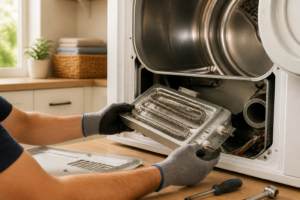
The Samsung DVE50BG8300V uses an electric heating element (part number DC47-00019A) as its primary heat source. The heating circuit is protected by a thermal fuse, and the system is regulated by a thermistor that monitors temperature. If your dryer is running but not producing heat, one of these three components is likely the culprit.
Step 1: Test the Thermal Fuse
The thermal fuse is a one-time-use safety device that permanently opens when the dryer overheats, stopping all power to the heating element. This is the most common cause of no-heat problems on the DVE50BG8300V.
- Unplug the dryer from the electrical outlet
- Remove the front lint trap housing and exhaust duct from the front of the dryer
- Remove the front panel by unbolting the four corner bolts
- Locate the thermal fuse mounted on the blower housing at the rear left side of the dryer interior. It is a cylindrical component approximately 1.5 inches long
- Using a multimeter set to the ohms (resistance) function, touch the probes to each end of the thermal fuse
- A functioning thermal fuse should read between 0-5 ohms (indicating continuity)
- If the reading shows infinite resistance or OL (open line), the thermal fuse is blown and must be replaced with part number DC96-00887A
If the thermal fuse is blown, replace it immediately. However, investigate why it blew before running the dryer again. Common causes include a blocked exhaust vent (see vent maintenance section) or a faulty thermistor causing the dryer to overheat.
Step 2: Test the Heating Element
If the thermal fuse is intact, the heating element itself may be defective. The heating element part number for the DVE50BG8300V is DC47-00019A.
- With the dryer unplugged, remove the front panel as described above
- Locate the heating element at the bottom right of the interior drum assembly
- Disconnect the two terminal spade connectors from the heating element
- Set your multimeter to the ohms function
- Touch the probes to the two terminals on the heating element
- A working heating element typically reads between 10-25 ohms
- If you read 0 ohms (short circuit) or infinite ohms (open circuit), replace the element with part number DC47-00019A
Note that heating elements can fail intermittently. If the resistance reading is higher than 25 ohms, the element may be weakening and should be monitored. Gradually increasing drying times often indicate a failing heating element.
Step 3: Test the Thermistor
The thermistor is a temperature-sensing resistor that communicates with the control board to regulate heat output on the DVE50BG8300V. A faulty thermistor can prevent the heating element from receiving power.
- Unplug the dryer completely
- Remove the front panel and locate the thermistor mounted on the blower housing duct (small cylindrical component with a single wire connector)
- Disconnect the thermistor connector
- Using your multimeter on the ohms setting, measure the resistance of the thermistor
- At room temperature (68-72°F), the thermistor should read approximately 5,000-10,000 ohms
- If the reading is significantly different or shows infinite resistance, the thermistor (part number DC32-00007A) requires replacement
To verify the thermistor is responding to temperature changes, gently warm it with your hand and watch for resistance changes on the multimeter. Resistance should decrease as temperature increases.
Dryer Not Starting or Drum Not Turning
Check the Door Latch Switch
The door latch switch is a critical safety component that prevents the dryer from operating when the door is open. If this switch is faulty, the Samsung DVE50BG8300V will not start regardless of other conditions.
- Unplug the dryer
- Open the dryer door and examine the latch mechanism on the inside of the door frame
- Remove the front panel by unbolting the four corner fasteners
- Locate the door latch switch assembly on the left side of the front panel (part number DC64-01660A)
- Disconnect the wire connectors from the switch
- Set your multimeter to the ohms function
- With the door open, the switch should read infinite ohms (no continuity)
- Manually press the switch plunger and the resistance should drop to 0 ohms (full continuity)
- If the switch fails either test, replace it with part number DC64-01660A
A faulty door latch switch is one of the most common reasons the DVE50BG8300V fails to start. Verify the door closes completely and the latch engages properly before assuming the switch is defective.
Inspect the Drive Belt
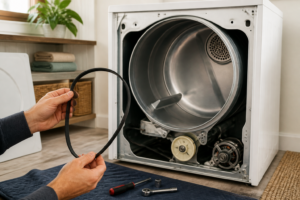
The drive belt turns the drum on your Samsung DVE50BG8300V. A broken or severely worn belt will prevent the drum from rotating even if the motor runs.
- Unplug the dryer and remove the front panel
- Visually inspect the belt wrapped around the drum and idler pulley
- Look for cracks, fraying, separation of belt layers, or visible wear patterns
- The belt should be approximately 3/8 inch thick and have no visible damage
- Press the belt with your thumb—it should have slight resistance and not be cracked
- If the belt is damaged, it must be replaced with part number DC93-00152A
Worn belts on the DVE50BG8300V often produce squeaking or grinding noises before they break completely. If you hear these sounds, replacing the belt proactively can prevent complete failure.
Test the Drive Motor
The motor provides power to turn the drum through the drive belt. A faulty motor will either not run at all or run without turning the drum.
- Unplug the Samsung DVE50BG8300V
- Remove the front panel and locate the motor at the bottom left of the dryer interior (part number DC31-00111A)
- Disconnect all wire connectors from the motor
- Using your multimeter on the ohms setting, measure resistance between the motor terminals
- A functional motor typically reads between 5-15 ohms between the main terminals
- If resistance is infinite (open circuit) or 0 ohms (short circuit), replace the motor with part number DC31-00111A
- To verify the motor itself can run, you can apply 240V directly to it temporarily, though this should only be done by experienced technicians
Motor replacement is more involved than other repairs. If you confirm the motor is faulty but are uncomfortable replacing it, this is an appropriate repair to delegate to a professional technician.
Extended Drying Times on the DVE50BG8300V
Most Common Cause: Restricted Exhaust Vent
Over 80% of drying time complaints on the DVE50BG8300V stem from a blocked or restricted exhaust vent. Lint accumulates in the exhaust duct and vent hood, forcing the dryer to work harder and longer.
- Unplug the dryer from the wall outlet
- Locate where the dryer’s exhaust duct connects to the wall (typically behind or at the side of the unit)
- Disconnect the flexible duct from the dryer outlet
- Using a flashlight, look through the duct toward the external vent hood
- If you cannot see light through the entire duct, it is blocked and must be cleaned
- Use a plumbing snake or dryer vent cleaning brush to push lint from the duct
- Alternatively, you can use a wet/dry vacuum to suction lint from both ends of the duct
- Check the external vent hood flap—it should move freely and not be caked with lint
- Clean the hood with a brush and verify the flap operates smoothly
- Reconnect the duct and test the dryer
You should perform exhaust vent cleaning on your Samsung DVE50BG8300V at least twice per year. Restricted vents not only reduce efficiency but also increase the risk of thermal fuse failure and potential fire hazards.
Clean the Moisture Sensor
The DVE50BG8300V uses a moisture sensor to detect when clothes are dry and automatically end the cycle. A dirty sensor may cause the dryer to think clothes are still wet, extending the drying time unnecessarily.
- Unplug the dryer
- Open the dryer door and look at the left interior wall just inside the drum opening
- You will see two small metal fingers protruding from the interior wall (approximately 3 inches long)
- These are the moisture sensor contacts
- Using a soft cloth or pencil eraser, gently rub the surface of each metal finger for 30 seconds
- This removes lint and residue buildup that interferes with moisture detection
- Do not use water or harsh cleaners—dry cleaning only
- Plug the dryer back in and run a test cycle
Clean the moisture sensor on your DVE50BG8300V every 6-12 months as part of regular maintenance. This simple step can restore drying performance without replacing any parts.
Evaluate the Heating Element Output
As heating elements age, they gradually lose efficiency and generate less heat. Even if the element tests within resistance ranges, it may be underperforming.
- Load the DVE50BG8300V with a standard load of cotton items (towels, jeans, etc.)
- Select the highest heat setting (typically “High Heat” or “More Dry”)
- Run a full 60-minute cycle
- After 30 minutes, open the door and feel the temperature of the clothes and air
- The air should feel quite hot—hot enough that you cannot comfortably hold your hand in the exhaust area
- If the air only feels warm, the heating element is weakening and should be replaced
- If clothes are hot at the 30-minute mark, the element is functioning adequately
Heating element degradation is a normal part of appliance aging. If your Samsung DVE50BG8300V has been in service for 5+ years and drying times have gradually increased, element replacement is a common maintenance item.
Noise Issues with the DVE50BG8300V
Squeaking Noises: Drum Glides and Bearing
Squeaking typically originates from friction between the drum and the dryer cabinet. On the DVE50BG8300V, this is caused by worn drum glides or a failing drum bearing.
- Unplug the Samsung DVE50BG8300V
- Remove the front panel
- Grab the drum and try to move it forward and backward
- If there is excessive play (more than 1/4 inch of movement), the drum bearing is likely worn
- Remove the drum by unbolting the drum support roller and removing the entire drum assembly
- The drum bearing is located at the rear of the drum and can be replaced separately (part number DC61-20052A)
- The front drum glides are located on the front inside surface of the dryer cabinet and should be replaced if worn shiny (part number DC61-00159A—typically requires 2 glides)
- Similarly, rear drum glides at the rear of the cabinet may need replacement (part number DC61-00160A)
Squeaking on the DVE50BG8300V should not be ignored, as continued operation can damage the drum itself, leading to costly repairs.
Grinding or Scraping Noises: Idler Pulley
The idler pulley applies tension to the drive belt. When it wears out, the belt slips and creates grinding noises.
- Unplug the dryer
- Remove the front panel
- Locate the idler pulley assembly on the right side of the drum (small wheel-like component)
- Manually spin the pulley wheel—it should rotate freely without resistance
- If the wheel does not spin or makes grinding sounds while spinning, the pulley is failing
- Replace the idler pulley with part number DC93-00152B
Rattling or Thumping: Blower Wheel Obstruction
The blower wheel circulates air through the dryer. Lint or debris caught in the blower wheel creates rhythmic thumping sounds on the DVE50BG8300V.
- Unplug the dryer
- Remove the front panel and locate the blower wheel assembly behind the drum
- Visually inspect the blower wheel for lint, coins, or debris
- If you see obstructions, carefully remove them using needle-nose pliers or a vacuum hose
- Do not force the blower wheel to spin—if it will not rotate freely, the wheel itself may be damaged and requires replacement (part number DC61-00111A)
Error Codes on the Samsung DVE50BG8300V Display
Modern Samsung dryers display error codes to help diagnose problems. Understanding these codes will guide your troubleshooting efforts.
HE Error Code
The HE code indicates a heating error. This typically means the heating element has failed or the thermal fuse has blown. Perform the heating element tests described in the “Dryer Not Heating” section above. Check the thermal fuse first, as it is the most common cause.
HC Error Code
HC indicates a humidity sensor (moisture sensor) error. The control board cannot communicate properly with the moisture sensor. Clean the sensor contacts as described in the moisture sensor section. If cleaning does not resolve the code, the sensor itself may require replacement.
bE Error Code
The bE code means the door was opened during the cycle or the door latch switch is not functioning properly. If the door was not actually opened, test and replace the door latch switch as described in the “Dryer Not Starting” section.
tE Error Code
A tE error indicates a thermistor error on your DVE50BG8300V. This sensor monitors temperature. Test the thermistor as described in the heating section. A faulty thermistor typically requires replacement with part number DC32-00007A.
dE or dL Error Code
These codes indicate the door lock is not engaging properly. Verify the door closes completely and the latch mechanism is not damaged. The door latch switch may need replacement.
Lint Filter and Vent Maintenance
Regular Lint Filter Cleaning
The lint filter on your Samsung DVE50BG8300V should be cleaned after every single cycle. This is the most important maintenance task.
- Open the dryer door immediately after the cycle ends
- Locate the lint filter at the top of the door opening (accessible without tools)
- Pull the filter straight out and upward
- Use your fingers to brush accumulated lint from the filter mesh screen
- For stubborn buildup, rinse the filter under warm running water and dry completely before reinstalling
- Push the filter back into its slot until it sits flush with the door frame
Never operate the DVE50BG8300V without the lint filter installed. The filter protects internal components from lint damage.
Deep Cleaning the Lint Filter
Every 3-6 months, perform a deeper clean of the lint filter itself.
- Remove the lint filter as described above
- OEM-equivalent fuse and thermostat paired together—catches the most common culprit first without the back-and-forth guessing that costs you a week of laundry.
- The thermal fuse cartridge sits in an accessible location on this model, and the kit includes clear enough terminals that you can confidently swap without fumbling around inside the blower housing.
- Replacing both at once prevents the “I fixed the fuse, but the thermostat was the real problem” scenario that happens more often than you’d think on Samsung dryers.
- If your no-heat issue is actually a failed heating element (less common but possible), this kit won’t solve it—you’ll need to test voltage at the element terminals first.
- Installation still requires you to remove the front panel and access the blower housing, which takes 20–30 minutes even if you’re comfortable with basic disassembly.
Recommended Parts & Tools
Dryer Thermal Fuse and High Limit Thermostat Kit
The thermal fuse is one of the most common failure points in Samsung dryers and will prevent the dryer from heating if blown. This replacement kit includes both the thermal fuse and high limit thermostat, which are often replaced together on this model to ensure proper temperature control. Check current pricing on Amazon.
Multi-Bit Screwdriver Set with Magnetic Tips
Disassembling the Samsung DVE50BG8300V requires removing multiple screws of varying sizes from the lint trap housing, blower wheel, and interior panels. A quality magnetic screwdriver set makes it easier to access tight spaces and prevents losing small fasteners during the repair process. Check current pricing on Amazon.
Dryer Vent Lint Cleaning Brush Kit
Restricted airflow due to lint buildup is a leading cause of dryer problems and is essential to address during troubleshooting. This brush kit removes accumulated lint from the vent hose, lint trap, and exhaust duct to restore proper ventilation and prevent overheating issues. Check current pricing on Amazon.
The Thermal Fuse Kit That Stops the Samsung DVE50BG8300V from Running Cold
If your DVE50BG8300V is tumbling but producing no heat, the thermal fuse or high limit thermostat has almost certainly blown. This kit gives you both components in one order, so you’re not swapping one part only to discover the other failed next.
What works
What doesn’t
I’ve seen too many DIYers order just the fuse, replace it, and then call a tech when the heat still doesn’t come back—turns out the thermostat was failing too and tripped during the cycle. Dryer Thermal Fuse and High Limit Thermostat Kit
This post contains affiliate links. As an Amazon Associate, I earn from qualifying purchases at no extra cost to you.