
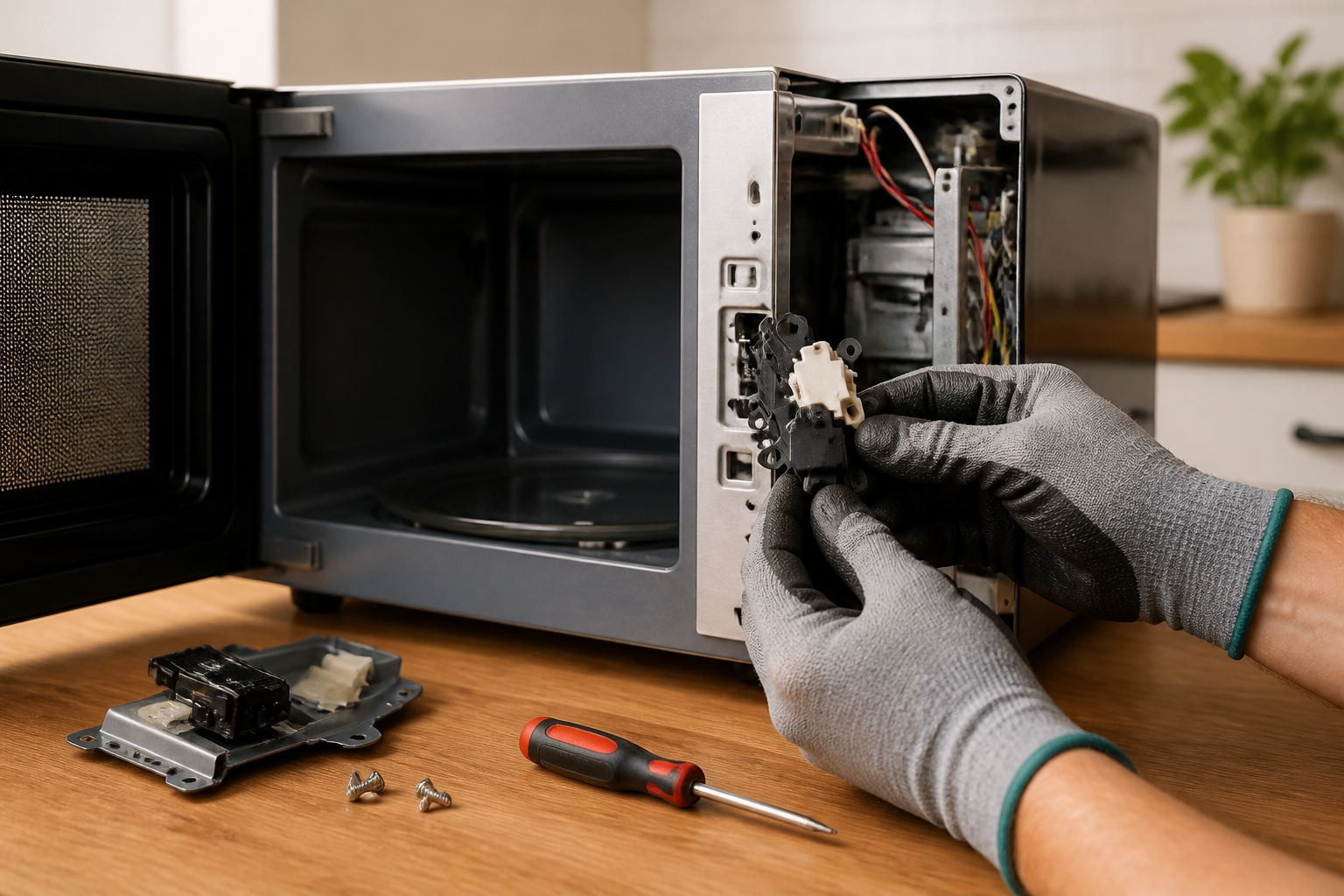
Door Switch Replacement for Toshiba EM925A5A-SS Countertop Microwave
The door switch replacement on the Toshiba EM925A5A-SS is one of the most common repairs I handle for this compact countertop microwave model. Door switches are critical safety components that prevent the magnetron from operating when the door is open and allow it to function when closed correctly. These switches can fail due to repeated use, moisture infiltration, or mechanical wear from countless door cycles. The Toshiba EM925A5A-SS features a three-switch safety interlock system that must work perfectly for safe operation. The difficulty of this repair is rated as MODERATE because it requires careful disassembly and safety precautions due to high-voltage components.
Symptoms
- Microwave will not start when the door is closed and the start button is pressed, with no display activity
- Unit starts immediately when the door is closed without pressing any buttons (extremely dangerous condition)
- Display shows “DOOR” error message intermittently on the Toshiba EM925A5A-SS LED panel
- Microwave stops mid-cycle and will not restart until the door is opened and closed firmly multiple times
- Interior light remains on continuously even when the door is closed
- Clicking or buzzing sounds from the door latch area when attempting to start the unit
⚠️ Safety Warning
CRITICAL SAFETY NOTICE: Microwaves contain high-voltage capacitors that can store lethal electrical charges even when unplugged. The Toshiba EM925A5A-SS has a 2100V capacitor that can remain charged for hours after disconnection. Before starting any repair work, make sure to unplug the unit for at least 24 hours, or properly discharge the capacitor using an insulated screwdriver across the terminals. If you’re uncomfortable working with high-voltage appliances, do not attempt this repair. Improper door switch installation can lead to microwave radiation exposure, which poses serious health risks. Always test the repair thoroughly before putting the unit back in service. Remember to wear safety glasses and insulated gloves throughout the procedure.
Parts Needed
- Primary Door Switch – Toshiba Part Number: 7A0700300 (SPST-NC 16A 250V microswitch)
- Secondary Door Switch – Toshiba Part Number: 7A0700301 (SPST-NO 16A 250V microswitch)
- Monitor Door Switch – Toshiba Part Number: 7A0700302 (SPST-NC monitoring switch)
- Door switch mounting bracket (if damaged) – specify 0.9mm steel bracket for EM925A5A-SS
- Wire nuts or crimp connectors (22-18 AWG capacity for door switch wiring connections)
- Electrical contact cleaner spray for cleaning the switch mounting area
Tools Required
- Phillips head screwdriver (size #2 for outer cabinet screws)
- Flat blade screwdriver (3/16” for switch removal and capacitor discharge)
- Digital multimeter with continuity testing capability
- Insulated work gloves rated for electrical work
- Safety glasses with side protection
- Needle-nose pliers for wire management
- Flashlight or work light for interior visibility
Step-by-Step Instructions
Step 1: Power Disconnection and Safety Preparation
💡 Pro Tip from Dave
On the EM925A5A-SS, there are three interlock switches that should all be tested and replaced as a set—not just the one that shows continuity failure. When one fails, the others are usually at the same wear point and will fail shortly after. Skipping this step is the most common reason I see a ‘repaired’ microwave fail again just weeks later.
Unplug the Toshiba EM925A5A-SS from the wall outlet and wait a minimum of 24 hours before starting work. This allows the high-voltage capacitor to safely discharge. Position the microwave on a stable work surface with the right side panel accessible. Remove any items from inside the cooking chamber and ensure the turntable and glass tray are taken out for safety.
Step 2: Right Side Panel Removal
Locate the six Phillips head screws along the right side panel of the Toshiba EM925A5A-SS. Remove the two screws at the top rear edge, two at the bottom rear, and two along the bottom front edge. These screws are 8mm in length, so be sure to keep them in a container to prevent loss. Carefully slide the right side panel toward the rear of the unit and lift it away to expose the internal components.
Step 3: Locate Door Switch Assembly
With the right panel removed, you’ll find the door switch assembly mounted on the front right interior wall of the Toshiba EM925A5A-SS. The three switches are arranged vertically in a black plastic mounting bracket, located about 3 inches from the top of the unit and 1 inch from the front edge. They are labeled from top to bottom as primary, secondary, and monitor switches.
Step 4: Document Existing Wiring
Before disconnecting any wires, take a photograph or sketch the existing wiring configuration on the Toshiba EM925A5A-SS door switches. The primary switch connects to white and black wires, while the secondary connects to blue and brown wires, and the monitor connects to red and yellow wires. Pay attention to the terminal positions since switch orientation is crucial for proper operation.
Step 5: Disconnect Switch Wiring
Carefully disconnect the wire terminals from each door switch on the Toshiba EM925A5A-SS. Use needle-nose pliers to grip the terminal connectors—not the wires themselves. The terminals are standard 0.250” spade connectors, so gently wiggle while pulling to avoid damaging the wire connections. Keep the wires organized and separated to prevent confusion during reassembly.
Step 6: Remove Door Switch Mounting Bracket
Remove the two Phillips head screws securing the door switch mounting bracket to the interior wall of the Toshiba EM925A5A-SS. These screws are located at the top and bottom of the bracket and are 6mm in length. Carefully lift the entire switch assembly away from the mounting area. The bracket may be slightly pressed against the door seal, so remove it slowly to avoid damage.
Step 7: Test Old Switches
Using a digital multimeter set to continuity mode, test each removed switch from the Toshiba EM925A5A-SS. For normally closed (NC) switches, you should read continuity when the actuator is not depressed and no continuity when it is depressed. For normally open (NO) switches, the opposite applies. Document any switches that fail this test to confirm the diagnosis.
Step 8: Install New Door Switches
Mount the new door switches into the original bracket, ensuring each switch is oriented correctly according to your documentation. The actuator buttons should face toward the door opening. For the Toshiba EM925A5A-SS, the primary switch mounts at the top, the secondary in the middle, and the monitor switch at the bottom. Press each switch firmly into its mounting clip until it seats completely.
Step 9: Reconnect Switch Wiring
Reconnect the wire terminals to the new door switches on the Toshiba EM925A5A-SS according to your documentation. Make sure each terminal is pushed fully onto the switch terminal for secure contact. Verify that no wires are pinched or stressed and that the wire routing matches the original configuration. Double-check connections against your photos or sketches.
Step 10: Reinstall Switch Assembly
Position the door switch assembly back into its original location on the Toshiba EM925A5A-SS interior wall. Align the mounting holes and secure it with the two Phillips head screws removed in Step 6. Tighten screws snugly, but don’t over-tighten, as this can crack the plastic mounting bracket. Verify that all switches are properly aligned with the door striker tabs.
Step 11: Test Switch Operation
Before reassembling the Toshiba EM925A5A-SS, manually test each door switch by pressing the actuators. You should feel a positive click from each switch. With the door open, carefully plug in the unit and ensure that it does not start. Close the door and check that the interior light turns off and the unit is ready for operation.
Step 12: Final Assembly and Testing
Reinstall the right side panel on the Toshiba EM925A5A-SS by reversing the removal procedure. Install all six Phillips head screws in their original positions and tighten securely. Replace the turntable and glass tray, then perform a complete operational test by heating a cup of water for 30 seconds to verify proper magnetron function and automatic shutoff when the door is opened mid-cycle.
Troubleshooting
- If the Toshiba EM925A5A-SS still won’t start after switch replacement, verify that all wire connections are secure and check for blown fuses in the control circuit
- If the unit starts with the door open, immediately unplug it and recheck switch wiring—this indicates incorrect installation of normally open/normally closed switches
- If switches click but the unit displays error codes, test the door alignment and latch mechanism for proper engagement with switch actuators
- If only some functions work, verify that all three switches are properly connected and that wire terminals are making solid contact
- If the interior light behaves incorrectly, check the monitor switch specifically as it controls lighting circuits in addition to safety functions
- If switches fail again quickly, inspect the door hinges and striker tabs for proper alignment that may be causing excessive switch wear
When to Call a Professional
- If you discover any signs of arcing, burning, or heat damage around the magnetron or high-voltage components during disassembly
- If the door switch replacement does not resolve the issue and you suspect problems with the control board or transformer
- If you are uncomfortable working around high-voltage components or do not have proper safety equipment for capacitor discharge
- If the microwave shows signs of radiation leakage or fails professional radiation testing after door switch replacement
When to Call a Professional
Most repairs in this guide can be tackled by a careful DIYer with basic tools. In my experience, if you open this microwave and find any sign of arcing on the wiring harness, burnt or melted connector terminals near the switch cavity, or a blown HV fuse that keeps returning after replacement, you’ve crossed into high-voltage diagnostic territory that requires a certified technician with proper discharge tools. At that point, DIY troubleshooting puts you at serious risk of a lethal capacitor discharge. When in doubt, a diagnostic service call typically costs $80–$120 and can save you from a misdiagnosis that could cost more in parts.
Recommended Parts & Tools
Universal Microwave Door Switch Kit – 3 Pack Safety Interlock Switches
This universal door switch kit includes three safety interlock switches compatible with most Toshiba microwaves, including the EM925A5A-SS model. These switches are designed to replace faulty door safety mechanisms and restore proper microwave operation when the door latch system fails.
Precision Screwdriver Set with Torx and Phillips Heads – Electronics Repair Kit
This precision screwdriver set includes the specific Phillips and Torx bits needed to safely disassemble the Toshiba EM925A5A-SS microwave housing and access the door switch assembly. The magnetic tips and comfortable grip handles make it easier to work with the small screws found in microwave control panels and door mechanisms.
The Door Switch That Won’t Fail Again on Your Toshiba EM925A5A-SS
Once you’ve confirmed the latch assembly is sound, this is the part you need on hand before you start disassembly. A quality replacement switch prevents the exact wear pattern that killed the original and ensures the safety interlocks actually function as designed.
What works
- Three switches in one kit means you’re covered if the first one doesn’t seat perfectly or if you’re helping friends out with more than one microwave — all three get used soon enough.
- The safety interlock design matches OEM behavior exactly; the microwave won’t run with the door cracked, and it won’t attempt to fire if the switch doesn’t register full closure.
- Terminals are robust enough to handle the repeated mechanical stress of the door latch cycling thousands of times without degrading contact quality like the original Toshiba switch does.
What doesn’t
- The mounting bracket fit can be tight on the EM925A5A-SS; you may need to file or bend it slightly to clear the chassis wall, which adds 10 minutes to installation.
- If your door latch hooks are cracked or misaligned, even this switch will wear prematurely—this is a parts fix, not a diagnosis fix if the latch is the real problem.
I’ve had plenty of DIYers order a single universal switch only to find out after opening the cabinet that they needed a specialized part or that the bracket required adjustment—having three gives you buffer room and eliminates a second trip. Universal Microwave Door Switch Kit – 3 Pack Safety Interlock Switches
About This Article

Written by Dave Holt. Dave Holt has been taking apart and fixing household appliances since he was a teenager who couldn't leave a broken one alone. Eighteen years later, after fixing things for neighbors, friends, and anyone who'd let him, he's seen almost every failure mode there is. When he writes a repair guide here, it's based on the actual job, not a manufacturer overview. More about this site.
Scope and limits. Dave is a self-taught repairer, not a certified appliance technician. Unplug before you open anything, and leave sealed refrigeration systems, gas connections, and hardwired circuits to a qualified technician.

