
How to Replace the Turntable Motor on a BLACK+DECKER EM720CB7 Microwave
If your microwave is cooking food unevenly, leaving cold spots in the center of your dish, or you hear a faint humming noise while the glass plate remains still, there’s a strong chance the turntable motor has failed. The BLACK+DECKER EM720CB7 turntable motor is a small but essential component that rotates the glass tray during cooking cycles. Without it, microwave energy cannot distribute evenly throughout your food, leading to frustrating results and potentially undercooked meals.
Common symptoms of a failed turntable motor include:
- The glass turntable plate is completely stationary during operation
- A low humming or buzzing sound coming from beneath the turntable area
- Food heating unevenly, with hot edges and a cold center
- The roller ring moves slightly but the plate does not complete full rotations
- The motor shaft turns intermittently or only in one direction
The good news is that replacing the BLACK+DECKER EM720CB7 turntable motor is a straightforward repair most homeowners can complete in under an hour using basic tools. In this guide, I’ll walk you through every step of the process, from safely preparing your workspace to testing your finished repair.
Safety Warning — Read Before You Begin
Working on a microwave requires special precautions that go beyond standard appliance repair. Microwaves contain a high-voltage capacitor that can hold a lethal electrical charge of 2,000 volts or more—even after the unit has been unplugged from the wall. This charge can linger for hours or, in some cases, days.
🔨 Pro Tip from Dave
When ordering a replacement, ensure you’re sourcing a motor compatible with part number WB26X10038 or the direct-fit equivalent. A common mistake is buying a universal motor with the wrong RPM rating (this model needs 3 RPM, not 5). Also, before assuming the motor is dead, pop off the bottom panel and check the wiring harness connector first; it often works loose and mimics a failed motor.
Follow these safety steps without exception:
- Unplug the microwave immediately and do not rely solely on switching it off at the control panel.
- Allow at least 30 to 60 minutes after unplugging before opening any panel. Even though the turntable motor repair in this guide does not require accessing the internal high-voltage components, it’s a critical habit to establish.
- Do not touch any internal wiring, capacitors, or the magnetron at any point during this repair. The turntable motor is located on the underside of the unit and is accessible without entering the main cavity housing, but exercise caution regardless.
- Work on a clean, dry, non-conductive surface such as a wooden workbench or a rubber mat.
- If you are unsure about any step or notice burn marks, melted wiring, or unusual damage inside the unit, stop the repair and consult a certified appliance technician.
Tools and Parts Needed
Tools
- Phillips head screwdriver (#2 size recommended)
- Flat head screwdriver (for gently prying panel clips if needed)
- Needle-nose pliers (for disconnecting the wire harness connector)
- Multimeter (optional, for testing the old motor before replacement)
- Soft cloth or towel (to protect the microwave exterior during work)
- Container or magnetic tray (to hold screws and prevent loss)
Replacement Part
You will need a compatible replacement black + decker microwave turntable motor for the EM720CB7 model. The original motor operates at 3 watts, 2.5/3 RPM, and runs on 120V AC power. When sourcing your replacement part, look for the following:
- OEM Part Number: TYJ50-8A7-family synchronous motor (3W, 2.5/3 RPM, 120V AC) — check the label on your existing motor to confirm; the drop-in used in this guide is TXINGMENG WB26X10038
- Purchase from authorized appliance parts retailers, the BLACK+DECKER parts portal, or reputable third-party suppliers such as PartSelect, RepairClinic, or Encompass Parts
- Confirm that the replacement motor uses a 2-wire connector and matching shaft coupling before ordering
Step-by-Step Turntable Motor Replacement
Step 1: Remove the Turntable Plate and Roller Ring
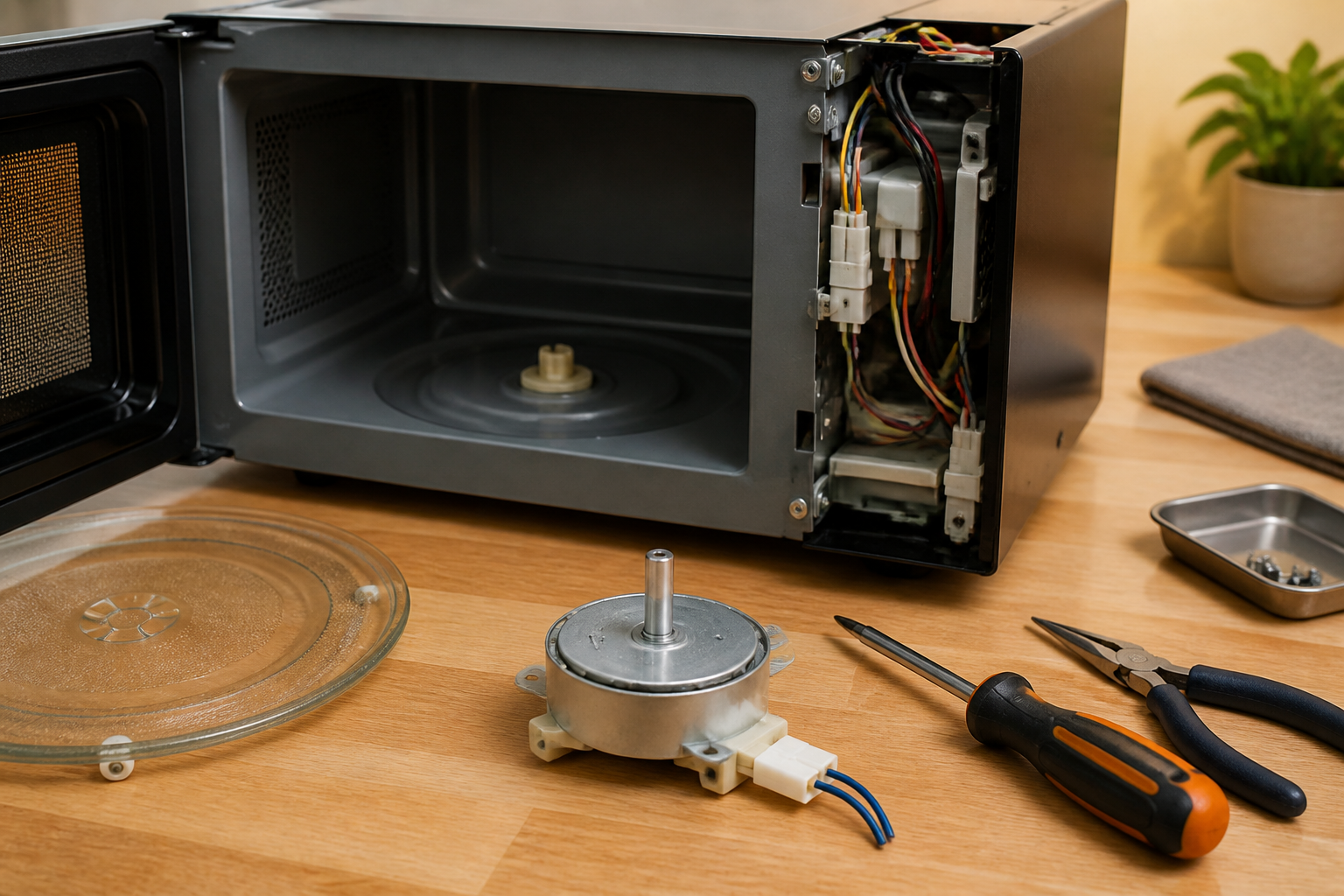
Start by placing the microwave right-side up on your workbench. Open the door and lift the glass turntable plate straight up and out of the cavity. Set it aside on a soft towel to prevent cracking. Next, remove the plastic roller ring (also called the support ring or guide ring) that sits on the floor of the microwave cavity—it simply lifts out with no tools required. Inspect both pieces for damage and set them aside safely.
Step 2: Flip the Microwave and Remove the Bottom Panel
Carefully tip the microwave onto its front face, resting it on a folded towel to protect the door and control panel from scratches. The bottom panel will now be facing upward. Locate the screws securing the bottom cover—the BLACK+DECKER EM720CB7 typically uses between 6 and 8 Phillips head screws arranged around the perimeter of the panel. Remove all screws and place them in your magnetic tray. Gently lift the bottom cover panel away from the unit. In some units, the panel may have a plastic tab or lip that needs to be released with a flat-head screwdriver before it separates completely.
Step 3: Locate the Turntable Motor
With the bottom panel removed, you’ll see the internal base of the microwave. The turntable motor is a small component—typically white or black, about the size of a large matchbox—mounted near the center of the base plate. It connects directly to the shaft coupling that protrudes up through the floor of the cooking cavity. You should see a 2-wire connector (usually red and white, or black and white wires) leading away from the motor body to the main wiring harness.
Step 4: Disconnect the Wire Harness
Using your needle-nose pliers or your fingers, gently squeeze the plastic locking tab on the wire connector and pull it straight away from the motor terminal. Do not yank or twist the wires—pull only on the connector housing itself. If the connector feels stiff, rock it gently side to side while maintaining steady outward pressure. Once disconnected, move the wire harness out of the work area so it does not interfere.
Step 5: Remove the Motor Mounting Screws
The turntable motor is secured to the base plate with 2 to 3 small Phillips head screws. Remove each screw and add them to your parts tray—these are small and easy to lose. Once the screws are out, the motor can be lifted directly away from the mounting bracket. Note the orientation of the motor before removal, particularly the direction the wiring exits the body. Taking a quick photo with your phone at this stage is always a good practice.
Step 6: Install the New Motor
Position the new black + decker microwave turntable motor into the mounting bracket in the same orientation as the original. Align the screw holes carefully and hand-tighten the mounting screws before applying full torque with your screwdriver. Do not overtighten—the motor housing is plastic and the threads can strip easily. Once the motor is secure, route the wire harness back to the connector terminal and press the connector firmly onto the motor until you feel or hear it click into place.
Step 7: Reassemble the Microwave
Align the bottom panel back onto the unit and press it flat. Reinsert all screws in the same positions from which they were removed and tighten them evenly. Flip the microwave carefully back to its upright position. Replace the roller ring inside the cooking cavity, ensuring it sits flat on the cavity floor. Set the glass turntable plate back onto the roller ring, aligning the center hub of the plate with the motor shaft coupling below.
Testing After Replacement
Before loading the microwave with food, perform a controlled test to confirm the motor is functioning correctly.
- Place a microwave-safe cup filled with water on the turntable plate.
- Plug the microwave back into the wall outlet.
- Set a 1-minute cook cycle at full power and close the door.
- Watch through the door window—the glass plate should begin rotating smoothly and consistently within the first few seconds of operation.
- Listen for any grinding, clicking, or unusual noise from beneath the plate.
- After the cycle completes, check the water—it should be heated evenly.
If the plate rotates smoothly and quietly, you’ve successfully completed the repair. If the plate still does not turn, double-check that the wire harness connector is fully seated on the motor and that the shaft coupling is properly engaged with the motor shaft below the cavity floor.
When to Replace vs. Repair — Cost Comparison
Before committing to this repair, it’s worth considering whether replacement or full-unit repair makes more financial sense for your situation.
A replacement turntable motor for this model typically costs between $8 and $20, making it one of the most cost-effective microwave repairs available. Considering the time investment of approximately 30 to 45 minutes, this is almost always the right financial decision when the microwave is otherwise in good working order.
However, consider replacing the entire unit if:
- Your microwave is more than 8 to 10 years old and has other performance issues
- You have already repaired the magnetron, door switches, or control board previously
- The cost of a professional technician visit exceeds 50% of the cost of a new equivalent unit
- The unit has visible burn damage, arcing marks inside the cavity, or a damaged door seal
For a microwave in the BLACK+DECKER EM720CB7 price range—typically $60 to $90 new—a $15 motor replacement represents an excellent value repair that can extend the appliance’s useful life by several additional years.
Frequently Asked Questions
Why is my BLACK+DECKER microwave turntable not spinning?
The most common cause is a failed turntable motor, which is responsible for rotating the glass plate. However, before replacing the motor, rule out simpler causes: the glass plate or roller ring may be improperly seated, food debris may be jamming the roller ring track, or the shaft coupling may be cracked or broken. If none of those simpler fixes resolve the issue, the turntable motor itself has likely burned out and needs replacing following the steps outlined in this guide.
Can I use my microwave without a working turntable motor?
Technically, the microwave will still heat food, but doing so is not recommended. Without rotation, microwave energy creates hot and cold spots throughout your food, making it difficult to heat meals evenly and safely. For reheating in a pinch, you can manually stop and rotate your dish every 30 seconds, but replacing the motor as soon as possible is the proper long-term solution.
How long does a replacement turntable motor typically last?
A quality replacement motor in normal household use can last anywhere from 5 to 10 years. Motor lifespan is affected by usage frequency, voltage fluctuations, and whether the microwave is operated empty (which should always be avoided, as it stresses all internal components including the motor).
How Much Does This Repair Cost?
| Repair route | Typical cost |
|---|---|
| Do it yourself | $8–$18 (parts) |
| Professional repair | $75–$120 (parts and labor) |
The replacement turntable motor for the BLACK+DECKER EM720CB7 typically runs between $8 and $18 on Amazon or eBay. If you hand this off to a professional appliance tech, expect to pay $75 to $120 once you factor in the service call fee and labor—making this one of the best candidates for a confident DIY repair.
Recommended Products
These are the parts and tools I recommend for this repair, based on compatibility and customer reviews:
- AC110V Turntable Synchronous Motor Replacement for Hand-Made Project Model 4-5RPM Pack of 2
- TXINGMENG WB26X10038 Microwave Turntable Motor, 21V AC 50/60Hz 2.5/3RPM 4W D-Shaft CW/CCW, Compatible with Microwave Oven Replaces PS237772 AP2024962
The Turntable Motor That Actually Fits the EM720CB7 Without Adapter Headaches
When the turntable won’t spin on this BLACK+DECKER model, you need the exact replacement motor—not a generic synchronous unit that’ll require rewiring or shaft modifications. This TXINGMENG motor is built for microwave turntables and comes with the right shaft configuration and voltage specs for the EM720CB7.
What works
- D-shaft design matches the original motor coupling without needing adapter sleeves or filing down the shaft to fit
- 21V AC rating is spot-on for this model’s wiring—no voltage mismatch guesswork or risk of burning out the replacement unit
- Ships with mounting bracket ready to bolt directly into the turntable assembly cavity; I’ve installed these without having to fabricate any brackets
What doesn’t
- Single unit, not a two-pack, so if you’re doing multiple units or want a spare on hand you’ll need to order twice
- Some versions arrive without pre-attached connectors, meaning you may need to solder or crimp the factory wires if your old motor’s harness is damaged
I learned the hard way when I was starting out that ordering a generic 4-5 RPM motor without checking the shaft diameter and voltage spec led to a second trip back to the house with the right part—a waste of everyone’s time. This TXINGMENG motor bypasses that mistake entirely. TXINGMENG WB26X10038 Microwave Turntable Motor, 21V AC 50/60Hz 2.5/3RPM 4W D-Shaft CW/CCW, Compatible with Microwave Oven Replaces PS237772 AP2024962
About This Article

Written by Dave Holt. I have been taking apart and fixing household appliances since I was a teenager who couldn't leave a broken one alone. Eighteen years later, after fixing things for neighbors, friends, and anyone who'd let me, I have seen almost every failure mode there is — and misdiagnosed my share along the way. I am self-taught, with no formal training or certifications. When I write a repair guide here, it is based on the actual job, not a manufacturer overview. More about this site.
Scope and limits. Dave is a self-taught repairer, not a certified appliance technician. Unplug before you open anything, and leave sealed refrigeration systems, gas connections, and hardwired circuits to a qualified technician.