Complete Guide to the Igloo Ice Maker SCLEAN Sensor and Cleaning Process
When your Igloo portable ice maker starts displaying the SCLEAN indicator light or message, it’s time to take some action. A lot of people read this as an error code or a sign of malfunction, but it’s really just a maintenance reminder telling you to clean and descale the machine. In this guide I’ll help you understand the SCLEAN system, show you where to find the relevant sensors, and walk you through the cleaning and reset process.
Understanding the SCLEAN Indicator on Igloo Ice Makers
The SCLEAN indicator isn’t an error code—it’s a maintenance reminder system found in most modern Igloo portable ice makers. This reminder is your cue to clean and descale the internal components of your ice maker, which helps maintain optimal performance and ice quality.
What SCLEAN Stands For
SCLEAN stands for “System Clean,” signaling that it’s time to run a cleaning cycle through the ice maker’s internal water system and evaporator. You’ll typically see this indicator light up after the unit has completed a specific number of ice batch cycles or after a certain time period, regardless of how often you use it.
Why SCLEAN Appears
The SCLEAN reminder pops up for several reasons:
- Mineral buildup prevention: Lime, calcium, and other minerals can accumulate inside the water lines and evaporator, especially in areas with hard water.
- Bacteria and mold growth: If not regularly cleaned, the water reservoir and distribution system can develop biofilm and mold.
- Ice quality maintenance: Mineral deposits can lead to cloudy ice, off-flavors, and reduced freezing efficiency.
- Equipment longevity: Regular cleaning helps prevent corrosion and component failure.
SCLEAN Light and Button Locations on Common Igloo Models
Where to Find the SCLEAN Indicator
The location of the SCLEAN light or button varies slightly depending on your Igloo ice maker model, but it’s generally found on the control panel at the front of the machine. Here’s where to look for popular models:
Igloo ICEB26AQ (26-Pound Capacity)
For the ICEB26AQ model, the SCLEAN indicator light is on the digital control panel at the front, usually in the bottom row of indicator lights. This panel sits directly above the ice storage bin access door. The SCLEAN light will illuminate in red or orange when it’s time to clean. The corresponding button or touch control is located right below or next to the indicator light. Just press and hold this button for 3-5 seconds to access the cleaning menu.
Igloo ICEB33SS (33-Pound Stainless Steel)
The ICEB33SS has a similar control panel setup, with the SCLEAN indicator on the right side of the digital display panel. You’ll find a small recessed button labeled “CLEAN” or “SCLEAN” directly below the illuminated indicator. The panel is about 2 inches above the ice bin door’s front edge.
Igloo ICEB25NS and Other Compact Models
In smaller models like the ICEB25NS, the SCLEAN indicator is displayed as a separate LED light in the top-right corner of the control area. These models typically have a single multi-function button that cycles through different modes, including the cleaning function.
Locating the Control Panel on Your Model
To find your control panel, follow these steps:
- Face the front of the ice maker.
- Look for the digital display or LED indicator lights across the top of the front fascia.
- The control panel is always mounted on the exterior, not hidden inside or under panels.
- The SCLEAN indicator will be among several other lights (Power, Ice Full, Add Water, etc.).
- Check your user manual for your specific model number to identify the exact button layout.
Does Your Igloo Have a Water Sensor?
Understanding Igloo’s Sensor Systems
The SCLEAN reminder system in Igloo ice makers operates using two different triggering mechanisms based on the model year and complexity:
Time-Based Cycle Systems (Most Common)
Most Igloo portable ice makers use a simple time-based or batch-count system for the SCLEAN reminder. These models don’t have a water quality sensor. Instead, the machine’s microcontroller keeps track of:
- Number of ice batches produced (usually 25-35 cycles).
- Calendar days since the unit was powered on (often 7-14 days, regardless of use).
- Total operating hours.
Once the threshold is reached, the SCLEAN light activates. Remember, this is just a preventative maintenance reminder and not a response to detected contamination.
Water Turbidity Sensor Models (Premium Units)
Some higher-end Igloo models, especially those made after 2018, include an optional water quality or turbidity sensor. This sensor detects changes in water clarity that may indicate mineral buildup or contamination. If your model has this sensor, it’s typically located in one of these spots:
Water Sensor Location: Behind the Water Pump Assembly
If your Igloo model features a water sensor, it’s usually found behind or next to the water pump assembly inside the machine. To access it, follow these steps:
- Unplug the ice maker from the electrical outlet and let it sit for 5 minutes.
- Remove the top or side access panel (you’ll likely need a Phillips head screwdriver; typically 2-4 screws).
- Find the water pump—it’s the component with multiple plastic tubing connections, usually in the bottom-left or bottom-right corner of the interior.
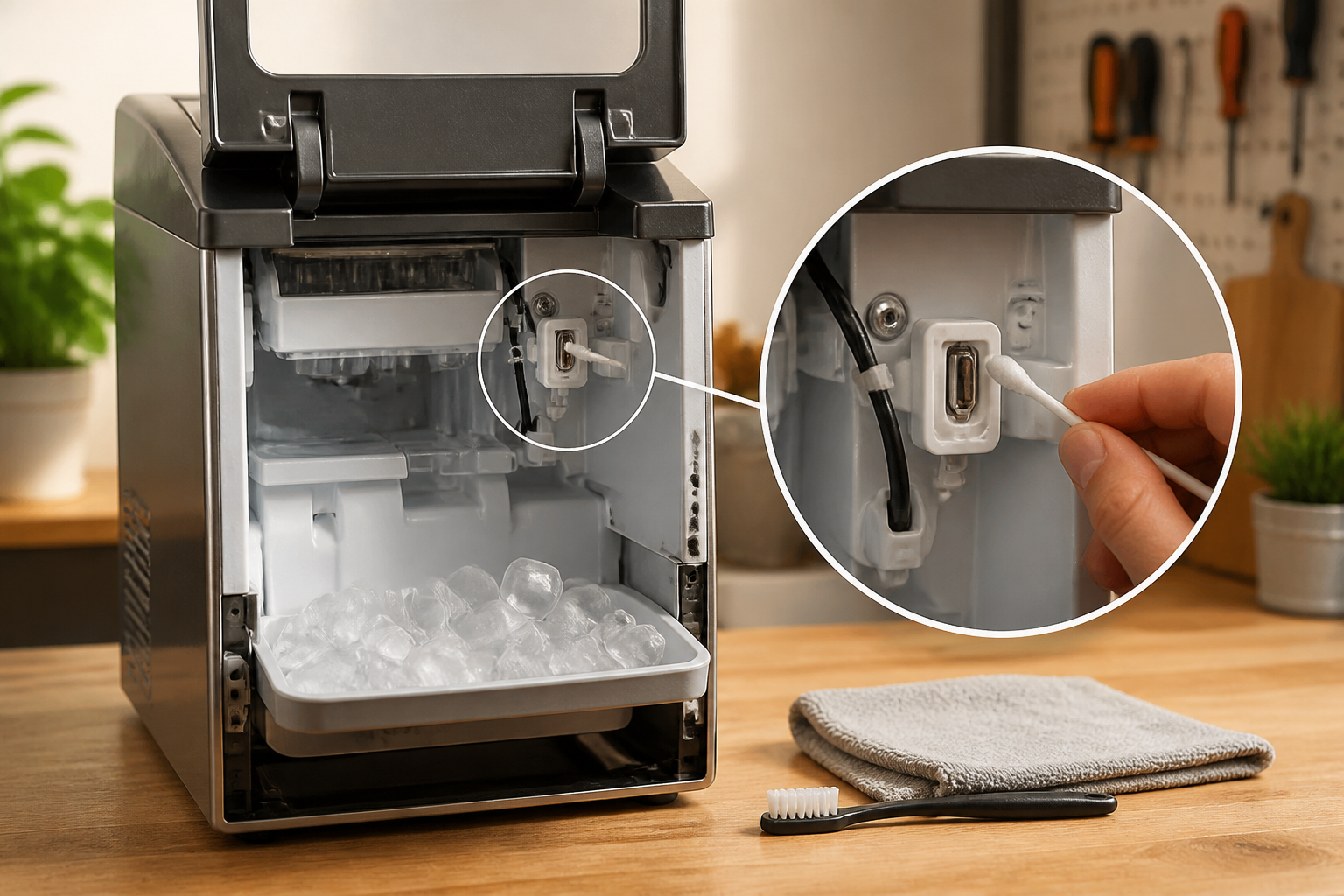
- The sensor will be a small cylindrical component (about 1 inch long, 0.5 inches in diameter) with a clear lens on one end.
- It should have a connector with 2-3 wires leading back to the main control board.
Water Sensor Location: Inside the Water Reservoir
On some models, the water sensor may be located inside the water reservoir itself, typically mounted on the interior bottom or side wall of the water bucket. This sensor looks like a small probe with a clear plastic window, which you can see by checking the water inlet opening without taking the unit apart.
How to Identify If Your Model Has a Water Sensor
Check your user manual for your specific model number. Look for any mention of “water quality sensor,” “turbidity sensor,” or “automatic cleaning cycle.” If your manual states that SCLEAN appears based on water conditions rather than a fixed schedule, your model likely includes a water sensor. Premium stainless steel models are generally more likely to have sensors than basic plastic ones.
Complete Igloo Ice Maker Cleaning and Descaling Procedure
⚠️ SAFETY WARNING: Before you start any cleaning procedures, unplug your ice maker from the electrical outlet. Wait at least 5 minutes for any residual electrical charge to dissipate. Never attempt to clean internal components while the unit is plugged in, as this creates an electrical shock hazard. Also, make sure your hands are dry before touching any electrical parts.
Materials and Tools You’ll Need
- Citric acid powder (4-6 ounces) or a commercial ice maker cleaning solution approved by the manufacturer.
- Distilled water (1-2 gallons).
- Phillips head screwdriver (for panel removal, if needed).
- Soft-bristled brush or cleaning brush.
- Microfiber cloth or soft cloth (not paper towels, which leave lint).
- Small container for mixing the cleaning solution.
- Flashlight or headlamp for visibility.
- User manual for your specific model.
Step 1: Empty Ice and Water from the Machine
Before starting the cleaning cycle, remove all ice and water from the unit:
- Press the power button to turn off the ice maker.
- Open the ice bin access door and use a plastic scoop to remove all ice cubes.
- Find the water drain plug on the bottom exterior of the unit (usually a small valve on the front-bottom corner).
- Place a shallow bucket under the drain valve.
- Slowly open the drain valve by turning it counterclockwise until water flows into the bucket.
- Let all water drain completely (this usually takes 2-3 minutes).
- Close the drain valve by turning it clockwise until snug (don’t overtighten).
- Empty the bucket.
Step 2: Prepare the Cleaning Solution
The SCLEAN cleaning cycle requires a descaling solution to get rid of mineral deposits from the internal water lines and evaporator:
- In a measuring cup, mix 4-6 ounces of citric acid powder with 1 gallon of distilled water.
- Stir thoroughly until the citric acid is completely dissolved (this should take around 1-2 minutes).
- The solution should be clear but may have a slightly cloudy appearance.
- If you’re using a commercial ice maker cleaner, follow the manufacturer’s dilution instructions instead of the citric acid method.
Important Note on Water Quality: Always use distilled water rather than tap water for your cleaning solution. Tap water contains minerals that can interfere with the descaling process and may leave additional deposits.
Step 3: Fill the Water Reservoir with Cleaning Solution
- Locate the water inlet on the top of the ice maker (usually marked with a small water droplet icon).
- Remove any protective cap covering the inlet.
- Carefully pour the prepared cleaning solution into the water inlet until it reaches the “Full” line on the internal water reservoir.
- Don’t overfill—excess solution may overflow into electrical components.
- Replace any caps or covers you removed.
Step 4: Run the SCLEAN Cleaning Cycle
Once the cleaning solution is in, you need to activate the cleaning cycle through the control panel:
- Plug the ice maker back into the electrical outlet.
- Press the power button to turn on the unit.
- Press and hold the SCLEAN button or “Clean” button for 3-5 seconds (the location varies by model, so refer to the section above for your specific model).
- The control panel should display a confirmation message, or the SCLEAN light should blink, indicating the cleaning cycle has started.
- During the cleaning cycle, the machine will pump the cleaning solution through the internal water lines and evaporator assembly.
- This cycle typically lasts 15-25 minutes, depending on your model.
- You might hear the water pump running or see the solution dripping into the bin below the ice maker.
- Don’t interrupt the cleaning cycle—let it run to completion.
- When the cycle finishes, the control panel will return to normal display mode.
Step 5: Drain and Rinse the System
After the cleaning cycle, you need to remove all cleaning solution and rinse the internal system:
- Turn off and unplug the ice maker again.
- Open the drain valve on the bottom exterior of the unit (same valve you used in Step 1).
- Place a bucket underneath to catch the discharge.
- Let all cleaning solution drain completely (about 3-5 minutes).
- Close the drain valve.
- Prepare another batch of distilled water (1 gallon) without any cleaning solution.
- Fill the water reservoir with this plain distilled water.
- Plug the unit back in and turn it on.
- Press and hold the SCLEAN button again to run a rinse cycle with plain water.
- Allow this cycle to complete (typically 15-20 minutes).
- When finished, turn off and unplug the unit again.
- Drain any remaining water through the bottom drain valve into a bucket.
Step 6: Optional Sensor Cleaning (If Your Model Has a Water Sensor)
If your Igloo model has a water sensor (check the section above for identification), you should gently clean the sensor lens after the rinse cycle:
- Locate the water sensor using the directions in the “Water Sensor Location” section above.
- Don’t attempt to remove the sensor from its mounting—just clean it in place.
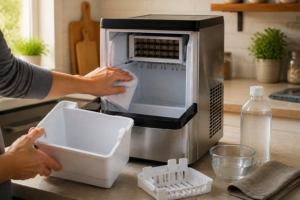
- Dampen a microfiber cloth with distilled water.
- Gently wipe the clear lens portion of the sensor (the end facing the water flow).
- Use a soft touch—avoid scrubbing or applying pressure.
- If mineral deposits are visible on the lens, add a tiny bit of white vinegar to the cloth and gently wipe again.
- Dry the sensor completely with a clean, dry microfiber cloth.
- Make sure no moisture remains on the electrical connector part of the sensor.
Step 7: Reset the SCLEAN Indicator Light
After you’ve completed the cleaning and rinsing procedure, you’ll need to reset the SCLEAN indicator to clear the reminder. The reset procedure varies by model:
Standard Reset Procedure (Most Models)
- Plug the ice maker back into the electrical outlet.
- Press the power button to turn on the unit.
- Press and hold the SCLEAN button for 5-10 seconds.
- The SCLEAN light should blink rapidly, then turn off completely.
- The control panel may display “CLEAN OK” or a similar confirmation message.
- Release the button—the SCLEAN reminder has been reset.
- The ice maker will now resume normal operation and ice production.
Alternative Reset Method (If Standard Method Doesn’t Work)
Some models may require a different reset sequence:
- Press the power button to turn off the unit completely.
- Unplug the ice maker from the electrical outlet.
- Wait 30 seconds.
- Press and hold the power button while plugging the unit back in.
- Continue holding for another 5 seconds after plugging in.
- Release the power button—this performs a complete system reset.
- The SCLEAN indicator should be cleared.
What to Do If SCLEAN Won’t Reset
If the SCLEAN light stays on after trying both reset methods, consider the following:
- Ensure that the cleaning and rinse cycles ran to completion without interruption.
- Verify that you pressed the SCLEAN button during the reset sequence (not the power button).
- Check your user manual for model-specific reset instructions.
- Turn off the unit for 10 minutes, then try the reset procedure again.
- If your model has a water sensor, make sure the sensor lens is completely clean and dry.
First Ice Production After Cleaning
After completing the cleaning, rinsing, and reset procedures, running at least one complete ice-making cycle before consuming any ice from the machine is crucial:
- Fill the water reservoir with fresh, cold distilled water or filtered tap water.
- Let the ice maker produce a complete batch of ice (typically 9-12 cubes, taking 20-30 minutes).
- Discard this first batch—it may contain residual cleaning solution or mineral particles.
- The second and subsequent batches are safe to consume.
Recommended Cleaning Frequency
To keep your ice maker running optimally, follow these cleaning recommendations:
Hard Water Areas (Higher Mineral Content)
If you live in an area with hard water (mineral content above 150 mg/L), you should:
- Run the SCLEAN cleaning cycle whenever the reminder appears (typically every 7-14 days).
- Don’t skip cleaning cycles even if the machine seems to be working well.
- Consider performing an additional manual cleaning cycle every 4 weeks.
- Use a commercial ice maker cleaner specifically designed for hard water areas.
Normal Water Areas (Average Mineral Content)
In areas with typical mineral content (100-150 mg/L), stick to the standard SCLEAN reminder schedule:
- Complete the cleaning cycle when the SCLEAN indicator appears.
- This is usually every 2-3 weeks of regular use.
- If the machine sits unused for more than a month, run a cleaning cycle before starting ice production again.
Recommended Parts & Tools
Igloo Ice Maker Water Filter Replacement
When cleaning the SCLEAN sensor, it’s often necessary to replace the water filter to ensure proper sensor function and ice quality. A clogged or dirty filter can lead to sensor errors and diminish ice production.
White Vinegar Cleaning Solution (Distilled)
Distilled white vinegar is the go-to cleaning solution for descaling the SCLEAN sensor and ice maker components without damaging any sensitive electronics. This natural cleaner effectively removes mineral deposits and buildup that interfere with sensor accuracy.
Soft Brush & Cleaning Brush Set
Soft-bristled brushes are essential for gently cleaning around the SCLEAN sensor without scratching or damaging its delicate parts. These brushes help dislodge mineral deposits and debris from hard-to-reach areas of the sensor assembly.
White Vinegar: The Descaling Solution That Actually Clears the SCLEAN Message
When the SCLEAN sensor triggers, it’s typically due to mineral buildup inside the water lines and ice mold. White vinegar is my first choice for dissolving this buildup without resorting to harsh chemicals. In my experience, nine times out of ten, a proper descale cycle with vinegar clears the message and gets everything back to normal.
What works
- Cuts through calcium and lime deposits faster than plain water alone — you’ll see the vinegar solution turn cloudy as it dissolves the mineral buildup that the sensor detects.
- Safe to run through the internal lines without damaging plastic tubing or the water pump, and it won’t leave any chemical residue that affects ice taste if you rinse properly afterward.
- A single bottle handles multiple descale cycles, making the per-use cost almost nothing compared to calling a technician or replacing the unit.
What doesn’t
- Requires patience — the descale cycle takes 30–45 minutes, and some people expect the SCLEAN light to go away immediately after pouring in vinegar.
- Won’t work if the SCLEAN sensor itself has failed or if there’s a mechanical blockage; in those rare cases, you might be looking at filter or pump replacement instead.
The first time I ignored the SCLEAN message and just kept making ice, the machine started dispensing cloudy cubes and then shut down altogether. I learned the hard way that waiting too long can lead to mineral scale blocking the water inlet. Now, White Vinegar Cleaning Solution (Distilled) is a staple alongside every Igloo unit I work on.
About This Article

Written by Dave Holt. Dave Holt has been taking apart and fixing household appliances since he was a teenager who couldn't leave a broken one alone. Eighteen years later, after fixing things for neighbors, friends, and anyone who'd let him, he's seen almost every failure mode there is. When he writes a repair guide here, it's based on the actual job, not a manufacturer overview. More about this site.
Scope and limits. Dave is a self-taught repairer, not a certified appliance technician. Unplug before you open anything, and leave sealed refrigeration systems, gas connections, and hardwired circuits to a qualified technician.