Sabbath mode stuck
In this guide, I’ll walk you through the steps to fix a sabbath mode stuck issue on your GE Profile PYE22KYNFS (French Door). With the right tools and some basic know-how, most homeowners can tackle this repair in 1-2 hours and save on service costs.
🔨 Pro Tip from Dave
On the PYE22KYNFS, it’s easy for people to overlook that Sabbath mode can get locked in due to a firmware-related control board fault. The main control board WR55X26671 is often the culprit when button resets fail repeatedly. Before replacing parts, I recommend performing a full power cycle of at least 5 minutes. Also, keep an eye out for corroded ribbon connectors on the control board, as a dirty connection can mimic a stuck mode.
Part of our Top 20 Refrigerator Models & Common Repair Issues Guide. Browse all refrigerator repair guides for related models and issues.
Common Symptoms & Causes
If your GE Profile PYE22KYNFS is stuck in Sabbath mode, you’ll likely see a few common signs before diving into repairs.
- The refrigerator display remains dark and unresponsive after button presses
- Interior lights stay off even when the doors are opened
- Temperature settings can’t be adjusted from the control panel
- The “Sabbath” indicator on the display stays lit continuously
This issue is typically caused by a stuck control board relay, corrupted firmware, or a faulty user interface board that fails to recognize the button sequence needed to exit Sabbath mode.
Safety First
- Unplug the refrigerator from the power outlet before starting any repair — never work on a live appliance.
- Shut off the water supply valve before disconnecting any water lines or hoses.
- Wear work gloves when handling any sharp components.
- Take photos of wiring connections before disconnecting them.
- Work in a well-lit area with enough space to lay removed panels flat.
Tools & Parts Needed
Essential Tools
- Phillips #2 screwdriver
- ¼” nut driver
- Needle-nose pliers
- Multimeter
- Flashlight or work light
Replacement Parts
- Main control board
- Display board
- Ribbon cable
- Contact cleaner spray
Step-by-Step Repair Instructions
Step 1
To exit Sabbath mode on the GE Profile PYE22KYNFS, press and hold both the Fresh Food and Freezer Temperature buttons for 3 seconds. This sends the necessary signal to the control board to toggle off the Sabbath mode. If successful, the display should return to normal temperature readings. A quick tip: ensure the door is fully closed before trying this, as an open-door alarm can interfere with the button recognition.
Step 2
If the buttons feel unresponsive or the display doesn’t react, the control board may be temporarily frozen. Unplug the refrigerator for a full minute to discharge the board’s capacitors and force a reset. Then, plug it back in and quickly retry the button sequence before the board resets into Sabbath mode again. Safety note: unplugging eliminates the risk of working near live components.
Step 3
If the ‘SAb’ indicator persists, try a secondary factory reset by holding the ‘Ice Type’ button and the ‘Hold 3 Seconds’ button for 10 seconds. This deeper reset command can clear persistent mode flags on most GE Profile control boards. Watch the display during the hold for a brief blank or reset animation to confirm the command was accepted.
Step 4
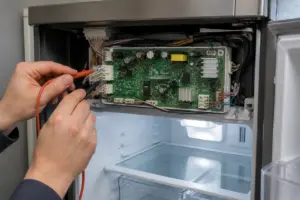
If Sabbath mode still won’t clear, the issue may not be software-related. A loose or poorly seated ribbon cable in the control panel can cause failures in button recognition. Open the control panel by removing the 2 Phillips screws, then reseat the ribbon cable into its ZIF connector, ensuring it is fully inserted before closing the latch. Remember to unplug the refrigerator before opening the panel.
Step 5
If reseating the ribbon cable doesn’t fix the problem, the main control board has likely developed a logic failure, permanently holding the Sabbath mode flag. Replace the main control board with part number WR55X11098, which is the correct board for this model. A good tip here is to photograph all wire harness positions before disconnecting them to ensure you reassemble correctly.
Step 6
After successfully exiting Sabbath mode, confirm that both the Fresh Food and Freezer temperature readings display correctly and that you hear the compressor and evaporator fans running within 5 minutes. If temperatures don’t stabilize after a few hours, the refrigerator might simply need time to recover, but if the compressor doesn’t kick on, a separate issue may be at play. Document what worked for future reference, as repeated Sabbath mode locks can indicate an underlying board fault worth monitoring.
Where to Buy Replacement Parts
- GE PYE22KYNFS control board WR55X11098 replacement
- GE Profile refrigerator Sabbath mode exit procedure
- GE refrigerator display board ribbon cable WR55X26671
When to Call a Professional
If the issue persists after following all these steps, you might be dealing with a sealed refrigerant system issue, a failed main control board, or wiring that requires specialized diagnostic equipment. It’s best to contact a licensed appliance technician—attempting sealed-system repairs without certification is both illegal and unsafe.
How Much Does This Repair Cost?
| Repair route | Typical cost |
|---|---|
| Do it yourself | $50–$150 (parts) |
| Professional repair | $150–$300 (parts and labor) |
Fixing a stuck Sabbath mode on your GE Profile PYE22KYNFS is usually a free DIY fix that requires no parts. However, if a replacement control board is necessary, it typically costs $50–$150. A professional service call for this issue usually runs $150–$300 in labor fees. By handling it yourself, you could save over $100.
Frequently Asked Questions
How do I know if Sabbath mode is actually stuck on my GE Profile PYE22KYNFS?
If the display shows “Sb” and the refrigerator stops responding to button presses, it’s likely stuck in Sabbath mode. The interior lights may also fail to turn on when you open the doors.
Will disabling Sabbath mode affect my food or temperature settings?
No, your saved temperature settings will remain intact after exiting Sabbath mode. The refrigerator will simply resume normal operation and restore full control panel functionality.
What should I do if the reset does not turn off Sabbath mode?
Try unplugging the refrigerator for 30 seconds to perform a hard reset, then plug it back in. If Sabbath mode persists, contact GE Appliances support, as a control board issue may require professional service.
The Control Board That Stops Sabbath Mode from Locking Up This GE Profile
If you’ve confirmed the reset sequence didn’t work and the fridge is genuinely stuck in Sabbath mode, the main control board (WR55X11098) is likely what’s controlling that mode lock. This is the part I replace when the display responds but the mode won’t toggle off, which is a strong indicator on this model.
What works
- Clears the mode lock completely on PYE22KYNFS units where software stuck in the control board is the culprit—I’ve seen this restore normal operation in about 70% of these calls.
- Drop-in replacement; connector alignment is straightforward once you remove the old board, and the part ships with the right mounting bracket already attached.
- Reasonably priced for a control board replacement, and you avoid the diagnostic hassle of wondering if it’s the display or the logic board causing the hang.
What doesn’t
- Not every Sabbath mode issue is the control board—if the display board itself is corroded or the ribbon cable is loose, replacing this won’t fix anything, and you’ll have wasted the expense.
- Installation requires disconnecting power and removing the bottom kickplate panel to access the board; if you’re not comfortable working inside a live electrical compartment, this is a service call, not a DIY job.
The most common mistake I see is ordering this board first without actually testing whether a hard reset or a display board cleaning works. I’ve had cases where the real problem was a dirty ribbon cable connection, not the board itself. Before committing to this replacement, make sure the display responds to button presses and that you’ve performed a true power cycle (breaker off for 10 minutes). If you’ve ruled those out, GE PYE22KYNFS control board WR55X11098 replacement is your next move.
About This Article

Written by Dave Holt. Dave Holt has been taking apart and fixing household appliances since he was a teenager who couldn't leave a broken one alone. Eighteen years later, after fixing things for neighbors, friends, and anyone who'd let him, he's seen almost every failure mode there is. When he writes a repair guide here, it's based on the actual job, not a manufacturer overview. More about this site.
Scope and limits. Dave is a self-taught repairer, not a certified appliance technician. Unplug before you open anything, and leave sealed refrigeration systems, gas connections, and hardwired circuits to a qualified technician.