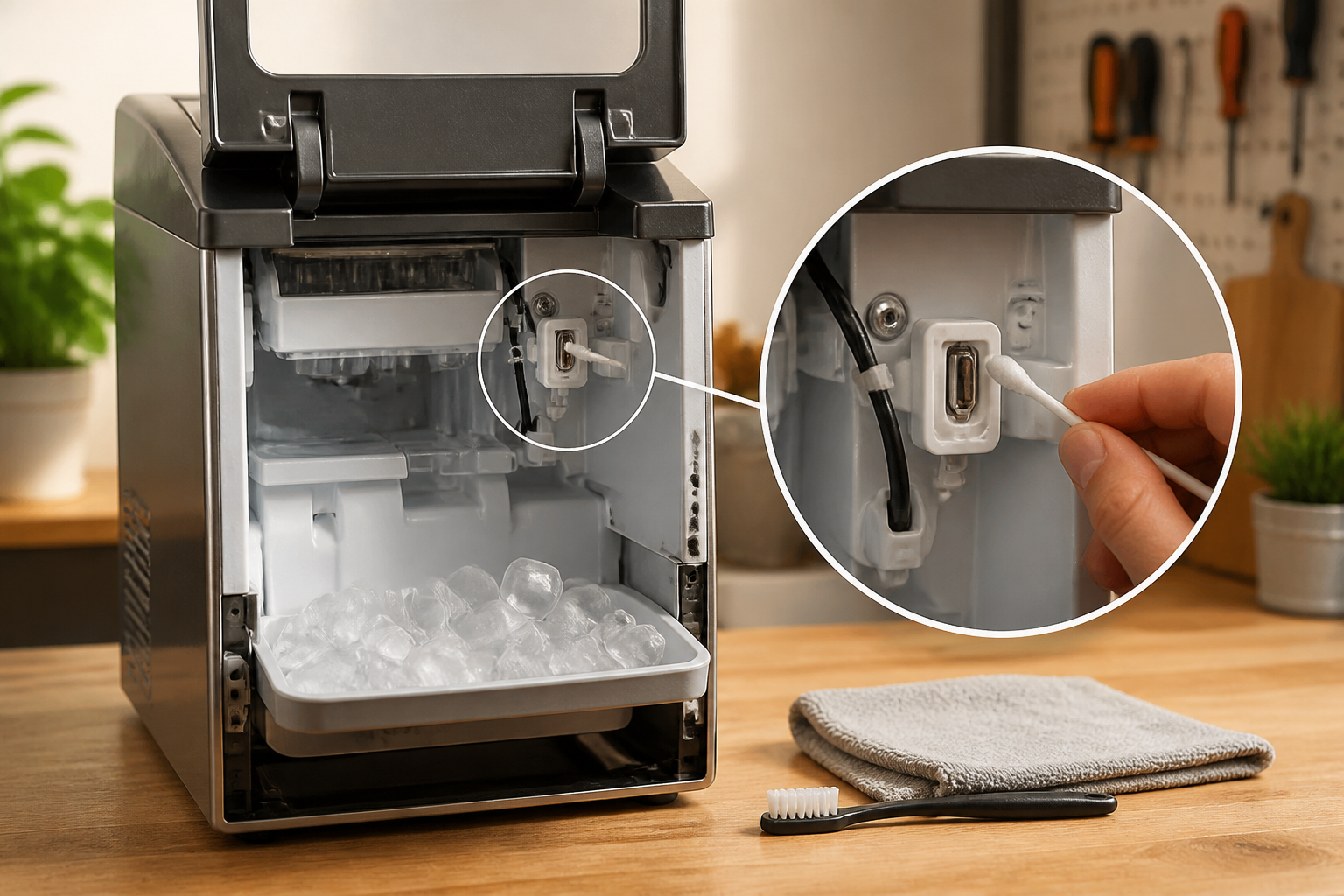
Complete Guide to the Igloo Ice Maker SCLEAN Sensor and Cleaning Process
If your Igloo portable ice maker is displaying the SCLEAN indicator light or message, you may be wondering what this means and where to find the sensor responsible for this notification. Many homeowners confuse the SCLEAN reminder with an error code or malfunction, but in reality, it’s a maintenance reminder designed to prompt you to clean and descale your ice maker. This comprehensive guide will walk you through understanding the SCLEAN system, locating any sensors involved, and performing a complete cleaning and reset procedure.
Understanding the SCLEAN Indicator on Igloo Ice Makers
The SCLEAN indicator is not an error code or malfunction sensor—it’s a maintenance reminder system built into most modern Igloo portable ice makers. This reminder prompts you to clean and descale the internal components of your ice maker to maintain optimal performance and ice quality.
What SCLEAN Stands For
SCLEAN is short for “System Clean,” indicating that it’s time to run a cleaning cycle through the ice maker’s internal water system and evaporator. The indicator typically appears after the unit has completed a certain number of ice batch cycles or after a predetermined time period, regardless of how frequently the machine is used.
Why SCLEAN Appears
The SCLEAN reminder appears for several reasons:
- Mineral buildup prevention: Lime, calcium, and other minerals accumulate inside the water lines and evaporator over time, especially in areas with hard water
- Bacteria and mold growth: The water reservoir and distribution system can develop biofilm and mold if not regularly cleaned
- Ice quality maintenance: Mineral deposits cause cloudy ice, off-flavors, and reduced freezing efficiency
- Equipment longevity: Regular cleaning prevents corrosion and component failure
SCLEAN Light and Button Locations on Common Igloo Models
Where to Find the SCLEAN Indicator
The SCLEAN light or button location varies slightly depending on your Igloo ice maker model, but it’s consistently located on the control panel on the front of the machine. Here are the specific locations for popular models:
Igloo ICEB26AQ (26-Pound Capacity)
On the ICEB26AQ model, the SCLEAN indicator light is located on the digital control panel on the front face of the unit, typically positioned in the bottom row of indicator lights. The control panel sits directly above the ice storage bin access door. The SCLEAN light will illuminate in red or orange when a cleaning cycle is due. The corresponding button or touch control is located immediately below or adjacent to the indicator light. Press and hold this button for 3-5 seconds to access the cleaning menu.
Igloo ICEB33SS (33-Pound Stainless Steel)
The ICEB33SS features a similar control panel layout with the SCLEAN indicator positioned on the right side of the digital display panel. On this model, you’ll find a small recessed button labeled “CLEAN” or “SCLEAN” directly below the illuminated indicator. The panel is located approximately 2 inches above the front edge of the ice bin door.
Igloo ICEB25NS and Other Compact Models
Smaller Igloo models like the ICEB25NS have a simplified control panel where the SCLEAN indicator appears as a separate LED light in the top-right corner of the control area. These models typically have a single multi-function button that cycles through different modes, including the cleaning function.
Locating the Control Panel on Your Model
Regardless of your specific Igloo model, follow these steps to locate your control panel:
- Face the front of the ice maker
- Look for the digital display or LED indicator lights positioned horizontally across the top portion of the front fascia
- The control panel is always mounted on the exterior, never hidden inside or under panels
- The SCLEAN indicator will be among several other lights (Power, Ice Full, Add Water, etc.)
- Consult your user manual for your exact model number to identify the precise button layout
Does Your Igloo Have a Water Sensor?
Understanding Igloo’s Sensor Systems
The SCLEAN reminder system on Igloo ice makers uses two different triggering mechanisms depending on the model year and complexity level:
Time-Based Cycle Systems (Most Common)
The majority of Igloo portable ice makers use a simple time-based or batch-count system for the SCLEAN reminder. These models contain no water quality sensor. Instead, the machine’s microcontroller tracks:
- Number of ice batches produced (typically 25-35 cycles)
- Calendar days elapsed since the unit was powered on (often 7-14 days regardless of use)
- Total operating hours
When the threshold is reached, the SCLEAN light activates. This is a preventative maintenance reminder, not a response to detected contamination.
Water Turbidity Sensor Models (Premium Units)
Some higher-end Igloo models, particularly those manufactured after 2018, include an optional water quality or turbidity sensor. This sensor detects changes in water clarity that indicate mineral buildup or contamination. If your model includes this sensor, it will be located in one of these positions:
Water Sensor Location: Behind the Water Pump Assembly
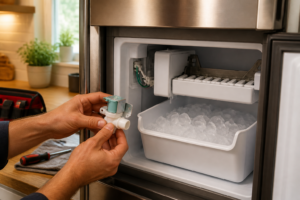
If your Igloo model includes a water sensor, it’s most commonly located inside the machine, behind or adjacent to the water pump assembly. To access it:
- Unplug the ice maker from the electrical outlet and allow it to sit for 5 minutes
- Remove the top access panel or side panel (use a Phillips head screwdriver; typically 2-4 screws)
- Locate the water pump—it’s the component with multiple plastic tubing connections, usually mounted on the bottom-left or bottom-right corner of the interior
- The sensor is a small cylindrical component (approximately 1 inch long, 0.5 inches in diameter) with a clear lens on one end
- It will have a connector with 2-3 wires leading back to the main control board
Water Sensor Location: Inside the Water Reservoir
On some models, the water sensor may be positioned inside the water reservoir itself, typically mounted on the interior bottom or side wall of the water bucket. This sensor appears as a small probe with a clear plastic window. You can observe it by looking into the water inlet opening without disassembling the unit.
How to Identify If Your Model Has a Water Sensor
Check your user manual for your specific model number. Search for any mention of “water quality sensor,” “turbidity sensor,” or “automatic cleaning cycle.” If your manual states that SCLEAN appears based on water conditions rather than a fixed schedule, your model likely includes a water sensor. Additionally, premium stainless steel models are more likely to include sensors than basic plastic models.
Complete Igloo Ice Maker Cleaning and Descaling Procedure
⚠️ SAFETY WARNING: Before beginning any cleaning procedure, unplug your ice maker from the electrical outlet. Wait at least 5 minutes to allow any residual electrical charge to dissipate. Never attempt to clean internal components while the unit is plugged in, as this creates an electrical shock hazard. Ensure your hands are dry before touching any electrical components.
Materials and Tools You’ll Need
- Citric acid powder (4-6 ounces) or commercial ice maker cleaning solution approved by the manufacturer
- Distilled water (1-2 gallons)
- Phillips head screwdriver (for panel removal, if needed)
- Soft-bristled brush or cleaning brush
- Microfiber cloth or soft cloth (not paper towels, which leave lint)
- Small container for mixing cleaning solution
- Flashlight or headlamp for visibility
- User manual for your specific model
Step 1: Empty Ice and Water from the Machine
Before beginning the cleaning cycle, remove all ice and water from the unit:
- Press the power button to turn off the ice maker
- Open the ice bin access door and remove all ice cubes using a plastic scoop
- Locate the water drain plug on the bottom exterior of the unit (usually a small plastic valve on the front-bottom corner)
- Place a shallow bucket underneath the drain valve
- Slowly open the drain valve by turning it counterclockwise until water flows into the bucket
- Allow all water to drain completely (typically 2-3 minutes)
- Close the drain valve by turning it clockwise until snug (do not overtighten)
- Empty the bucket
Step 2: Prepare the Cleaning Solution
The SCLEAN cleaning cycle requires a descaling solution to remove mineral deposits from the internal water lines and evaporator:
- In a measuring cup, combine 4-6 ounces of citric acid powder with 1 gallon of distilled water
- Stir thoroughly until the citric acid completely dissolves (approximately 1-2 minutes)
- The solution should be clear with a slightly cloudy appearance
- If using a commercial ice maker cleaner, follow the manufacturer’s dilution instructions instead of the citric acid method
Important Note on Water Quality: Always use distilled water rather than tap water for the cleaning solution. Tap water contains minerals that can interfere with the descaling process and may leave additional deposits.
Step 3: Fill the Water Reservoir with Cleaning Solution
- Locate the water inlet on the top of the ice maker (typically marked with a small water droplet icon)
- Remove any protective cap covering the inlet
- Slowly pour the prepared cleaning solution into the water inlet until it reaches the “Full” line on the internal water reservoir
- Do not overfill—excess solution may overflow into the electrical components
- Replace any caps or covers you removed
Step 4: Run the SCLEAN Cleaning Cycle
Once the cleaning solution is loaded, you must activate the cleaning cycle through the control panel:
- Plug the ice maker back into the electrical outlet
- Press the power button to turn on the unit
- Press and hold the SCLEAN button or “Clean” button for 3-5 seconds (location varies by model, see the section above for your specific model)
- The control panel should display a confirmation message or the SCLEAN light should blink to indicate the cleaning cycle has started
- During the cleaning cycle, the machine will pump the cleaning solution through the internal water lines and evaporator assembly
- This cycle typically lasts 15-25 minutes depending on your model
- You may hear the water pump running or see solution dripping into the bin below the ice maker
- Do not interrupt the cleaning cycle—allow it to run to completion
- When the cycle finishes, the control panel will return to normal display mode
Step 5: Drain and Rinse the System
After the cleaning cycle completes, you must remove all cleaning solution and rinse the internal system:
- Turn off and unplug the ice maker again
- Open the drain valve on the bottom exterior of the unit (same valve used in Step 1)
- Place a bucket underneath to catch the discharge
- Allow all cleaning solution to drain completely (approximately 3-5 minutes)
- Close the drain valve
- Prepare a second batch of distilled water (1 gallon) without any cleaning solution
- Fill the water reservoir with this plain distilled water
- Plug the unit back in and turn it on
- Press and hold the SCLEAN button again to run a rinse cycle with plain water
- Allow this cycle to complete (approximately 15-20 minutes)
- When finished, turn off and unplug the unit again
- Drain all remaining water through the bottom drain valve into a bucket
Step 6: Optional Sensor Cleaning (If Your Model Has a Water Sensor)
If your Igloo model includes a water sensor (see section above for identification), you should gently clean the sensor lens after running the rinse cycle:
- Locate the water sensor following the directions in the “Water Sensor Location” section above
- Do not attempt to remove the sensor from its mounting—only clean it in place
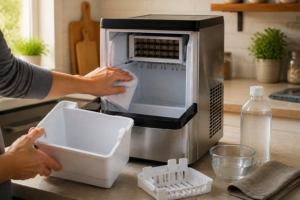
- Dampen a microfiber cloth with distilled water
- Gently wipe the clear lens portion of the sensor (the end facing the water flow)
- Use a soft touch—do not scrub or apply pressure
- If mineral deposits are visible on the lens, apply a tiny amount of white vinegar to the cloth and gently wipe again
- Dry the sensor completely with a clean, dry microfiber cloth
- Do not allow moisture to sit on the electrical connector portion of the sensor
Step 7: Reset the SCLEAN Indicator Light
After completing the cleaning and rinsing procedure, you must reset the SCLEAN indicator to clear the reminder. The reset procedure varies by model:
Standard Reset Procedure (Most Models)
- Plug the ice maker back into the electrical outlet
- Press the power button to turn on the unit
- Press and hold the SCLEAN button for 5-10 seconds
- The SCLEAN light should blink rapidly, then turn off completely
- The control panel may display “CLEAN OK” or a similar confirmation message
- Release the button—the SCLEAN reminder has been reset
- The ice maker will now resume normal operation and ice production
Alternative Reset Method (If Standard Method Doesn’t Work)
Some models use a different reset sequence:
- Press the power button to turn off the unit completely
- Unplug the ice maker from the electrical outlet
- Wait 30 seconds
- Press and hold the power button while you plug the unit back in
- Continue holding for another 5 seconds after plugging in
- Release the power button—this performs a complete system reset
- The SCLEAN indicator should be cleared
What to Do If SCLEAN Won’t Reset
If the SCLEAN light remains on after attempting both reset methods, try the following:
- Ensure the cleaning and rinse cycles ran to completion without interruption
- Verify you actually pressed the SCLEAN button during the reset sequence (not the power button)
- Check your user manual for model-specific reset instructions
- Try turning off the unit for 10 minutes, then repeating the reset procedure
- If your model has a water sensor, ensure the sensor lens is completely clean and dry
First Ice Production After Cleaning
After completing the cleaning, rinsing, and reset procedures, it’s important to run at least one complete ice-making cycle before consuming ice from the machine:
- Fill the water reservoir with fresh, cold distilled water or filtered tap water
- Allow the ice maker to produce a complete batch of ice (typically 9-12 cubes, taking 20-30 minutes)
- Discard this first batch—it may contain residual cleaning solution or mineral particles
- The second and subsequent batches are safe to consume
Recommended Cleaning Frequency
To maintain optimal ice maker performance and quality, follow these cleaning recommendations:
Hard Water Areas (Higher Mineral Content)
If you live in an area with hard water (mineral content above 150 mg/L), you should:
- Run the SCLEAN cleaning cycle every time the reminder appears (typically every 7-14 days)
- Do not skip cleaning cycles even if the machine seems to be working well
- Consider performing an additional manual cleaning cycle every 4 weeks
- Use a commercial ice maker cleaner specifically designed for hard water areas
Normal Water Areas (Average Mineral Content)
In areas with typical mineral content (100-150 mg/L), follow the standard SCLEAN reminder schedule:
- Complete the cleaning cycle when the SCLEAN indicator appears
- This is typically every 2-3 weeks of regular use
- If the machine sits unused for more than one month, run a cleaning cycle before resuming ice production
Recommended Parts & Tools
Igloo Ice Maker Water Filter Replacement
When cleaning the SCLEAN sensor, you’ll often need to replace the water filter to ensure proper sensor function and ice quality. A clogged or dirty filter can cause sensor errors and reduce ice production. Check current pricing on Amazon.
White Vinegar Cleaning Solution (Distilled)
Distilled white vinegar is the recommended cleaning solution for descaling the SCLEAN sensor and ice maker components without damaging sensitive electronics. This natural cleaner effectively removes mineral deposits and buildup that interfere with sensor accuracy. Check current pricing on Amazon.
Soft Brush & Cleaning Brush Set
Soft-bristled brushes are essential for gently cleaning around the SCLEAN sensor without scratching or damaging its delicate components. These brushes help dislodge mineral deposits and debris from hard-to-reach areas of the sensor assembly. Check current pricing on Amazon.
White Vinegar: The Descaling Solution That Actually Clears the SCLEAN Message
When the SCLEAN sensor triggers, mineral buildup inside the water lines and ice mold is the real culprit — and white vinegar is the cheapest, most effective way to dissolve it without harsh chemicals. This is the first thing I reach for before ordering any replacement parts, because nine times out of ten, a proper descale cycle clears the message and restores normal operation.
What works
- Cuts through calcium and lime deposits faster than plain water alone — you’ll see the vinegar solution turn cloudy as it dissolves mineral buildup that the sensor detects.
- Safe to run through the internal lines without damaging plastic tubing or the water pump, and won’t leave chemical residue that affects ice taste if you rinse properly afterward.
- A single bottle handles multiple descale cycles, so the per-use cost is almost nothing compared to calling a technician or replacing the unit.
What doesn’t
- Requires patience — the descale cycle takes 30–45 minutes, and some people expect the SCLEAN light to vanish immediately after pouring vinegar in.
- Won’t work if the SCLEAN sensor itself has failed or if there’s an actual mechanical blockage; in those rare cases you’re looking at filter or pump replacement instead.
The first time I ignored the SCLEAN message and just kept making ice, the machine started dispensing cloudy cubes and then shut down entirely — it turned out I’d waited too long and mineral scale had partially blocked the water inlet. White Vinegar Cleaning Solution (Distilled) now sits next to every Igloo unit I work on.
This post contains affiliate links. As an Amazon Associate, I earn from qualifying purchases at no extra cost to you.