Drum Not Spinning
This guide walks you through diagnosing and repairing a drum that won’t spin on the Samsung DV42H5200EW electric dryer. We’ll cover the most common causes — from a worn drive belt to a failed motor — and give you clear instructions to get your dryer running again. Most homeowners with basic mechanical skills can complete this repair in 1–2 hours using common household tools.
Common Symptoms & Causes
A drum that won’t spin usually comes with a few telltale signs that point toward the root cause:
- Dryer powers on and heats but the drum sits completely still
- A loud thump or squealing noise just before the drum stopped rotating
- Clothes remain wet after a full cycle despite normal heat output
- Motor hums but the drum does not move when the door is closed and cycle starts
The most common root cause on the DV42H5200EW is a broken or slipped drive belt, followed by a worn idler pulley or failed drum support rollers that place excessive load on the motor.
Safety First
- Unplug the dryer from the wall outlet before opening any panels
- Wear work gloves — sheet metal edges inside the cabinet are sharp
- Photograph all wiring harness connections before disconnecting anything
- Work in a well-lit space so you can clearly see small components and clips
Tools & Parts Needed
Essential Tools
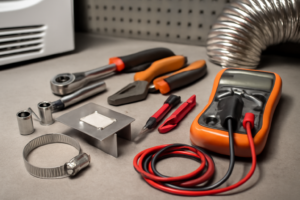
- Phillips-head screwdriver (#2)
- Flat-head screwdriver or putty knife (for releasing cabinet clips)
- Nut driver set (¼” and 5/16″)
- Needle-nose pliers
- Flashlight or headlamp
Replacement Parts
- Samsung DV42H5200EW Drive Belt (DC66-00343A)
- Samsung DV42H5200EW Idler Pulley (DC93-00634A)
- Samsung DV42H5200EW Drum Support Rollers (DC97-16782A)
Step-by-Step Repair Instructions
🔨 Pro Tip from Dave
On the DV42H5200EW specifically, the idler pulley bracket has a known wear point where it cracks and loses spring tension without fully breaking — techs who don’t know this will replace the belt, button everything back up, and then get a callback two weeks later when the belt slips off again. Always flex and inspect that idler bracket closely under good light before you close the cabinet; if it’s cracked or the pivot feels sloppy, replace the pulley assembly at the same time you replace the belt.
Step 1: Unplug and Access the Cabinet
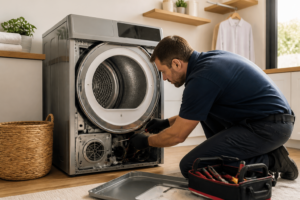
Unplug the dryer and slide it away from the wall for working room. Use a putty knife or flat-head screwdriver to release the two spring clips located just under the front lip of the top panel, then lift the top and set it back safely. You should now have clear access to the front bulkhead and drum assembly.
Step 2: Remove the Front Panel
Disconnect the door switch wiring harness after photographing it, then remove the two screws at the top of the front panel and the two screws at the bottom behind the toe kick panel. Carefully pull the front panel away and set it aside. You will now see the drum sitting in the cabinet supported by the rear bearing and front glides.
Step 3: Inspect the Drive Belt
Reach under the drum and feel for the drive belt — it should be looped tightly around the drum’s outer circumference. If the belt is snapped, completely loose, or falls off when you touch it, replacement is required. A broken belt is the number one cause of a non-spinning drum on this model.
Step 4: Check the Idler Pulley
With the belt off, locate the idler pulley on the motor bracket near the bottom of the cabinet and spin it by hand. It should rotate smoothly and quietly with no wobble. A pulley that grinds, seizes, or wobbles side-to-side needs to be replaced before installing a new belt.
Step 5: Inspect the Drum Support Rollers
The DV42H5200EW uses two rear drum support rollers mounted on a shaft. Spin each roller by hand — they should turn freely with no flat spots or roughness. Worn rollers create drag that overloads the motor and can indirectly prevent the drum from spinning; replace them as a pair if either shows wear.
Step 6: Install the New Belt and Reassemble
Drape the new drive belt around the drum with the ribbed side facing inward against the drum surface. Route the belt under the idler pulley and around the motor shaft pulley, using the idler to create tension — the belt should feel snug with no slack. Reverse the disassembly steps to reinstall the front panel and top, reconnecting the door switch harness securely.
Step 7: Test the Dryer
Plug the dryer back in, select a timed dry cycle, and listen for the drum to begin rotating within the first few seconds. Open the door mid-cycle to confirm the drum spins freely and quietly. If the motor hums but the drum still won’t turn after belt replacement, the motor or start capacitor may need further diagnosis.
How Much Does This Repair Cost?
Doing this repair yourself typically costs between $15 and $55 in parts — a replacement drive belt runs about $12–$20, an idler pulley around $15–$25, and a roller kit around $20–$35. Compare that to a professional service call on this appliance, which typically runs $150–$300 once you factor in labor and trip fees. Tackling it yourself can save you $100 or more, and the parts are widely available and straightforward to install.
Where to Buy Replacement Parts
All three parts commonly needed for this repair are available on Amazon with fast shipping. Search for the following to find compatible components for your Samsung DV42H5200EW:
- Samsung DV42H5200EW Drive Belt (DC66-00343A)
- Samsung DV42H5200EW Idler Pulley (DC93-00634A)
- Samsung DV42H5200EW Drum Support Rollers (DC97-16782A)
Frequently Asked Questions
Before you dive into the repair, you’ll want to have the right replacement belt on hand — a broken or stretched drum belt is the most common reason a Samsung dryer drum stops spinning. The Dryer Drum Belt Replacement For Samsung DV448AEP/XAA DV42H5200EW/A3 DV219AEW/XAA DV42H5200EF/A3 DV48H7400EW/A2 DVE50R5200W/A3 DV209AEW/XAA DV410AEW/XAA DV331AEW/XAA DV40J3000GW/A2 DV405ETPASU/AA is a direct-fit replacement that’s confirmed compatible with the DV42H5200EW, so you won’t have to guess on fitment. Grabbing this before you start means you can complete the repair in a single session without waiting on parts. (As an Amazon Associate I earn from qualifying purchases.)
Once you’ve got the front panel off and the old belt in your hands, it’s a good time to double-check your replacement matches the original’s length and rib count. The Dryer Drum Drive Belt Replacement for Samsung Dryers DV42H5000EW/A3,DV42H5200EP/A3,DV45H7000EW/A2,DV40J3000EW/A2,DV40J3000GW/A2,DV48H7400EW/A2,DV50K8600EV/A3,DV48J7770EP/A2,DV210AEW/XAA is engineered to OEM specifications and fits a wide range of Samsung electric dryer models, making it a reliable choice if you’re working across multiple units or just want a quality part with broad compatibility. Routing the new belt around the drum and idler