
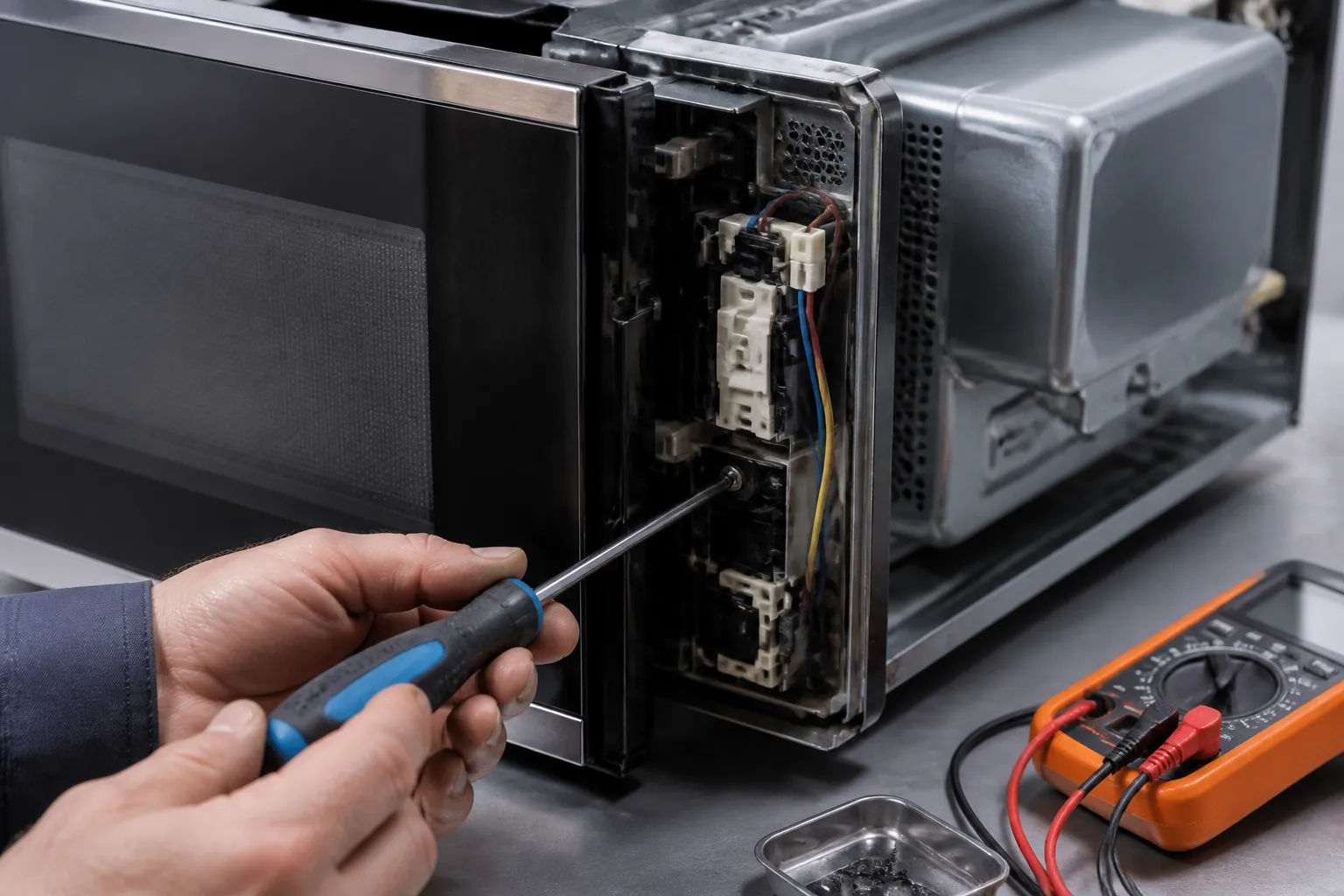
Door Switch Replacement for Samsung ME21R7051SS Over-the-Range Microwave
The door switch in the Samsung ME21R7051SS is a crucial safety feature that ensures the microwave won’t operate when the door is open, and works correctly when it’s closed. This guide will help you address faulty door switches that don’t detect the door position properly, leading to operational issues or a completely dead microwave. While this repair is classified as MODERATE difficulty due to the need to discharge a high-voltage capacitor and work with electrical connections, it’s a task most DIY enthusiasts can manage with the right safety precautions and a bit of electrical knowledge.
Symptoms
- Microwave runs continuously even when door is opened (extremely dangerous condition)
- Unit displays error codes or “DOOR” message on the Samsung ME21R7051SS control panel
- Microwave fails to start despite door being properly closed and latched
- Interior light remains on constantly or fails to illuminate when door opens
- Cooking cycle stops unexpectedly mid-operation with door error indicators
- Unusual clicking or buzzing sounds from the door latch area when opening or closing
⚠️ Safety Warning
DANGER: The Samsung ME21R7051SS contains a high-voltage capacitor that retains a lethal electrical charge even when unplugged. Before starting any repairs, unplug the unit for at least 10 minutes, and discharge the capacitor using an insulated screwdriver across the terminals. High voltage components can deliver fatal shocks up to 2,100 volts. Never attempt this repair with the microwave plugged in. If the microwave runs with the door open, unplug it immediately and do not use it until repaired, as this poses serious radiation exposure risks. Always wear safety glasses and ensure you have adequate lighting when working inside the unit.
Parts Needed
- Primary Door Switch – Samsung Part Number DE66-00327A (micro switch rated for 16A, 250V)
- Secondary Door Switch – Samsung Part Number DE66-00227A (safety interlock switch)
- Monitor Switch – Samsung Part Number DE66-00287A (if replacing complete set)
- Wire connectors (if existing connectors are damaged during removal)
- Electrical contact cleaner (for cleaning switch mounting area)
Tools Required
- Phillips head screwdriver (magnetic tip recommended)
- Flathead screwdriver with insulated handle for capacitor discharge
- Digital multimeter capable of measuring continuity and resistance
- Needle-nose pliers for wire connector removal
- Flashlight or headlamp for interior illumination
- Safety glasses and work gloves
- Small bowl or magnetic parts tray for screw storage
Step-by-Step Instructions
Step 1: Power Disconnection and Capacitor Discharge
⚡ Pro Tip from Dave
On the ME21R7051SS specifically, I’ve noticed that the secondary door switch and the monitor switch often fail together due to the same worn actuator lobe on the door latch. If you’re replacing one, it’s worth testing all three switches with your multimeter before you close it up. This can save you from a return visit within 30 days.
To start, unplug the Samsung ME21R7051SS from the electrical outlet and wait at least 10 minutes. Remove the outer cabinet by taking out the 8 Phillips screws: 3 along the top edge, 2 on each side panel, and 1 at the bottom rear. Locate the high-voltage capacitor (it’s a cylindrical component, about 3 inches tall) near the magnetron. Using an insulated screwdriver, carefully short the two capacitor terminals together, and then short each terminal to the metal chassis. You should hear a pop and see a small spark, indicating that the discharge was successful.
Step 2: Access the Door Switch Assembly
Once the outer cabinet is removed, find the door switch assembly on the right side of the microwave cavity opening. The Samsung ME21R7051SS has three door switches arranged vertically within a black plastic housing that measures about 4 inches tall by 2 inches wide. These switches align with the door hooks when the door closes properly.
Step 3: Document Wire Connections
Before disconnecting any wires, take a photograph or sketch the wire routing and connections for each switch. The door switches on the Samsung ME21R7051SS typically have: the top switch with white and blue wires, the middle switch with brown and white wires, and the bottom switch with orange and black wires. Each switch uses slide-on spade connectors that are color-coded for easy reassembly.
Step 4: Test Existing Switches
Using your multimeter set to continuity mode, test each switch before you remove them. With the door open, the primary switches should show an open circuit (infinite resistance), and the monitor switch should show continuity (0-5 ohms). When you manually press each switch actuator, the readings should reverse. If any switches fail to change state or show intermittent readings, they need replacing.
Step 5: Remove Wire Connectors
Carefully disconnect all wire connectors from the door switches using your needle-nose pliers. Pull straight back on each connector while supporting the switch body to avoid damaging the switch terminals. The Samsung ME21R7051SS uses standard 0.25-inch spade connectors that should remove with gentle but firm pressure.
Step 6: Remove Switch Mounting Screws
Remove the two Phillips screws that secure the door switch mounting bracket to the microwave frame. These screws are located at the top and bottom of the switch assembly, approximately 3.5 inches apart. Depending on the manufacturing date of your Samsung ME21R7051SS, the mounting bracket may contain all three switches as a single assembly, or they may be individually mounted.
Step 7: Replace Individual Switches
If the switches are individually replaceable, take out the single Phillips screw securing each faulty switch to the mounting bracket. Install the new switch, making sure the actuator arm extends toward the door opening and aligns with the corresponding door hook position. The switch body should sit flush against the mounting bracket without any gaps or misalignment.
Step 8: Install New Switch Assembly
Position the new or rebuilt switch assembly in the microwave frame opening, ensuring it aligns properly with the door hook engagement points. Secure it with the two mounting screws, tightening them to approximately 15-20 inch-pounds of torque to avoid over-tightening the plastic mounting tabs.
Step 9: Reconnect Wire Harnesses
Reconnect all wire connectors to their corresponding switches based on your documentation from Step 3. Ensure each connector slides fully onto the switch terminal and makes secure contact. Double-check the wire routing to avoid interference with door operation or pinching during cabinet reinstallation.
Step 10: Test Door Switch Operation
Before you reassemble the cabinet, reconnect the power and test the door switch functionality. With the door open, the Samsung ME21R7051SS should not operate and should display the appropriate door indicators. Close the door and verify normal operation, including the interior light function and proper control panel response.
Step 11: Reinstall Outer Cabinet
Replace the outer cabinet, ensuring all wire harnesses are properly routed and no wires are pinched between the metal panels. Install all 8 cabinet screws in reverse order of removal, starting with the bottom and side screws, and finish with the top edge screws. Make sure the cabinet sits flush against the mounting bracket.
Step 12: Final Testing and Calibration
Perform a complete operational test, including door open/close cycles, interior light operation, and a brief cooking cycle with a microwave-safe cup of water. Verify that the Samsung ME21R7051SS responds immediately when the door is opened during operation and resumes properly when the door is closed and the start button is pressed.
Troubleshooting
- If the microwave still won’t start after replacing the switch, check for proper door alignment and ensure all three switches actuate simultaneously when the door closes.
- Intermittent operation may indicate loose wire connections or improper switch mounting — recheck all connections and ensure that switches are securely fastened.
- If error codes persist, the main control board may have failed and require replacement along with the door switches.
- Door light malfunctioning after the repair typically suggests that the monitor switch wiring was reversed during installation.
- Unusual noises from the door area could indicate misaligned switches or damaged door hooks that may require adjustment or replacement.
- If the microwave operates but stops randomly, check for loose connections or damaged wire insulation that could cause intermittent contact.
When to Call a Professional
- If you’re uncomfortable working with high-voltage components or lack experience with electrical repairs.
- When multiple components appear damaged or if the main control board requires replacement simultaneously.
- If door alignment issues persist after switch replacement, indicating structural problems with the door hinges or cabinet.
- When local electrical codes require licensed technician installation or if warranty considerations prohibit DIY repairs.
When to Call a Professional
Most of the repairs in this guide are manageable for a careful DIYer with basic tools. In my experience, if you’ve replaced all three door switches and the unit still blows the 20-amp ceramic fuse on the first door close, that’s a clear sign that the monitor switch wiring harness has an intermittent short or that the magnetron thermal cutout might be involved. At that point, you’re dealing with cascading failures that require a calibrated multimeter, a capacitor discharge tool, and familiarity with high-voltage microwave circuits. It’s probably time to bring in a certified technician. When in doubt, a diagnostic service call typically costs $80–$120 and can save you from misdiagnosing the issue and spending more on parts.
Recommended Parts & Tools
Samsung DE34-00019A Microwave Door Switch Assembly
This is the genuine Samsung door switch replacement part compatible with the ME21R7051SS over-the-range microwave model. The DE34-00019A switch assembly ensures proper door latching detection and safe operation when installed.
Magnetic Tip Screwdriver Set for Appliance Repair
This precision screwdriver set includes the Phillips head and Torx bits needed to safely remove the Samsung ME21R7051SS cabinet panels and access the door switch assembly. The magnetic tips prevent dropped screws during the repair process.
The Door Switch That Stops the Dead Microwave Problem on the ME21R7051SS
If your ME21R7051SS won’t power on or keeps blowing the main fuse, the Samsung OEM door switch is the first part to try. This component trips the interlock circuit, and if it’s failed, it will cut power to the entire unit or cause continuous fuse blowouts. Getting the right Samsung assembly is essential here because third-party switches don’t always fit correctly in this model’s latch mechanism.
What works
- OEM fit and electrical contacts are exact—no guessing whether the microwave will recognize the door as closed when you reassemble.
- The switch terminals are pre-wired and color-coded to match your harness, so you’re not hunting for continuity or making reverse-polarity mistakes during reinstallation.
- Eliminates the most common false diagnosis trap: you’ll know immediately if this part fixes the dead unit, which saves you from ordering a $400 control board that wasn’t the problem.
What doesn’t
- You still need to discharge the high-voltage capacitor before touching anything inside the microwave—the switch itself won’t protect you during teardown.
- If the door latch housing is cracked or warped (which happens on older units), the new switch won’t seat properly and you’ll be back where you started.
I’ve seen more than a few generic universal door switches go in first and fail to trigger the interlock correctly. That wasted a week and led to a second service call—stick with the Samsung OEM assembly from the get-go. Samsung DE34-00019A Microwave Door Switch Assembly
About This Article

Written by Dave Holt. Dave Holt has been taking apart and fixing household appliances since he was a teenager who couldn't leave a broken one alone. Eighteen years later, after fixing things for neighbors, friends, and anyone who'd let him, he's seen almost every failure mode there is. When he writes a repair guide here, it's based on the actual job, not a manufacturer overview. More about this site.
Scope and limits. Dave is a self-taught repairer, not a certified appliance technician. Unplug before you open anything, and leave sealed refrigeration systems, gas connections, and hardwired circuits to a qualified technician.

