
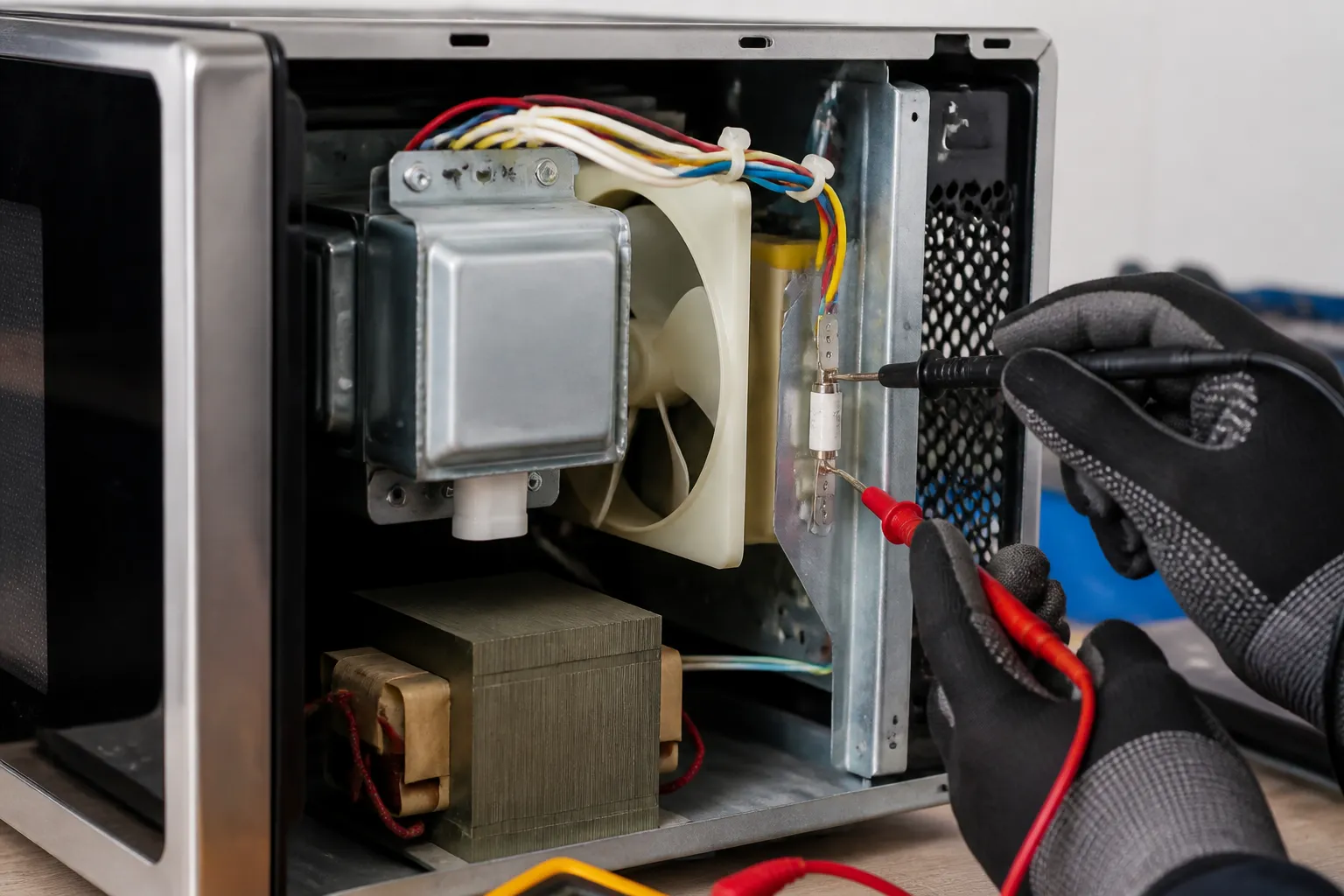
Replacing a Blown Thermal Fuse on the Panasonic NN-SN686S Countertop Microwave
The thermal fuse is a crucial safety component in the Panasonic NN-SN686S that protects the microwave from overheating by cutting power when temperatures exceed safe limits. Typically, when this fuse blows, it’s due to blocked ventilation, a faulty magnetron, or accumulated grease and debris obstructing airflow. I rate this repair as MODERATE because it requires safely discharging the high-voltage capacitor and working around potentially hazardous electrical components. While swapping out the fuse is straightforward, the safety precautions and the disassembly required mean you need to pay careful attention to detail.
Symptoms
- Microwave has no power and the display remains completely blank when plugged in
- LED display lights up normally but the unit will not start heating when the start button is pressed
- Turntable motor runs and interior light illuminates, but no microwave energy is generated
- Unit worked normally until suddenly stopping mid-cycle and now shows no signs of life
- Control panel responds to input but pressing start results in no fan noise or magnetron operation
- Fuse in the electrical panel has not tripped, but the Panasonic NN-SN686S appears completely dead
⚠️ Safety Warning
CRITICAL SAFETY NOTICE: Microwaves contain high-voltage components that can deliver lethal electrical shocks even when unplugged. The high-voltage capacitor in the Panasonic NN-SN686S can retain a dangerous charge for hours or even days after disconnection. Before starting any work, you must properly discharge the capacitor using an insulated screwdriver across the capacitor terminals. If you’re uncomfortable with high-voltage electrical components, do not attempt this repair. Always unplug the unit and wait at least 60 minutes before beginning work. Wear safety glasses and work with one hand when possible to avoid creating a path for electrical current across your body. If you detect burning smells, see arcing, or notice any unusual damage to internal components, stop immediately and consult a professional technician.
Parts Needed
- Panasonic thermal fuse part number A61006350AP (20-amp, 320°F thermal cutoff fuse)
- High-temperature electrical tape or wire nuts if wire splicing is required
- Dielectric grease for connector protection (optional but recommended)
Tools Required
- Phillips head screwdriver (magnetic tip recommended)
- Flathead screwdriver with insulated handle for capacitor discharge
- Digital multimeter with continuity testing capability
- Needle-nose pliers with insulated handles
- Wire strippers (if splicing is necessary)
- Flashlight or headlamp for interior visibility
- Anti-static wrist strap (recommended for component protection)
Step-by-Step Instructions
Step 1: Power Disconnection and Initial Preparation
🔨 Pro Tip from Dave
Even after unplugging, the high-voltage capacitor in a microwave can hold a lethal charge of up to 2,100 volts for hours. Always discharge it using a resistor or an insulated screwdriver across the terminals before touching anything internal, and verify it’s at zero with your multimeter. On the NN-SN686S, the thermal fuse is tucked up near the magnetron behind a bracket that’s easy to overlook, so if you’re having trouble finding it, don’t assume you have the wrong part — it’s just hidden deeper than you’d expect.
Unplug the Panasonic NN-SN686S from the wall outlet and wait at least 60 minutes to allow internal components to discharge. Remove any items from inside the microwave cavity and ensure the turntable and glass tray are taken out. Clear your work area and lay the unit on a soft towel to protect its exterior finish. Position the microwave so the right side panel (when facing the front) is accessible, as this is where you’ll remove the cover to access internal components.
Step 2: External Cover Removal
Locate the six Phillips head screws around the perimeter of the right side panel of the Panasonic NN-SN686S. Remove the two screws at the top edge, two along the back edge, and two at the bottom rear corner. The screws are approximately 12mm long with a silver finish. Once all screws are removed, carefully slide the outer cover toward the back of the unit about one inch, then lift it away. Set the cover aside in a safe location where it won’t get damaged.
Step 3: High-Voltage Capacitor Safety Discharge
Locate the large cylindrical high-voltage capacitor, typically mounted vertically near the magnetron on the right side of the internal cavity. The capacitor in the Panasonic NN-SN686S is black and about four inches tall. Using an insulated flathead screwdriver, carefully touch the metal blade across both terminals at the same time to discharge any stored energy. You may see a small spark, which is normal. Perform this discharge procedure three times, waiting 30 seconds between each discharge to ensure complete safety.
Step 4: Locating the Thermal Fuse
The thermal fuse in the Panasonic NN-SN686S is located on the upper right portion of the internal frame, typically mounted to the air duct housing near the magnetron cooling fan. It appears as a small cylindrical component, approximately one inch long, with two wire terminals. The fuse is usually white or cream-colored with temperature markings on the housing. It may be secured with a small metal bracket or simply held in place by the connecting wires.
Step 5: Testing the Current Thermal Fuse
Before removing the suspected blown fuse, test it for continuity with your multimeter. Set the meter to continuity or resistance mode (ohms). Touch one probe to each terminal of the thermal fuse while it’s still connected. A functioning fuse should show near-zero resistance (typically less than one ohm) and may beep if your meter has that feature. An open (blown) fuse will show infinite resistance or “OL” on the display. Document this reading for comparison with the new component.
Step 6: Disconnecting the Faulty Thermal Fuse
Carefully disconnect the two wire terminals from the thermal fuse. In the Panasonic NN-SN686S, these are typically push-on style connectors that can be removed by gently pulling straight off with needle-nose pliers. Take note of the wire colors and positions before disconnection. Common wire colors are brown and blue or brown and black. If the fuse is secured with a mounting bracket, remove the single Phillips screw holding the bracket in place. Some thermal fuses are held only by the wire connections and may be free-floating.
Step 7: Installing the New Thermal Fuse
Position the new thermal fuse (part number A61006350AP) in the exact location of the original component. If there was a mounting bracket, secure the new fuse with the bracket and reinstall the Phillips screw. Ensure the fuse is oriented with the temperature markings visible and accessible for future reference. The thermal fuse orientation is not typically critical for electrical function, but proper positioning ensures adequate airflow around the component for accurate temperature sensing.
Step 8: Reconnecting Electrical Connections
Reconnect the wire terminals to the new thermal fuse, ensuring they are firmly seated and making good electrical contact. The connections should slide on easily but require a gentle tug to remove. If the original wire connectors are damaged or loose, they should be replaced with new terminals of the same size. Apply a small amount of dielectric grease to the connections to prevent corrosion and ensure long-term reliability in the humid environment near the magnetron.
Step 9: Testing the New Installation
With the new thermal fuse installed and connected, test for proper continuity across the component before reassembly. Your multimeter should show near-zero resistance across the terminals, confirming the new fuse is functional and properly connected. Also, verify that no other components were accidentally disconnected during the repair process by visually inspecting all nearby connections.
Step 10: Reassembly and Final Testing
Carefully replace the outer cover of the Panasonic NN-SN686S by sliding it forward into position and securing it with all six Phillips head screws. Ensure all screw holes align properly before tightening. Reinstall the turntable and glass tray, then plug the unit back into the wall outlet. Test the microwave with a cup of water for 30 seconds on high power to verify proper operation. The unit should start immediately, the magnetron should produce its characteristic humming sound, and the water should begin heating within 10 to 15 seconds.
Troubleshooting
- If the microwave still has no power after thermal fuse replacement, check the main fuse located in the primary circuit near the power cord connection — this may also be blown.
- If the unit powers on but immediately shuts down again, there may be an underlying overheating issue such as blocked ventilation vents that caused the original fuse failure.
- If you hear unusual noises or arcing sounds during testing, immediately unplug the unit as there may be magnetron or high-voltage component damage.
- If the thermal fuse tests good but the microwave still doesn’t function, check the door switches and door latch mechanism for proper operation.
- If the new fuse blows repeatedly, there is likely a short circuit in the magnetron or high-voltage transformer requiring professional diagnosis.
- If the display works but no heating occurs even with a good thermal fuse, the magnetron itself may have failed and needs replacement.
When to Call a Professional
- If you discover any signs of arcing, burning, or heat damage to internal components during disassembly.
- If the thermal fuse continues to blow after replacement, indicating an underlying electrical fault.
- If you are uncomfortable working around high-voltage components or lack experience with electrical repairs.
- If multiple components appear damaged or if the magnetron or high-voltage transformer requires replacement.
When to Call a Professional
Most of the repairs in this guide are within reach for a careful DIYer with basic tools. From my experience, if you’ve replaced the thermal fuse and it blows again soon after, or if your multimeter shows the magnetron itself has failed (like an open or shorted primary winding), that’s when you should consider bringing in a professional. A magnetron replacement on this model can get pricey, and mishandling that component can lead to serious safety risks. In uncertain situations, a diagnostic service call typically costs $80–$120 and can help avoid costly misdiagnoses.
Recommended Parts & Tools
Panasonic Microwave Thermal Fuse Replacement Part
This thermal fuse is designed specifically for Panasonic microwave models including the NN-SN686S and serves as a critical safety component that prevents overheating. When this fuse blows, your microwave will not start or operate, making this an essential replacement part for restoring functionality. This genuine replacement part ensures proper fit and safety compliance with your Panasonic NN-SN686S countertop microwave.
Screwdriver Set with Security Bits for Appliance Repair
This comprehensive screwdriver set includes the specialized security bits needed to safely remove the outer casing of your Panasonic NN-SN686S microwave to access the thermal fuse. The set features both standard and Torx bits that are commonly used in microwave construction, along with magnetic tips for easier handling of small screws. Having the right tools is essential for safely disassembling and reassembling your microwave during thermal fuse replacement.
The Thermal Fuse That Actually Stops the NN-SN686S from Shutting Down Mid-Cook
Once you’ve confirmed the fuse is actually blown (the continuity test shows no flow), this is the part you need before reassembly. I’ve found that having the correct Panasonic thermal fuse on hand before you crack the cabinet saves you from a second teardown if you guessed wrong on the model number.
What works
- Drops in as a direct replacement without any adapter or modification needed — the connection terminals line up exactly as the factory part did.
- Rated for the same temperature threshold as OEM, so you’re not masking a ventilation problem by swapping in a higher-rated fuse that will just fail again in three months.
- Consistently available with Amazon Prime shipping, which beats waiting for a Panasonic parts order when a friend’s microwave is down.
What doesn’t
- Won’t solve the real problem if ventilation blockage is the root cause — you have to clean the grease traps and exhaust path first, or this fuse will blow again in weeks.
- Some third-party listings for this part number occasionally ship the wrong thermal fuse for similar Panasonic models, so double-check the spec sheet against your model before ordering.
I learned the hard way when I was starting out that I’d order a thermal fuse, install it, run a test cycle, and the fuse would blow again within a week because I hadn’t tracked down the clogged vent. Now I treat the fuse as the symptom detector, not the solution — clear the vents first, then install the part. Panasonic Microwave Thermal Fuse Replacement Part
About This Article

Written by Dave Holt. Dave Holt has been taking apart and fixing household appliances since he was a teenager who couldn't leave a broken one alone. Eighteen years later, after fixing things for neighbors, friends, and anyone who'd let him, he's seen almost every failure mode there is. When he writes a repair guide here, it's based on the actual job, not a manufacturer overview. More about this site.
Scope and limits. Dave is a self-taught repairer, not a certified appliance technician. Unplug before you open anything, and leave sealed refrigeration systems, gas connections, and hardwired circuits to a qualified technician.

