
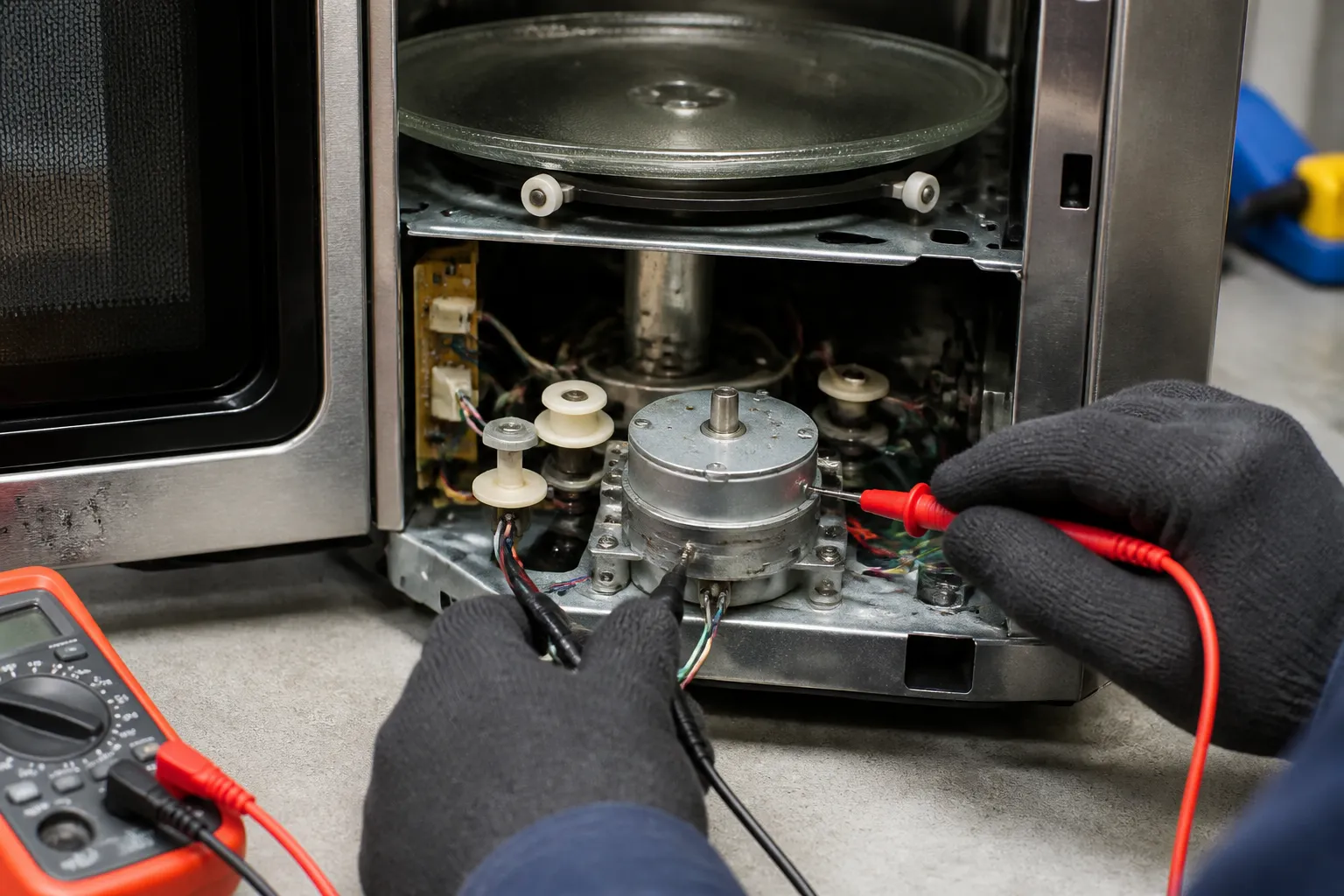
Turntable Motor Not Spinning Repair – Panasonic NN-SN686S Microwave
The turntable motor in your Panasonic NN-SN686S countertop microwave is crucial for rotating the glass tray during cooking cycles, ensuring even heating. If this motor fails, you’ll notice that food cooks unevenly or develops hot spots. This issue usually stems from a faulty motor assembly, a worn drive coupling, damaged motor drive gear, or problems with electrical connections. The repair difficulty level is MODERATE, requiring you to disassemble the microwave cabinet and navigate high-voltage components. While replacing the motor is straightforward, the safety precautions and accessing the cabinet make this a task for those comfortable with appliance repair.
Symptoms
- Glass turntable remains stationary during cooking cycles while magnetron operates normally
- Grinding or clicking noises coming from beneath the cooking chamber during operation
- Turntable attempts to rotate but stops after a few seconds or moves intermittently
- Motor hums or buzzes but the turntable coupling does not engage
- Food heating unevenly with cold spots on one side, indicating lack of rotation
- Visible damage to the white plastic drive coupling or metal drive shaft beneath the turntable
⚠️ Safety Warning
CRITICAL SAFETY NOTICE: Microwave ovens contain high-voltage capacitors that can retain lethal electrical charges (up to 4000 volts) even when unplugged. The Panasonic NN-SN686S must be properly discharged before any internal work. Always unplug the unit for at least 10 minutes before beginning work, and use an insulated screwdriver to discharge the high-voltage capacitor by shorting the terminals. Never work on the magnetron, high-voltage transformer, or capacitor unless you are qualified. Wear safety glasses and insulated gloves. Ensure the microwave door safety interlocks are not bypassed during testing.
Parts Needed
- Panasonic Turntable Motor Assembly – Part #F630D8K00XP (1.5 RPM synchronous motor)
- Turntable Drive Coupling – Part #F630D4K00CP (white plastic coupler, if damaged)
- Motor Drive Gear – Part #F630D4K10XP (metal gear assembly, if worn)
- Wire connector terminals – 0.25″ female spade connectors if existing connectors are corroded
- High-temperature silicone lubricant (microwave-safe, for gear assembly maintenance)
Tools Required
- Phillips head screwdriver (magnetic tip recommended for small screws)
- Flat blade screwdriver with insulated handle (for capacitor discharge)
- Digital multimeter with continuity testing capability
- Needle-nose pliers for connector removal
- Flashlight or work light for interior visibility
- Insulated work gloves and safety glasses
- Socket wrench set (8mm and 10mm sockets may be needed for motor bracket)
Step-by-Step Instructions
Step 1: Safety Preparation and Power Disconnection
🔨 Pro Tip from Dave
On the NN-SN686S specifically, I’ve seen the motor test fine with a multimeter but still fail to spin under load — never settle for the ohm reading alone, because a motor with a weakening winding will read correct resistance but stall the moment you add the tray weight. Don’t power the motor by hand to prove it — button the oven back up, drop in the roller ring, the glass tray, and a cup of water, and run a 30-second cook cycle so the microwave energizes the motor itself. If the tray stalls or stutters under that load, the motor is the issue, even if it ohmed out fine. Skipping this loaded check is why many people end up doing the same repair twice.
Unplug the Panasonic NN-SN686S from the electrical outlet and wait a minimum of 10 minutes for capacitor discharge. Remove any items from inside the cooking chamber and take out the glass turntable and center support ring. Locate the high-voltage capacitor (the cylindrical component near the magnetron) and carefully discharge it by touching both terminals simultaneously with an insulated screwdriver blade. You may hear a small pop — this is normal.
Step 2: Remove Outer Cabinet
Remove the eight Phillips screws from the outer cabinet: four screws along the back panel edge, two screws on each side panel near the rear corners, and two screws underneath the unit. On the Panasonic NN-SN686S, the side screws are located 2 inches from the rear edge and 1 inch from the bottom. Carefully lift the outer metal cabinet straight up and off the internal chassis, exposing the internal components.
Step 3: Locate the Turntable Motor Assembly
The turntable motor is mounted on the bottom of the cooking chamber, directly beneath the center of the cavity floor. It appears as a small cylindrical motor (approximately 2 inches in diameter) with two wire leads and a vertical drive shaft extending upward through the chamber floor. The motor is secured by a metal bracket with two screws positioned at the 3 o’clock and 9 o’clock positions relative to the motor housing.
Step 4: Test Motor Electrical Connections
Before removing components, test the motor’s electrical continuity. The motor leads are typically white and black wires connected via push-on terminals. Using your multimeter set to ohms, test across the motor terminals — you should read approximately 3000-3500 ohms resistance. If the reading shows infinite resistance (open circuit) or zero ohms (short circuit), the motor has failed and requires replacement.
Step 5: Disconnect Motor Wiring
Carefully disconnect the two wire terminals from the turntable motor using needle-nose pliers. The Panasonic NN-SN686S uses standard 0.25-inch push-on terminals that slide off the motor tabs. Note the wire colors and positions for proper reconnection: typically the white wire connects to the left terminal and black to the right when viewing from the rear of the unit.
Step 6: Remove Motor Mounting Bracket
Remove the two Phillips screws securing the motor mounting bracket to the bottom chamber floor. These screws are 8mm in length and may have thread-locking compound applied. The bracket is an L-shaped metal piece that clamps around the motor housing. Some units may have a third screw securing the drive gear housing — remove this as well if present.
Step 7: Extract Motor and Drive Assembly
Carefully lower the motor assembly down and out of the mounting bracket. The drive shaft will separate from the drive coupling inside the chamber. Inspect the white plastic drive coupling for wear, cracks, or stripped gear teeth. Also, examine the metal drive gear for worn teeth or damage. The drive shaft should extend 0.75 inches above the chamber floor when properly installed.
Step 8: Install New Motor Assembly
Position the new turntable motor assembly into the mounting bracket, ensuring the drive shaft aligns vertically with the opening in the chamber floor. The motor housing has a flat side that must face toward the front of the Panasonic NN-SN686S for proper alignment. Secure it with the mounting bracket screws, tightening to snug but not over-tight to avoid cracking the motor housing.
Step 9: Reconnect Electrical Connections
Reconnect the wire terminals to the motor, ensuring proper polarity — white wire to left terminal, black to right when viewed from the rear. Push terminals fully onto the motor tabs until they click into place. Gently tug each wire to verify a secure connection. Check that no wires are pinched between the motor bracket and chamber floor.
Step 10: Test Motor Operation Before Reassembly
Before reinstalling the cabinet, perform a brief test. Replace the turntable support ring and glass tray. Plug in the microwave and run a 30-second test cycle. The turntable should begin rotating smoothly within 2-3 seconds. Listen for any unusual noises and verify the rotation speed is consistent (approximately one full rotation every 40 seconds).
Step 11: Reassemble Cabinet
If motor operation is satisfactory, unplug the unit and carefully lower the outer cabinet back over the chassis. Align the cabinet with the base and internal mounting points. Replace all eight screws in reverse order of removal, ensuring the cabinet fits flush with no gaps. Do not over-tighten screws as this can warp the cabinet.
Step 12: Final Operational Test
Plug in the Panasonic NN-SN686S and perform a complete operational test. Run multiple cook cycles of varying durations to verify consistent turntable operation. Check that the turntable stops when the door is opened and resumes when closed. Test both high and low power settings to ensure motor operation is consistent across all power levels.
Troubleshooting
- If the turntable still doesn’t rotate, verify the drive coupling is properly seated in the motor drive shaft and not cracked or stripped
- Check that the glass turntable is properly seated in the center support ring and not binding against the chamber walls
- Intermittent operation may indicate loose wire connections — re-check all terminal connections for proper seating
- If the motor runs but the turntable moves slowly or hesitates, the drive gear assembly may need lubrication with microwave-safe silicone lubricant
- Grinding noises after repair suggest the drive gear teeth are damaged and require replacement of the complete gear assembly
- If the microwave doesn’t operate at all after repair, check door safety switches and verify proper cabinet reassembly
When to Call a Professional
- If you’re uncomfortable working around high-voltage components or lack experience with microwave safety procedures
- When the magnetron, transformer, or other high-voltage components require service in addition to the turntable motor
- If the microwave has other operational issues such as no heating, display problems, or door latch failures
- When multiple attempts at motor replacement don’t resolve the issue, indicating possible control board or wiring harness problems
When to Call a Professional
Most of the repairs in this guide are within reach for a careful DIYer with basic tools. From my experience, if you’ve replaced the turntable motor and coupling and the tray still won’t rotate, the fault has likely moved upstream to the control board or the triac driving the motor circuit. At that point, you’re dealing with live board-level diagnostics that carry real shock risk — that’s when it’s time to call a certified technician. When in doubt, a diagnostic service call typically costs $80–$120 and can save you from a misdiagnosis that could cost even more in parts.
Recommended Parts & Tools
Microwave Turntable Motor Replacement Compatible with Panasonic
This universal turntable motor is designed to replace the rotating motor assembly in Panasonic countertop microwaves, including the NN-SN686S model. The motor comes with mounting hardware and is engineered to match the original specifications for proper turntable rotation.
Amartisan 10-Piece Magnetic Screwdrivers Set
This precision screwdriver set includes the Phillips head and Torx bits needed to safely disassemble the Panasonic NN-SN686S microwave housing to access the turntable motor assembly. The magnetic tips help prevent losing screws during the repair process.
The Motor Replacement That Fixes a Non-Spinning Turntable on the NN-SN686S
If you’ve ruled out a cracked drive coupling and confirmed the motor isn’t getting power, this is the part that actually solves the problem — I’ve swapped it into these Panasonic models for friends and had the tray spinning again within minutes. It’s the most direct fix once diagnosis confirms the motor itself has failed.
What works
- Drop-in compatible with the NN-SN686S — no adapter needed, mounts exactly where the original sits.
- Comes with the necessary connector clips already attached, so you’re not hunting for proprietary fittings in a parts bin.
- Reliable enough that it rarely needs revisiting — when the motor’s genuinely dead, this part ends the problem.
What doesn’t
- Shipping delays are common — if you order this without having physically confirmed the motor is dead first, you might get frustrated waiting while a coupling replacement would’ve taken 15 minutes.
- Installation requires pulling the entire control panel and motor mount assembly — it’s not a five-minute job, and if you’re not comfortable with microwave disassembly, this becomes a bigger undertaking than expected.
The hardest part of this repair is getting your diagnosis right before you order — I’ve seen people buy the motor first, only to discover the coupling was cracked and the motor was fine the whole time, which meant sending it back and wasting a week. Always test continuity on the motor terminals and visually inspect that coupling before you click buy. Once you’re certain the motor is the culprit, Microwave Turntable Motor Replacement Compatible with Panasonic is the straightforward fix.
About This Article

Written by Dave Holt. Dave Holt has been taking apart and fixing household appliances since he was a teenager who couldn't leave a broken one alone. Eighteen years later, after fixing things for neighbors, friends, and anyone who'd let him, he's seen almost every failure mode there is. When he writes a repair guide here, it's based on the actual job, not a manufacturer overview. More about this site.
Scope and limits. Dave is a self-taught repairer, not a certified appliance technician. Unplug before you open anything, and leave sealed refrigeration systems, gas connections, and hardwired circuits to a qualified technician.

