When your Samsung DVE50R5400V dryer stops heating, it can quickly turn laundry day from a routine task into a real hassle. This electric dryer model, which sometimes gets misspelled as “sameung” in searches, is part of Samsung’s dependable 7.4 cubic foot line. However, like any appliance, it can develop heating issues over time. In this guide, I’ll help you diagnose and address the most common heating problems with your DVE50R5400V.
⚠️ Safety Warning
Before you dive into any repair work on your Samsung DVE50R5400V dryer, it’s crucial to follow these important safety precautions:
- Turn OFF the circuit breaker(s) feeding the dryer — electric dryers require TWO 120V breakers or one 240V breaker
- Unplug the dryer from the wall outlet
- Allow the dryer to cool completely if it has been running
- Wear safety glasses when working with small parts
- Have a multimeter capable of testing continuity and resistance
- Never bypass safety components like thermal fuses or thermostats
Quick Preliminary Checks
Circuit Breaker Inspection
The Samsung DVE50R5400V requires a 240V power supply, which means it needs two 120V circuit breakers working together or one double-pole 240V breaker. If only one breaker trips, the dryer will run but won’t heat. Check your electrical panel and ensure both breakers are in the “ON” position. If one has tripped, reset it and test the dryer. If it trips again immediately, you may have an electrical fault that needs a professional’s attention.
Lint Trap and Vent System
A clogged lint filter or blocked exhaust vent can cause the DVE50R5400V to overheat, triggering the safety mechanism to shut down the heating element. Remove the lint filter and clean it thoroughly with warm water and a soft brush. Check the exhaust vent outside your home—you should feel strong airflow when the dryer is running. If the airflow is weak or nonexistent, the vent system requires cleaning.
Door Latch and Seals
Inspect the door latch mechanism to ensure it clicks securely when closed. A faulty door latch can prevent the heating element from activating. Also, check the door seals for any tears or damage that could affect the dryer’s internal sensors.
Testing the Heating Element (Part DC47-00019A)
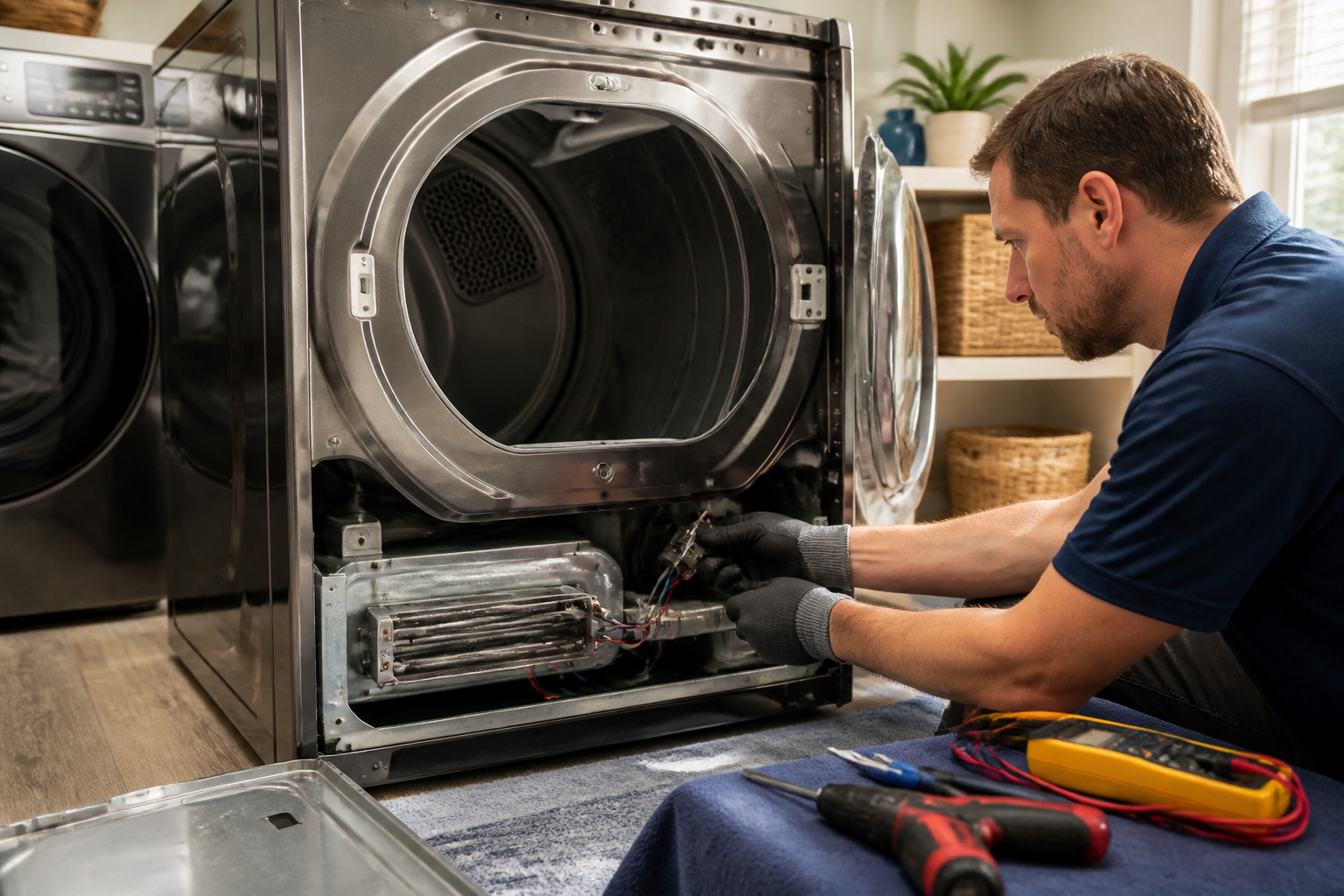
The heating element in your Samsung DVE50R5400V is located behind the rear drum panel and is often the leading cause of no-heat conditions. This part, DC47-00019A, is a coiled heating element rated at 5300 watts.
Accessing the Heating Element
- Disconnect power and pull the dryer away from the wall
- Remove the rear access panel by unscrewing the screws around the perimeter
- Locate the cylindrical heating element housing on the lower right side
- The heating element will have two wire terminals connected to it
Multimeter Testing Procedure
Set your multimeter to the resistance (Ω) setting. Disconnect both wire terminals from the heating element. Touch one multimeter probe to each terminal on the heating element. A good heating element should show resistance between 10-50 ohms. If the reading shows infinite resistance (OL or no continuity), the element is burned out and needs replacement.
Next, check for ground faults by touching one probe to a terminal and the other to the metal housing. This should show infinite resistance. If it shows any continuity, the element is grounded and must be replaced.
Checking the Thermal Fuse (Part DC47-00016A)
The thermal fuse on the DVE50R5400V is a one-time safety device located on the blower housing. When it fails, the dryer will run but produce no heat. The part number DC47-00016A is designed to blow when temperatures exceed 185°F.
Locating the Thermal Fuse
The thermal fuse is mounted on the blower housing and is accessible from the front of the dryer. You’ll need to remove the front panel:
- Remove the lint filter and two screws inside the filter housing
- Use a putty knife to release the front panel clips
- Disconnect the door switch wires and remove the front panel
- Look for a small rectangular component with two wires on the blower housing
Testing the Thermal Fuse
Disconnect both wire terminals from the thermal fuse. Set your multimeter to continuity mode. Touch the probes to both terminals — a good fuse will show continuity (near zero resistance). No continuity means the fuse has blown and needs replacement. Always find out why the fuse blew before installing a new one, as restricted airflow is usually the culprit.
Testing the High-Limit Thermostat (Part DC47-00018A)
The high-limit thermostat, part number DC47-00018A, is another safety component that can cause no-heat conditions in your DVE50R5400V. Unlike the thermal fuse, this component resets automatically when temperatures drop.
Located near the heating element housing, this thermostat should show continuity at room temperature. If it shows no continuity when cool, it has failed and needs replacement. Test it the same way as the thermal fuse using your multimeter’s continuity setting.
Cycling Thermostat Test
The cycling thermostat regulates the heating element’s operation during normal cycles. In the Samsung DVE50R5400V, this component is typically mounted on the blower housing near the thermal fuse.
Test for continuity at room temperature — it should show continuity when cool. If testing shows no continuity, replace the cycling thermostat. This component’s part number may vary depending on your specific model’s manufacturing date, so verify the exact part number from your dryer’s service manual or parts diagram.
Electric vs Gas Model Clarification
It’s crucial to understand that the DVE50R5400V is an electric dryer model. Samsung uses a clear naming convention:
- DVE = Electric dryer models
- DVG = Gas dryer models
If you have a gas model (DVG50R5400V), the troubleshooting steps will differ, focusing on gas valve solenoids, igniter assemblies, and flame sensors rather than heating elements. Make sure you’re working on the correct model type before ordering parts.
Control Board Issues
Modern Samsung dryers like the DVE50R5400V rely on electronic control boards to manage heating cycles. If all heating components test good but the dryer still won’t heat, the main control board may have failed.
Symptoms of Control Board Failure
- Dryer runs but never heats
- Erratic heating patterns
- Display shows error codes
- Buttons don’t respond properly
Diagnosing control board issues requires advanced testing and is often best left to professionals. However, you can perform a basic reset by unplugging the dryer for 30 minutes, then reconnecting power and testing operation.
Step-by-Step Heating Element Replacement for DVE50R5400V
If your testing revealed a faulty heating element (DC47-00019A), here’s how to replace it:
- Ensure power is disconnected and the dryer is cool
- Remove the rear access panel by unscrewing all perimeter screws
- Disconnect the two wire terminals from the heating element
- Remove the heating element housing by unscrewing the mounting screws (typically 3-4 screws)
- Carefully extract the old heating element from the housing
- Insert the new heating element into the housing, ensuring proper alignment
- Reinstall the housing and tighten mounting screws securely
- Reconnect the wire terminals, ensuring tight connections
- Replace the rear access panel
- Restore power and test the dryer operation
Important Installation Notes
When installing the new heating element in your DVE50R5400V, ensure the coiled element doesn’t touch the sides of the housing. The element expands when heated, and contact with the housing will lead to premature failure. Also, verify that all wire connections are tight — loose connections create resistance and heat that can damage components.
Additional Diagnostic Tips
Voltage Testing
If you’re comfortable working with electrical measurements, test the voltage at the heating element terminals while the dryer is running a heated cycle. You should measure approximately 240V AC across the terminals when the element should be heating. If voltage is present but the element doesn’t heat, the element is faulty. If no voltage is present, trace back through the thermostats and thermal fuse.
Moisture Sensor Issues
The DVE50R5400V uses moisture sensors to determine when clothes are dry. If these sensors are dirty or malfunctioning, the dryer might shut off the heat prematurely. Clean the sensor bars inside the drum with rubbing alcohol and a soft cloth.
When to Call a Professional
While many heating issues in the Samsung DVE50R5400V can be resolved with DIY repairs, there are situations where professional service is necessary. In my 15 years of experience, once you’ve confirmed that the thermal fuse and heating element are intact but the dryer still won’t heat, chances are you’re dealing with a failed control board or a wiring harness fault. At that point, the risk of misdiagnosis or shock exposure makes it wise to call in a certified technician.
- Repeated thermal fuse failures despite clean vents
- Electrical panel or wiring issues
- Control board replacement
- Gas line issues (if you mistakenly have a gas model)
- Structural problems with the dryer drum or housing
Frequently Asked Questions
Why does my Samsung DVE50R5400V run but not heat?
The most common causes are a blown thermal fuse, a failed heating element, or a tripped circuit breaker. Start by ensuring that both circuit breakers are on, then test the thermal fuse for continuity. If the fuse is good, check the heating element’s resistance.
How do I know if my heating element is bad in my DVE50R5400V?
Use a multimeter to test resistance across the heating element terminals. A good element will show 10-50 ohms resistance. Infinite resistance indicates that the element is burned out. Also, test from each terminal to the housing — any continuity points to a grounded element that must be replaced.
Where is the thermal fuse located on the DVE50R5400V?
The thermal fuse is mounted on the blower housing and can be accessed by removing the front panel of the dryer. Look for a small rectangular component with two wires, typically white or black in color.
Can I bypass the thermal fuse temporarily?
Never bypass the thermal fuse on your Samsung DVE50R5400V. This safety component is designed to prevent fires by shutting down the heating element if temperatures get too high. Operating without it could result in a serious fire hazard.
How much does it cost to replace a DVE50R5400V heating element?
The heating element (part DC47-00019A) typically costs between $50-80. If you’re comfortable doing the repair yourself, this is the only cost. Professional installation might add another $100-200 in labor charges.
Why does my thermal fuse keep blowing?
Repeated thermal fuse failures generally indicate restricted airflow, usually caused by a clogged vent system or blocked lint filter. Be sure to clean the entire exhaust vent system from the dryer to the outside termination before replacing another fuse.
How long should a Samsung DVE50R5400V heating element last?
With normal use and proper maintenance, a heating element should last 8-12 years. Factors such as hard water, lint buildup, and overloading can shorten its lifespan.
What’s the difference between DVE50R5400V and DVG50R5400V?
The DVE50R5400V is the electric version, while the DVG50R5400V is the gas version. They may look nearly identical but operate on completely different heating systems. Ensure you’re troubleshooting the correct model type before ordering parts.
Recommended Parts & Tools
Azdele Heating Element for Samsung Dryer
This is the most common replacement part needed when your Samsung DVE50R5400V dryer stops heating. The heating element burns out over time and often causes no-heat issues.
Klein Tools 32557 Multi-Bit Screwdriver
You’ll need Phillips and flathead screwdriver bits to remove the dryer panels and access internal components during this repair. This versatile tool includes all the common bits needed for appliance disassembly.
AmazonBasics Digital Multimeter
A multimeter is essential for testing the heating element continuity and diagnosing electrical issues in your Samsung dryer. This tool helps confirm whether the heating element needs replacement before ordering new parts.
The Heating Element That Actually Solves Most Samsung DVE50R5400V No-Heat Calls
If you’ve ruled out the thermal fuse and your multimeter shows the heating circuit is getting power, the DC47-00019A heating element is almost always the culprit on this model. this is the part to order second — after the fuse — because when it fails, the dryer will still tumble and the drum light works, but you get no heat at all.
What works
- Direct OEM match for the DVE50R5400V — no guessing about compatibility across Samsung’s dryer lineup
- Comes with the mounting brackets and terminal connectors already attached, so you’re not hunting for hardware or sizing wires
- Installs in roughly 20 minutes once you’ve got the blower wheel assembly out — the actual swap is straightforward and doesn’t require a second set of hands
What doesn’t
- If your no-heat issue is actually a blown thermal fuse or a faulty high-limit thermostat, this part won’t fix it — diagnosis has to come first
- The shipping time can stretch to 2–3 weeks on some sellers, so if you need your dryer back in a hurry, check the “shipped by Amazon” option at checkout
The mistake I see most often is homeowners ordering the heating element immediately after seeing the dryer tumble but produce no heat — they skip the multimeter check and the thermal fuse inspection, then get frustrated when the new element doesn’t solve it. Don’t be that person; test first, then grab the Azdele Heating Element for Samsung Dryer.
About This Article

Written by Dave Holt. Dave Holt has been taking apart and fixing household appliances since he was a teenager who couldn't leave a broken one alone. Eighteen years later, after fixing things for neighbors, friends, and anyone who'd let him, he's seen almost every failure mode there is. When he writes a repair guide here, it's based on the actual job, not a manufacturer overview. More about this site.
Scope and limits. Dave is a self-taught repairer, not a certified appliance technician. Unplug before you open anything, and leave sealed refrigeration systems, gas connections, and hardwired circuits to a qualified technician.