IE error — inlet water issue
In this step-by-step repair guide, I’ll show you how to fix the IE error — inlet water issue on your LG WT7300CW (Top Load). With the right tools and a bit of know-how, most homeowners can complete this repair in 1–2 hours and save themselves from a pricey service call.
🔨 Pro Tip from Dave
On the LG WT7300CW, the dual inlet water valve assembly (part number ACU72949803) has two solenoid ports — one for hot, one for cold — and many DIYers only replace one side when both screens are clogged. Before buying a new valve, I recommend pulling both screens and soaking them in white vinegar for 20 minutes; hard water buildup is often the true culprit, not a faulty valve.
Part of our Top 20 Washing Machine Models & Common Repair Issues Guide. Browse all washing machine repair guides for related models and issues.
Common Symptoms & Causes
When your LG WT7300CW is showing an IE error, you might notice one or more of the following signs before or during a wash cycle.
- The washer display shows the “IE” error code shortly after starting a cycle
- The drum remains empty and doesn’t fill with water within the first few minutes
- Water fills extremely slowly, triggering a timeout before the cycle begins
- The washer pauses mid-cycle and displays IE after detecting insufficient water pressure
This error is typically caused by a kinked or frozen inlet hose, clogged inlet valve screens, low household water pressure, or a worn-out water inlet valve.
Safety First
- Unplug the washing machine from the power outlet before starting any repair — never work on a live appliance.
- Shut off the water supply valve before disconnecting any water lines or hoses.
- Wear work gloves when handling metal brackets, sheet metal edges, or sharp components.
- Take photos with your phone before disconnecting any wiring harnesses or connectors.
- Work in a well-lit area with enough floor space to lay removed panels flat.
Tools & Parts Needed
Essential Tools
- Phillips #2 screwdriver
- ¼” nut driver
- Torx T20 screwdriver
- Multimeter
- Bucket and towels
Replacement Parts
- Water inlet valve
- Inlet hose screen filters
- Inline pressure gauge
- Phillips screwdriver
Step-by-Step Repair Instructions
Step 1
First, confirm that both supply valves at the wall are fully open and check the hoses for kinks. A partially closed valve or pinched hose can restrict flow enough to trigger an IE error, even if everything else is functioning correctly. A kinked hose is one of the most common culprits, so inspect the full length of each hose thoroughly before moving forward.
Step 2
Shut off the water supply, then disconnect the hoses at the washer inlet ports, keeping a bucket handy to catch any residual water. Using needle-nose pliers, pull out the mesh inlet screens and inspect them; sediment and debris can clog these screens over time, choking flow to the valve. Rinse them thoroughly under running water and reinstall them before reconnecting the hoses. Pro tip: if the screens are torn or deformed, replace them instead of reinstalling damaged mesh that can pass debris into the valve.
Step 3
Next, test your household water pressure. The LG WT7300CW requires between 14.5 and 116 PSI to fill properly. If your pressure is outside this range, it can cause an IE error even if the washer is functioning as it should. Homes on well systems are particularly susceptible to low-pressure issues, especially after heavy water use; a standard pressure gauge threaded onto a hose bib will give you an accurate reading quickly.
Step 4
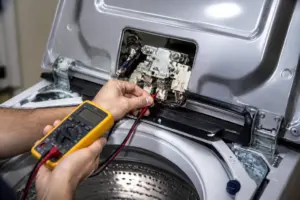
Before testing the water inlet valve, unplug the washer. Working on live appliances can lead to serious injuries. Remove the rear panel by unscrewing four quarter-inch hex screws, locate the inlet valve solenoid coils, and test each one with a multimeter set to Rx1. A healthy coil should read between 120 and 500 ohms; if you get a reading of infinity (open circuit), that means the coil has failed, and you’ll need to replace the entire valve assembly.
Step 5
If the inlet valve tests fine, but the drum still won’t fill, the water level pressure switch may be to blame. This component senses the tub water level through a small hose running from the tub to the control board. If it fails, it can incorrectly signal that the tub is already full. Listen for an audible click from the switch as water enters the tub; no click indicates the switch isn’t responding to pressure changes and should be replaced. Handle the pressure switch hose carefully, as a cracked or disconnected hose can mimic a failed switch.
Step 6
Reconnect all hoses firmly by hand, then give them a quarter-turn with pliers to prevent leaks. Restore power and run a Quick Wash cycle to confirm the repair. The drum should begin filling within 30 seconds of the cycle starting. If the IE error reappears immediately, the issue is likely electrical rather than mechanical, and you should inspect the main control board or wiring harness next.
Where to Buy Replacement Parts
- LG WT7300CW water inlet valve AGM73029603
- LG top load washer inlet hose screens cleaning
- LG washer inlet valve solenoid multimeter test
When to Call a Professional
If you’ve followed all the steps above and the issue persists, the problem might involve a failed main control board, a worn drive motor or bearing assembly, or wiring needing specialized diagnostic equipment. At that point, it’s best to contact a licensed appliance technician, and remember to shut off both the hot and cold supply valves before any work that opens the fill circuit.
How Much Does This Repair Cost?
| Repair route | Typical cost |
|---|---|
| Do it yourself | $10–$80 (parts) |
| Professional repair | $150–$300 (parts and labor) |
Taking on DIY repairs for an IE error on the LG WT7300CW usually costs between $10–$80, depending on whether you need a new inlet valve, hose, or screen filter. A professional service call for the same issue typically runs $150–$300, including labor. Tackling this repair yourself can save you $100 or more with just some basic tools and a little effort.
Frequently Asked Questions
What causes the IE error on my LG WT7300CW?
The IE error usually means that the washer isn’t getting enough water, often due to a kinked supply hose, a closed water valve, or a clogged inlet screen filter. Make sure to check these simple issues before replacing any parts.
How do I clean the inlet valve screen on the LG WT7300CW?
Turn off the water supply, disconnect the hoses, and use needle-nose pliers to remove the mesh screens from the inlet valve. Rinse them under running water to remove any sediment buildup.
Can I still run my washer if the IE error keeps returning?
No — continuing to run the machine with an active IE error can lead to pump and motor damage. Make sure to resolve the water supply issue before starting another wash cycle.
Recommended Products
These are the parts and tools I recommend for this repair, based on compatibility and customer reviews:
- AJU75152602 Washer Inlet Valve Assembly compatible with LG WT7100CW, WT7150CW, WT7300CV, WT7300CW, WT7400CW, WT7800CW, WT7900HBA, WT7305CV, WT7400CV, WT7800CV WT7155CW, WT7405CV, WT7405CW etc Series
- AJU75152602 Washer Inlet Valve Assembly Compatible with LG
- Upgraded AJU75152602 Washer Water Inlet Valve Assembly Fit for LG Washing Machine WT7100CW, WT7150CW, WT7300CV, WT7300CW, WT7400CV, WT7405CW WT7800CV, Replaces 5221EA1008S PD00060681
- AJU73213301 AJU75152601 5221EA1008F Washer Water Inlet
The Inlet Valve Assembly That Stops the IE Error on WT7300CW
If you’ve cleaned the screens and checked the hoses, and the IE error still persists, the inlet valve itself has likely failed internally. This is the exact OEM-compatible assembly to go with on this model. It fits perfectly with no adapter nonsense, and it typically costs half of what a service call would run you.
What works
- Exact fit for the WT7300CW without any bracket modifications or workarounds—just bolt it straight in, and you’re done.
- The solenoid coils on this valve are strong and responsive; you won’t deal with sluggish water fills or partial fills that leave you guessing.
- Compatible across the entire WT73/74/75/78 series, so if you’ve got another LG machine in your lineup, you’re covered.
What doesn’t
- You’ll need to drain the machine fully and access the valve from underneath—not a five-minute swap if you’re not comfortable tilting or lifting the tub.
- If your IE error is actually caused by a kinked hose or debris in the line, replacing the valve won’t help, and you’ll have wasted money; always rule out the easy fixes first.
I’ve seen someone replace the inlet valve, thinking that was the fix, only to find out later that a pinched supply line behind the washer was the real issue—a $140 part sat unused while a $5 hose repositioning could have solved it. So, before you order, run a water pressure test or at least inspect both hoses and screens thoroughly. If you’ve confirmed the valve is the problem, grab the AJU75152602 Washer Inlet Valve Assembly, and you can clear that IE error in under an hour.
About This Article

Written by Dave Holt. Dave Holt has been taking apart and fixing household appliances since he was a teenager who couldn't leave a broken one alone. Eighteen years later, after fixing things for neighbors, friends, and anyone who'd let him, he's seen almost every failure mode there is. When he writes a repair guide here, it's based on the actual job, not a manufacturer overview. More about this site.
Scope and limits. Dave is a self-taught repairer, not a certified appliance technician. Unplug before you open anything, and leave sealed refrigeration systems, gas connections, and hardwired circuits to a qualified technician.