
Ice Bin Sensor Failure
In this repair guide, I’ll take you through fixing ice bin sensor failure on your GE Profile Opal 1.0 ice maker. This issue is pretty common, and with the right tools and my step-by-step instructions, you can tackle this repair yourself, saving on service costs.
🔨 Pro Tip from Dave
On the Opal 1.0, the ice bin sensor (part WR55X26671) is often housed in a bracket that can crack, leading to misalignment and false full-bin readings. It’s a common oversight to replace the sensor without checking that bracket — if it’s cracked, the new sensor will fail just as quickly. Always test the sensor with a multimeter before ordering parts, as a dirty or iced-over sensor lens might be the real issue.
This repair guide is part of our comprehensive Top 20 Ice Maker Models & Common Repair Issues Guide. Check the full guide for insights on other ice maker models and common repair issues.
Understanding the Problem
Full indicator doesn’t work; sensor dirty
Before diving into any repair, it’s crucial to understand the root of the problem. Typically, this issue arises from normal wear and tear, component failures, or environmental factors like mineral buildup or temperature fluctuations. Identifying the primary cause helps determine whether this repair will solve your issue or if further troubleshooting is required.
Safety First
Before tackling any ice maker repair, remember these safety precautions:
- Unplug the appliance – Always disconnect power before working on electrical components.
- Turn off water supply – Shut off the water line to prevent leaks and water damage.
- Wear protective gear – Wear gloves and safety glasses when handling sharp components or tools.
- Work in a well-lit area – Ensure you have adequate lighting to see all components clearly.
- Allow components to warm up – If working on freezer components, let them reach room temperature to avoid injury from cold surfaces.
- Have a helper available – Some repairs may require two people, especially when handling heavy components.
Tools and Parts Needed
Before starting this repair, gather these tools and parts:
Essential Tools
- Phillips and flathead screwdrivers – For removing screws and accessing components.
- Nut driver set – For removing hex nuts and bolts.
- Pliers – Both regular and needle-nose for gripping and manipulating small parts.
- Multimeter – For testing electrical components and continuity.
- Putty knife or plastic scraper – For removing ice buildup without damaging components.
- Flashlight or work light – For illuminating dark freezer compartments.
- Container for water – To catch any water that drains during the repair.
Replacement Parts
This repair doesn’t require replacement parts. Most issues can be resolved through adjustments, cleaning, or reset procedures.
Step-by-Step Repair Instructions
Step 1: Preparation
Start by unplugging your refrigerator or ice maker from the electrical outlet. If you’re working on a built-in refrigerator ice maker, find the water shut-off valve and turn it off. For standalone units, empty the water reservoir and let the unit sit for about 15-30 minutes to reach room temperature, making ice removal easier and avoiding cold surface injuries.
Step 2: Access the Ice Maker
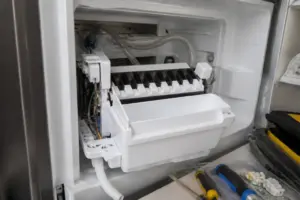
For refrigerator ice makers, open the freezer door and find the ice maker assembly, usually mounted on the left or right side wall of the freezer compartment. Remove any ice buildup around the unit. For standalone ice makers, take out the ice basket and clear any ice blocking access to internal components.
Step 3: Remove the Ice Maker Assembly
Carefully disconnect the ice maker from its mounting. This often involves removing screws or clips that secure the unit to the freezer wall. Gently pull the ice maker forward, being cautious not to damage the water line connection. If there’s a wiring harness, make a note of how it’s connected before disconnecting it. I recommend taking photos to assist with reassembly.
Step 4: Diagnose the Issue
With the ice maker removed, inspect it for visible signs of damage, wear, or malfunction. Look for cracked plastic components, damaged wiring, or indications of water damage. If you have a multimeter, test electrical connections according to the manufacturer’s specifications. This will confirm that you’re addressing the correct problem.
Step 5: Perform the Repair
For this repair, you’ll be performing adjustments, cleaning, or reset procedures instead of replacing parts. Follow the specific procedures for your model, which may involve adjusting mechanical components, cleaning mineral buildup, or resetting electronic controls.
Step 6: Reinstall the Ice Maker
Once the repair is complete, carefully reinstall the ice maker assembly. Reconnect all wiring harnesses and water lines, ensuring secure connections. Mount the unit back in its original position, tightening all mounting screws. Make sure the ice maker sits level and that nothing obstructs proper operation.
Step 7: Restore Power and Water
Turn the water supply back on and check for leaks around connections. Plug the appliance back into the electrical outlet. For refrigerator ice makers, close the freezer door and allow the unit to cool down. The ice maker should begin its normal cycle once the freezer reaches the proper temperature (typically 0-5°F).
Step 8: Test the Repair
Allow 24 hours for the ice maker to complete a full cycle and produce ice. Keep an eye on the unit during this time to ensure it’s functioning correctly. Check that ice is being produced at the expected rate and that no unusual noises or error indicators appear. If the problem persists, further troubleshooting may be necessary or you might need to consult a professional.
Troubleshooting Tips
If your ice maker still isn’t working after this repair, try these troubleshooting steps:
- Check water supply – Ensure the water line isn’t kinked or blocked, and that the water pressure is adequate.
- Verify temperature – The freezer temperature should be between 0-5°F for optimal ice production.
- Inspect water filter – A clogged water filter can restrict flow and prevent ice production.
- Check for ice buildup – Excessive ice accumulation can hinder the ice maker’s operation.
- Review error codes – If your model has a display, check for any error codes indicating further issues.
- Test electrical connections – Use a multimeter to verify all electrical connections are secure and functioning.
When to Call a Professional
While many ice maker repairs can be DIY projects, there are times when it’s best to call in a professional:
- If you’re not comfortable working with electrical components.
- When specialized tools or knowledge are required.
- If the issue continues after all troubleshooting steps.
- When dealing with complex electronic control boards.
- If you discover additional problems during the repair.
- When the cost of parts nears the cost of a new unit (for standalone ice makers).
Prevention and Maintenance
To prevent this issue from happening again, follow these maintenance tips:
- Regular cleaning – Clean your ice maker according to manufacturer recommendations, typically every 3-6 months.
- Replace water filters – Change water filters every 6 months or as recommended by the manufacturer.
- Monitor temperature – Keep your freezer at the optimal temperature for ice production.
- Check for leaks – Regularly inspect water connections for any signs of leaks or wear.
- Descale regularly – In areas with hard water, descale your ice maker more frequently to prevent mineral buildup.
- Use quality water – Using filtered or purified water can help extend the life of your ice maker.
Related Repair Guides
If this repair didn’t resolve your issue, or if you’re facing other problems with your GE Profile Opal 1.0 ice maker, check out our Top 20 Ice Maker Models & Common Repair Issues Guide for more insights on common problems and solutions.
How Much Does This Repair Cost?
| Repair route | Typical cost |
|---|---|
| Do it yourself | $15–$35 (ice bin sensor) |
| Professional repair | $120–$200 (service call) |
DIY repair typically runs $15–$35 for a replacement ice bin sensor, and if you need the bracket, that adds another $10–$20. In contrast, a professional service call for the same repair usually ranges from $120–$200, so choosing the DIY route can save you over $100.
Recommended Products
Here are the parts and tools I recommend for this repair, based on compatibility and customer reviews:
- Upgraded Ice Fullness Sensor, Ice bin Sensor Magnetic Switch for Business Cube ice Maker Commercial ice Machine Compatible with Vevor Cotline ice machines
- GE Profile Opal Carbon Replacement Water Filter for Opal Nugget Ice Maker | Cleans and Filters Water for Fresh Ice | Replace Every 3 Months for Best Results | Easy Install | Pack of 1
The Multimeter Test That Saves You from Ordering the Wrong Sensor
Before you spend money on a new ice bin sensor, it’s essential to determine if the sensor itself is actually malfunctioning or if it’s just a loose connection with corroded terminals. A multimeter is the quickest way to rule out a $15 connection issue before you commit to a $80–$120 part replacement.
What works
- Continuity mode lets you check if the sensor switch is responding to the magnetic float—you’ll hear a beep when the bin fills and the magnet triggers the switch, confirming whether the sensor is functional or truly failed.
- Voltage mode helps you trace whether power is reaching the sensor connection in the first place, catching corroded or disconnected wiring before you waste time on sensor replacement.
- Saves diagnostic time: I’ve pulled sensors that looked fine, only to find that the real problem was a corroded connector—the multimeter would have caught that in 2 minutes instead of 20.
What doesn’t
- Entry-level multimeters can be finicky with continuity beeping on cheaper models—you’ll want one with a clear audible tone or you might second-guess the reading.
- Won’t tell you if a sensor is failing intermittently; it only shows whether the switch responds at that exact moment, so a sensor that works now but dies under temperature stress will slip past this test.
I once returned to a job because a homeowner replaced a perfectly good sensor based on a visual inspection, and the actual problem was corroded terminals in the bin connector—a wasted $80 part swap that didn’t fix anything. Grab a multimeter first and test before you order.
About This Article

Written by Dave Holt. I have been taking apart and fixing household appliances since I was a teenager who couldn't leave a broken one alone. Eighteen years later, after fixing things for neighbors, friends, and anyone who'd let me, I have seen almost every failure mode there is — and misdiagnosed my share along the way. I am self-taught, with no formal training or certifications. When I write a repair guide here, it is based on the actual job, not a manufacturer overview. More about this site.
Scope and limits. Dave is a self-taught repairer, not a certified appliance technician. Unplug before you open anything, and leave sealed refrigeration systems, gas connections, and hardwired circuits to a qualified technician.