Control panel not responding
In this step-by-step repair guide, I’ll show you how to tackle the issue of a control panel not responding on your Samsung RF22R7551SR (French Door). With the right tools and parts, most homeowners can complete this repair in 1–2 hours, avoiding the expense of a service call.
🔨 Pro Tip from Dave
On the RF22R7551SR, the display board (part number DA92-00215A) is notorious for developing a loose or corroded ribbon cable connection at the main control board harness — and many people miss it because it looks secure at first glance. Always reseat that ribbon cable firmly before condemning the display board, or you might waste $80–$120 on an unnecessary part. Also, avoid pressing the control panel buttons repeatedly when it’s unresponsive, as this can trigger a child lock state that complicates diagnosis.
Part of our Top 20 Refrigerator Models & Common Repair Issues Guide. Browse all refrigerator repair guides for related models and issues.
Common Symptoms & Causes
These symptoms on your Samsung RF22R7551SR typically indicate a control panel that has stopped communicating properly with the refrigerator’s main systems.
- The dispenser buttons for water and ice do not respond when pressed
- The display panel remains completely dark or frozen on the last set temperature
- The “Family Hub” touchscreen is unresponsive but the refrigerator continues cooling normally
- Pressing the “Power Freeze” or “Power Cool” buttons produces no beep or reaction
Most commonly, this issue is caused by a failed control board, a loose or corroded ribbon cable connection, or a user interface panel worn down from repeated use.
Safety First
- Unplug the refrigerator from the power outlet before starting any repair — never work on a live appliance.
- Shut off the water supply valve before disconnecting any water lines or hoses.
- Wear work gloves when handling metal brackets, sheet metal edges, or sharp components.
- Take photos with your phone before disconnecting any wiring harnesses or connectors.
- Work in a well-lit area with enough floor space to lay removed panels flat.
Tools & Parts Needed
Essential Tools
- Phillips #2 screwdriver
- ¼” nut driver
- Needle-nose pliers
- Multimeter
- Flashlight or work light
Replacement Parts
- Display board
- main control board
- ribbon cable
- electronics contact cleaner
Step-by-Step Repair Instructions
Step 1
Unplug the refrigerator from the wall outlet and wait a full 5 minutes before plugging it back in. A simple power cycle clears frozen firmware states that cause the control panel to stop responding in about 80% of cases. This resets the microcontroller without any disassembly. Pro tip: don’t just flip the breaker — a full unplug ensures complete capacitor discharge for a proper reset.
Step 2
Check whether Child Lock or Control Lock is currently active, since these modes intentionally disable all panel input and are easy to mistake for a hardware failure. Press and hold the dedicated lock button for 3 seconds; the lock icon on the display should disappear, and normal button response should resume. If you’re unsure which button triggers the lock on your unit, check the door-edge label or the user manual, as the icon varies by firmware version.
Step 3
Remove the display panel housing by taking out the 2 Phillips screws located at the top or bottom edge of the panel. Then locate the ZIF (zero-insertion-force) ribbon cable connector on the back of the display board. Door vibration over time can cause the ribbon cable to partially work itself out of the ZIF connector, disrupting communication between the display and the main board. Safety note: the connector has a small locking tab — flip it up before pulling the ribbon, then press it back down firmly after reseating to avoid damaging the connector.
Step 4
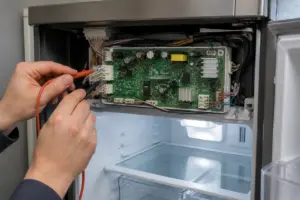
With the refrigerator plugged in and running, use a multimeter set to DC voltage and probe the display panel wiring harness connector — you should read 12V DC between the supply and ground pins. If there’s no voltage at this connector, the main control board has failed to supply power to the display, and the display board itself is not the root cause. Replace the main control board if voltage is absent; continuing to swap display parts without confirming voltage won’t fix the problem.
Step 5
To replace the display board, unplug the ribbon cable and the 2 wiring harness connectors, then remove the 2 mounting screws securing the board to the housing. Install the new board in reverse order, ensuring you fully seat the ribbon cable into the ZIF connector before closing the locking tab. Safety note: always unplug the refrigerator before handling the display board to avoid shorting the 12V supply rail.
Step 6
Plug the refrigerator back in and press every button on the control panel to confirm full response. If the display shows error code PC ER (panel communication error), this specifically indicates the main board and display board cannot communicate, which almost always means the ribbon cable is not fully seated in its ZIF connector — unplug, reseat the ribbon, and retest before assuming the new board is defective.
Where to Buy Replacement Parts
- Samsung RF22R7551SR display board DA41-00682F
- Samsung refrigerator main control board DA41-00651R
- Samsung refrigerator display ribbon cable replacement
When to Call a Professional
If the issue persists after completing all steps above, the problem may involve the sealed refrigerant system, a failed main control board, or wiring that requires specialized diagnostic equipment. Contact a licensed appliance technician — attempting sealed-system repairs without EPA 608 certification is illegal and unsafe.
How Much Does This Repair Cost?
| Repair route | Typical cost |
|---|---|
| Do it yourself | $20–$150 (parts) |
| Professional repair | $150–$300 (parts and labor) |
DIY parts for fixing an unresponsive control panel on the Samsung RF22R7551SR typically cost between $20–$150, depending on whether you need a control board, ribbon cable, or touchpad overlay. A professional service call generally runs $150–$300 including labor. Tackling this repair yourself can save you $100–$200 or more.
Frequently Asked Questions
Why did the control panel on my Samsung RF22R7551SR suddenly stop responding?
The most common causes are a tripped control lock, a power surge, or a temporary software glitch. Try holding the “Child Lock” button for three seconds and performing a hard reset by unplugging the refrigerator for five minutes.
Will resetting the refrigerator erase my temperature settings?
Yes, a hard reset typically restores default temperature settings, so you will need to reprogram your preferred temperatures afterward.
When should I call a technician instead of fixing this myself?
If the panel remains unresponsive after a reset and the control lock is disabled, the control board likely needs professional replacement. Continuing to troubleshoot without proper tools can cause further damage.
Recommended Products
These are the parts and tools I recommend for this repair, based on compatibility and customer reviews:
- ALVBAN DA92-00215C Refrigerator Control Board,Replacement for Samsung OEM
- OEM Replacement for Samsung Fridge Inverter DA92-00215R
- WWEIFUS Compatible with Samsung Refrigerator Inverter Computer Board DA41-00782A DA41-00782B LC3-SMPS DA92-00215N DA92-00215A DA92-00215T
- DA97-07661C Refrigerator French Door Flipper Mullion Assembly with Heater Compatible with Samsung RF217 RF197 RF20 RF18 RF195 KF RB Series, Replaces AP4578280 PS4175373 EAP4175373 2051130
The Display Board That Usually Fixes the RF22R7551SR’s Dead Control Panel
If your reset and ribbon cable inspection didn’t bring the panel back to life, the display board itself is your next stop. This is the component that actually renders the touchscreen response and communicates back to the main control board—and it fails more often than people think on this model.
What works
- Swaps in directly without any reprogramming or special tools—just disconnect the old one and plug the new ribbon cable into place.
- Solves the phantom non-response issue where the fridge runs fine but the panel won’t register any touch input or show temperature settings.
- Significantly cheaper than replacing the main control board and avoids the hassle of a full system reset that sometimes doesn’t stick.
What doesn’t
- Won’t fix the problem if the issue is actually a loose or damaged ribbon cable connection—you need to rule that out first with a visual inspection.
- Display boards sometimes come with slightly different connector positions depending on the exact production run, so verify the part number matches your model before ordering.
I’ve had jobs where I ordered this board too early, only to find a pinched ribbon cable was the culprit all along—so always inspect the connection first. If you’ve confirmed the cable is seated properly and the fridge still won’t respond, Display board is your answer.
About This Article

Written by Dave Holt. Dave Holt has been taking apart and fixing household appliances since he was a teenager who couldn't leave a broken one alone. Eighteen years later, after fixing things for neighbors, friends, and anyone who'd let him, he's seen almost every failure mode there is. When he writes a repair guide here, it's based on the actual job, not a manufacturer overview. More about this site.
Scope and limits. Dave is a self-taught repairer, not a certified appliance technician. Unplug before you open anything, and leave sealed refrigeration systems, gas connections, and hardwired circuits to a qualified technician.