7-beep error — water not entering
In this step-by-step guide, I’ll show you how to fix the 7-beep error — water not entering on your Whirlpool WDF520PADM. With the right tools and parts, you can complete this repair in about 1–2 hours, saving yourself a costly service call.
🔨 Pro Tip from Dave
On the WDF520PADM, the water inlet valve (part number W10327249) frequently fails at the solenoid coil rather than the screen. So, don’t just clean the filter and think you’re done — test the solenoid with a multimeter for continuity. I often see the float switch assembly overlooked; if the float is stuck due to debris buildup, the control board thinks the tub is full and never opens the valve.
Part of our Top 20 Dishwasher Models & Common Repair Issues Guide. Browse all dishwasher repair guides for related models and issues.
Common Symptoms & Causes
If you’re facing the 7-beep error on your Whirlpool WDF520PADM dishwasher, these symptoms indicate a water supply or inlet issue:
- The control panel beeps 7 times, and the wash cycle fails to start.
- The dishwasher tub remains completely dry after a cycle begins.
- You hear a humming sound, but no water fills the bottom of the tub.
- The clean light flashes repeatedly alongside the 7-beep sequence.
This error is often caused by a faulty water inlet valve, a kinked or closed supply line, or a failed float switch signaling an incorrect overfill condition.
Safety First
- Unplug the dishwasher from the power outlet before starting any repair — never work on a live appliance.
- Shut off the water supply valve before disconnecting any water lines or hoses.
- Wear work gloves when handling metal brackets, sheet metal edges, or sharp components.
- Take photos with your phone before disconnecting any wiring harnesses or connectors.
- Work in a well-lit area with enough floor space to lay removed panels flat.
Tools & Parts Needed
Essential Tools
- Phillips #2 screwdriver
- Torx T20 screwdriver
- Needle-nose pliers
- Multimeter
- Flashlight
Replacement Parts
- Water inlet valve
- Float switch
- Door latch
- Multimeter
Step-by-Step Repair Instructions
Step 1
Before touching any components, disconnect power to the dishwasher — working on a live appliance is risky. Ensure that the water supply valve under the sink is fully open; a partially closed valve can starve the machine of pressure, triggering a no-fill fault. While you’re there, run your hand along the supply line to check for kinks that could restrict flow.
Step 2
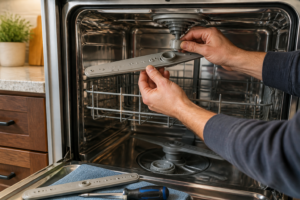
The anti-flood float sits on the front-left floor of the tub and cuts off filling if it detects a flood risk. However, debris like broken glass or food buildup can hold it elevated, leading the dishwasher to think there’s already water present. Lift the plastic float dome and inspect underneath for any material keeping it raised. Clear any debris so that the float can drop back to its resting position, signaling the control board that it’s safe to fill.
Step 3
With the float still accessible, test the float switch using a multimeter set to Rx1. A healthy switch should read closed — near-zero resistance — when the float is down; if it shows an open reading, the switch has failed and is permanently signaling a flood condition, blocking the fill cycle. Replace the float switch if you get an open reading with the float down.
Step 4
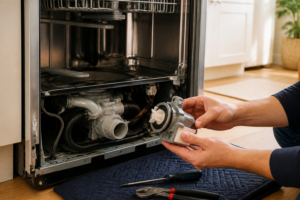
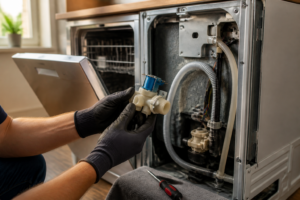
The water inlet valve acts as the gate allowing water into the tub, and a failed solenoid coil is a common cause of no-fill faults. Remove the kick plate, locate the valve on the left side, disconnect the wiring harness, and test each solenoid coil with a multimeter on Rx1 — a good coil should measure between 200 and 500 ohms. If either coil reads open or is wildly out of that range, replace the valve assembly.
Step 5
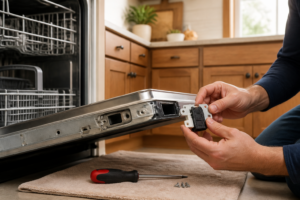
The 7-beep error specifically indicates the control board hasn’t received confirmation that the door is securely latched. So, even if the door feels closed, a faulty latch switch can prevent the cycle from starting and the tub from filling. Disconnect the door latch switch connector and test it on Rx1 with the latch engaged — it should read closed with near-zero resistance. If you get an open reading with the latch fully engaged, replace the switch before moving on.
Step 6
Reconnect the door latch wiring, reinstall the kick plate, and restore power to the dishwasher. Start a normal wash cycle and listen at the door — you should hear water entering the tub within 30 seconds of the cycle starting. If filling begins normally and the 7-beep alert doesn’t reappear, the fault has been resolved. If beeping continues, double-check your connections or consider pulling error codes with a service mode sequence for further diagnosis.
Where to Buy Replacement Parts
- Whirlpool WDF520PADM water inlet valve WPW10327249 replacement
- Whirlpool dishwasher float switch WD12X10216
- Whirlpool dishwasher door latch WPW10482502
When to Call a Professional
If the issue persists after completing all the steps above, the problem may involve a failed main control board, a seized circulation or drain pump, or wiring that requires specialized diagnostic equipment. In that case, contact a licensed appliance technician — and remember to shut off the water supply valve before any work that opens the fill or drain circuit.
How Much Does This Repair Cost?
| Repair route | Typical cost |
|---|---|
| Do it yourself | $15–$60 (parts) |
| Professional repair | $150–$300 (parts and labor) |
DIY parts for fixing a 7-beep water inlet error on the Whirlpool WDF520PADM — like a replacement water inlet valve — typically cost $15–$60. A professional service call for the same repair usually runs $150–$300, including labor. Tackling this repair yourself can save you $100 or more.
Frequently Asked Questions
Is it safe to run my Whirlpool WDF520PADM while it’s showing the 7-beep error?
No, you should not run the dishwasher until the issue is resolved, as operating it without proper water flow can damage the pump and heating element.
How do I know if the water inlet valve is the cause of the 7-beep error?
Check if water is reaching the dishwasher by confirming the supply valve under the sink is fully open. If water flow is confirmed but the error persists, the inlet valve likely needs replacement.
Can a clogged filter trigger the 7-beep error on the WDF520PADM?
A dirty filter won’t directly cause a water entry error, but cleaning it regularly helps prevent related drainage issues that can mimic similar symptoms.
The Water Inlet Valve That Stops the 7-Beep Error on Your WDF520PADM
If you’ve ruled out a kinked supply line and the dishwasher still won’t fill, the water inlet valve is your next move—it’s the most common culprit on this model, and a straightforward replacement that takes about 20 minutes once you access it.
What works
- Direct OEM part match (WPW10327249) means no adapter frustration or fitment guessing—it clips in exactly where the old one was.
- Once replaced, the 7-beep error clears immediately on the next cycle; you’ll see water flowing normally within seconds of the fill phase starting.
- The part itself is simple enough that you don’t need special tools beyond a screwdriver and maybe a pair of pliers to disconnect the inlet hose.
What doesn’t
- You have to access the valve from underneath the dishwasher, which means tilting or partially pulling out the unit—tight spaces if your kitchen cabinet layout is snug.
- If the problem is actually a blocked inlet screen (mineral buildup rather than a failed valve), replacing the whole unit is overkill; sometimes cleaning the screen first saves you the cost.
I’ve seen homeowners order a float switch first thinking the sensor is bad, only to find out later the valve itself was stuck closed—so always check that the water supply line isn’t kinked and listen for a clicking sound from the valve during the fill cycle before you order. If there’s no click and water doesn’t trickle in, this is your part. Grab the water inlet valve and you’ll have your dishwasher running again.
About This Article

Written by Dave Holt. Dave Holt has been taking apart and fixing household appliances since he was a teenager who couldn't leave a broken one alone. Eighteen years later, after fixing things for neighbors, friends, and anyone who'd let him, he's seen almost every failure mode there is. When he writes a repair guide here, it's based on the actual job, not a manufacturer overview. More about this site.
Scope and limits. Dave is a self-taught repairer, not a certified appliance technician. Unplug before you open anything, and leave sealed refrigeration systems, gas connections, and hardwired circuits to a qualified technician.