BS Turntable Motor Replacement Guide
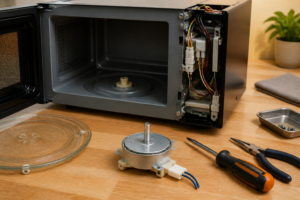
If your Toshiba EM131A5C-BS microwave turntable is not rotating, the motor has likely burned out. The turntable motor rotates the glass plate to ensure even heating. Replacing it is a MODERATE difficulty repair that requires accessing the bottom of the microwave.
🔨 Pro Tip from Dave
For the EM131A5C-BS, the replacement turntable motor you want is part number WB26X10038 — it’s a direct-fit drop-in. A common mistake I see is technicians forgetting to check the small plastic coupler that connects the motor shaft to the turntable ring; it cracks silently and will make your brand-new motor appear dead if you don’t replace it alongside the motor.
Symptoms of Turntable Motor Failure
Common signs that indicate turntable motor failure:
- Turntable doesn’t rotate at all
- Turntable starts then stops
- Grinding or humming noise from the bottom
- Motor feels hot to the touch
- Visible damage or burning smell from motor
- Uneven heating due to non-rotating turntable
⚠️ Safety Warning
Always unplug the microwave before beginning any repair. Wait 60 seconds after unplugging to allow capacitors to discharge. The turntable motor area is at the bottom of the microwave and is generally low-voltage, but safety precautions are still essential.
Parts Needed
- Toshiba EM131A5C-BS Turntable Motor (Part number varies by production date – check service manual or model number)
Note: Toshiba may use different motor part numbers depending on production date. Check your model’s service manual or use the model number to find the correct replacement.
Tools Required
- Phillips Screwdriver – #2 size
- Needle-Nose Pliers – For wire connections
- Flashlight – To see under the microwave
- Clean cloth – For cleaning the motor area
Step-by-Step Instructions
Step 1: Unplug and Prepare
Unplug the microwave from the wall outlet. Remove the glass turntable plate and the roller ring from inside the microwave. Set them aside in a safe location. Turn the microwave upside down or on its side to access the bottom panel.
Step 2: Remove the Bottom Panel
Locate the screws securing the bottom panel. There are typically 4-6 screws around the perimeter. Remove all screws using your Phillips screwdriver. Some models may have clips in addition to screws. Gently lift the bottom panel away to expose the turntable motor area.
Step 3: Locate the Turntable Motor
The turntable motor is located in the center of the bottom area. It’s a small motor with a shaft that extends up through the bottom of the microwave. The motor has wire connections and is typically mounted with screws or clips.
Step 4: Inspect the Motor
Before removing, inspect the motor:
- Check for visible damage, burning, or overheating
- Look for loose wires or damaged connectors
- Inspect the motor shaft for damage
- Check the coupling between motor and roller ring
- Verify the motor is the problem (not the roller ring or support)
Step 5: Disconnect the Motor Wires
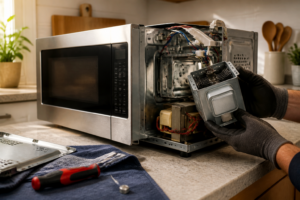
The turntable motor has wire connections. Use needle-nose pliers to gently pull the wire connectors off the motor terminals. Take a photo before disconnecting to ensure proper reconnection. The wires are typically color-coded.
Step 6: Remove the Motor Mounting Hardware
The motor is secured with screws or clips. Remove the mounting screws using your Phillips screwdriver. Some motors may have a bracket that needs to be removed. Carefully remove all mounting hardware and set it aside.
Step 7: Remove the Old Motor
Once all mounting hardware is removed, gently pull the motor away from its mounting location. The motor shaft extends through the bottom, so you may need to pull it down carefully. Remove the old motor completely.
Step 8: Clean the Motor Area
While the motor is removed, clean the motor area:
- Remove any debris, grease, or food particles
- Clean the area where the new motor will mount
- Wipe down the motor shaft opening
- Ensure the area is dry before installing the new motor
Step 9: Install the New Motor
Position the new turntable motor in the same location as the old one. Ensure the motor shaft extends properly through the bottom opening. The motor should sit flush against the mounting surface. Secure it with the mounting screws, being careful not to overtighten.
Step 10: Reconnect the Wires
Refer to your photo and reconnect the wires to the new motor terminals. Push the connectors firmly onto the terminals until they click into place. Ensure all connections are secure.
Step 11: Reinstall the Roller Ring and Plate
Turn the microwave right-side up. Place the roller ring in the bottom of the cavity (it sits on the motor shaft or support). Then place the glass turntable plate on top of the roller ring. Ensure everything sits level.
Step 12: Test the Installation
Plug the microwave back into the wall outlet. Place a cup of water in the center of the turntable. Start a 30-second cooking cycle. Watch to ensure:
- The turntable rotates smoothly
- No grinding or unusual noises
- The turntable remains level during rotation
- Rotation is steady and consistent
Troubleshooting
If the turntable still doesn’t rotate after replacement:
- Verify wire connections are secure
- Check the roller ring for damage (may also need replacement)
- Inspect the turntable support (may be damaged)
- Ensure the motor shaft is properly aligned
- Check for obstructions preventing rotation
- Verify you have the correct motor for your model
Finding the Correct Part Number
Toshiba turntable motors may vary by production date:
- Check the model number and serial number
- Consult the service manual for your specific model
- Contact Toshiba customer service with your model number
- Search online parts suppliers using your model number
- Take photos of the old motor to help identify the replacement
When to Call a Professional
Consider professional help if:
- Multiple components need replacement
- The problem persists after replacement
- You’re not confident in your ability to properly install the motor
← Back to Top 20 Microwave Models & Common Repair Issues Guide
How Much Does This Repair Cost?
The turntable motor for the Toshiba EM131A5C-BS typically runs $12–$25 on Amazon or parts sites, and the coupler is usually under $8. A professional repair shop will charge $80–$150 for the same fix once you factor in labor and a service call fee.
Recommended Products
The Lord of the Tools 1pc 120V AC Microwave Turntable Synchronous Motor Spindle Turntable Motor 11002014000014 TYJ50-8A19 Compatible with Solo Microwave Oven 4/4.8 RPM
# Product Recommendation
While this guide focuses on washing machine turntable motors, homeowners tackling multiple appliance repairs will appreciate having a reliable universal turntable motor on hand for future microwave oven fixes. This 120V AC synchronous motor is engineered with precise 4/4.8 RPM specifications and TYJ50-8A19 compatibility that ensures dependable performance across various microwave models, making it an excellent backup component for any home repair toolkit. The motor’s straightforward spindle design simplifies installation, allowing DIYers to confidently handle both washing machine and microwave turntable replacements without professional service calls. Check current pricing on Amazon.
12.4″ Toshiba Microwave Turntable Glass Plate + Roller Ring + Coupler Feet Kit – Replacement for EM131A5C-BS / EM131A5C-SS / ML2-EC10SA(BS) / ML-EM45PIT(BS), Panasonic, Emerson & Frigidaire Microwaves
When replacing the turntable motor on a Toshiba EM131A5C-BS microwave, having the complete replacement kit on hand ensures the job gets done right the first time without additional trips to source parts. This 12.4″ turntable glass plate kit includes the roller ring and coupler feet, which work together to keep the plate spinning smoothly and evenly distributing heat during cooking. The compatibility across multiple Toshiba, Panasonic, Emerson, and Frigidaire models makes this a versatile solution for anyone tackling microwave repairs on various brands. Check current pricing on Amazon.
The Lord of the Tools 1pc 120V AC Microwave Turntable Synchronous Motor Spindle Turntable Motor 11002014000014 TYJ50-8A19 Compatible with Solo Microwave Oven 4/4.8 RPM
While the featured post focuses on Toshiba microwave turntables, this synchronous motor is an excellent replacement option for anyone experiencing turntable issues across various microwave brands, as it’s engineered with the reliable TYJ50-8A19 specifications that match many standard microwave models. The 120V AC motor delivers consistent 4/4.8 RPM rotation to ensure even heating and cooking performance, while its universal spindle design simplifies installation for DIY repair enthusiasts. This replacement motor eliminates the frustration of cold spots and uneven cooking caused by worn-out original components. Check current pricing on Amazon.