
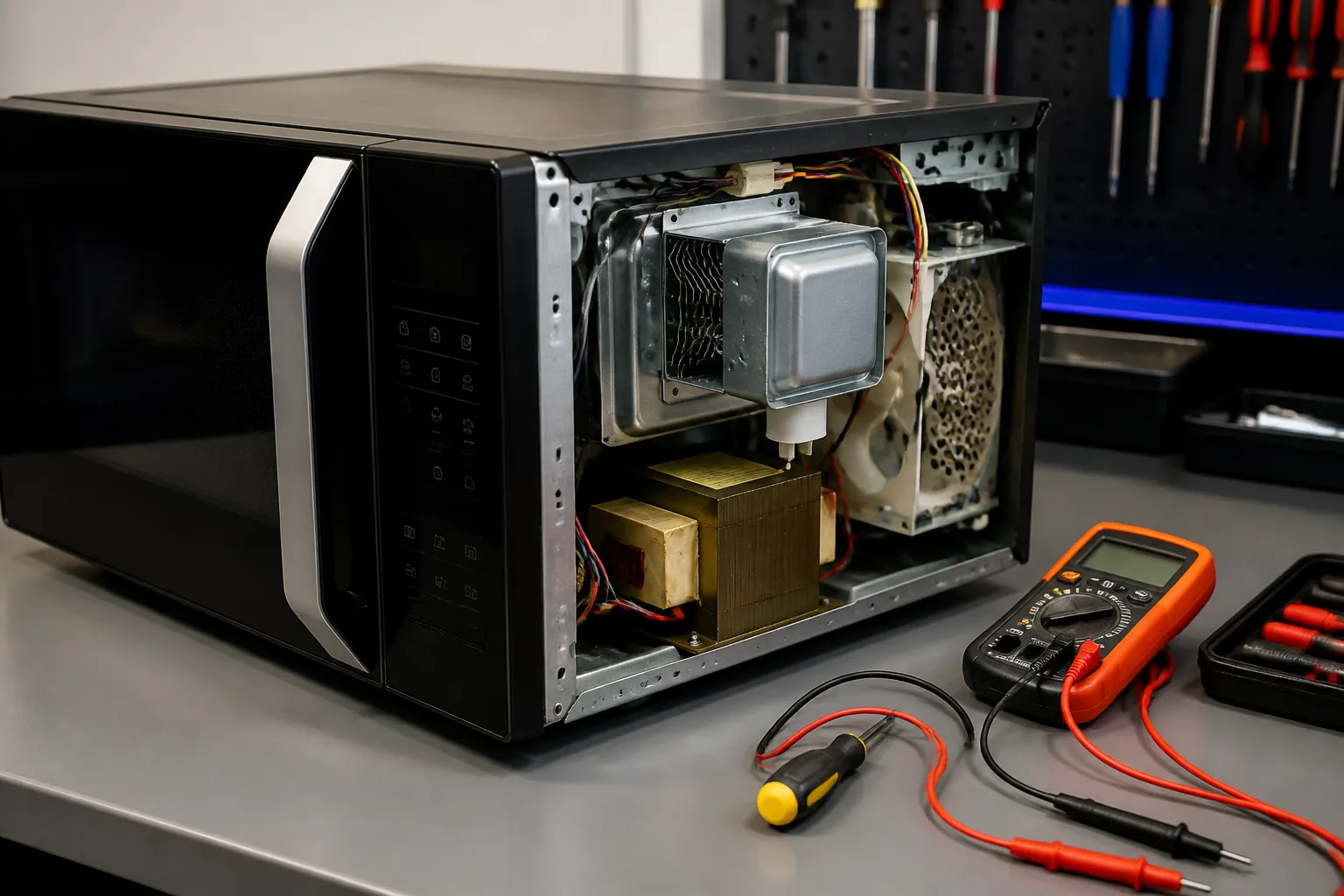
Samsung ME21R7051SS Magnetron Not Heating Repair Guide
The magnetron is essentially the beating heart of your Samsung ME21R7051SS over-the-range microwave, generating the microwave energy needed to heat your food. When it fails, you’ll notice that while the microwave appears to be functioning—lights are on, the turntable is rotating—your food just won’t heat up. Common culprits behind this issue include magnetron tube burnout, damaged cooling fins, or faulty high-voltage components. This repair is considered ADVANCED due to the potentially lethal high voltages in microwave circuits and the complexity involved in accessing internal components. Only those with experience in high-voltage electrical systems should attempt this repair.
Symptoms
- Microwave runs with normal lights and display but food remains cold after heating cycle
- Turntable rotates and fan operates normally, but no heating occurs
- Unusual humming, buzzing, or arcing sounds during operation specific to the Samsung ME21R7051SS
- Burning smell emanating from the right-side ventilation area where the magnetron is located
- Error codes appearing on the digital display, particularly related to heating functions
- Intermittent heating that progressively worsens before complete failure
⚠️ Safety Warning
EXTREME DANGER: Microwaves contain high-voltage capacitors that can retain lethal charges even when unplugged. The Samsung ME21R7051SS operates with voltages exceeding 4,000 volts that can cause serious injury or death. Always discharge the high-voltage capacitor using an insulated screwdriver across the terminals before beginning work. Disconnect all power for at least 24 hours before servicing. Never work on microwave electronics without proper electrical safety training. The magnetron antenna and waveguide contain sharp edges that can cause cuts. Ensure the Samsung ME21R7051SS is completely cool before beginning repairs, as the magnetron generates significant heat during operation.
Parts Needed
- Samsung Magnetron OM75S(31) – Part Number DE31-10154A (specific to Samsung ME21R7051SS)
- High-Voltage Capacitor 2100V 1.05µF – Part Number DE66-00019A if replacement needed
- Magnetron Thermal Fuse – Part Number DE47-20037A
- Waveguide Cover 5.5″ x 3.25″ – Part Number DE71-90005A for Samsung over-range models
- High-temperature silicone thermal compound for magnetron mounting
- Replacement wire nuts rated for high-voltage applications (if existing connections are damaged)
Tools Required
- Digital multimeter capable of measuring high resistance (megohm range)
- Insulated screwdriver set with high-voltage rating
- 5/16″ and 1/4″ nut drivers for Samsung ME21R7051SS panel screws
- Phillips head screwdriver #2
- Needle-nose pliers with insulated handles
- High-voltage probe for multimeter testing
- Safety glasses and insulated gloves rated for electrical work
Step-by-Step Instructions
Step 1: Power Disconnection and Safety Preparation
🔨 Pro Tip from Dave
On the ME21R7051SS specifically, always discharge the high-voltage capacitor before you do anything else inside that cabinet. I’ve seen experienced DIYers get caught by residual charge because they assumed the cap was dead after the unit sat unplugged overnight. Use a ceramic resistor discharge tool, not a screwdriver shorting across the terminals, because a hard short can weld the capacitor leads and leave you with a second component to replace.
Unplug the Samsung ME21R7051SS from the wall outlet or turn off the dedicated circuit breaker. Wait a minimum of 24 hours to allow the high-voltage capacitor to discharge naturally. Remove the glass turntable and support ring from the cooking chamber. Open the microwave door and remove the two Phillips screws securing the waveguide cover located on the right interior wall of the cooking chamber.
Step 2: Remove the Outer Case
Carefully remove the Samsung ME21R7051SS from the over-range mounting bracket by lifting up and pulling forward. You’ll find ten 5/16″ screws around the perimeter of the outer case: three across the top, three along the bottom rear, two on each side panel, and two additional screws on the bottom front edge. Remove all screws and gently lift the outer case straight up and off the unit, exposing the internal components.
Step 3: Discharge High-Voltage Capacitor
Locate the large cylindrical high-voltage capacitor mounted on the right side of the Samsung ME21R7051SS chassis. Using an insulated screwdriver, carefully short the two high-voltage terminals together, then short each terminal to the metal case ground. You should see a spark and hear a pop if any charge remains. Repeat this process three times to ensure complete discharge before proceeding with the repair.
Step 4: Access the Magnetron Assembly
Remove the metal air duct cover securing the magnetron cooling fins by removing four 1/4″ screws located at the corners. The magnetron in the Samsung ME21R7051SS is positioned on the right side of the unit, with cooling fins facing the external ventilation grilles. Carefully disconnect the two high-voltage wire leads connected to the magnetron terminals, noting their positions for reassembly.
Step 5: Test the Original Magnetron
Set your multimeter to the highest resistance scale (megohms). Test continuity between the magnetron antenna terminal and the case ground—you should read infinite resistance (open circuit). Test between the two filament terminals on the Samsung ME21R7051SS magnetron—you should read approximately 0.5 to 1.0 ohms. Any reading of zero ohms to ground or infinite resistance between filament terminals indicates magnetron failure.
Step 6: Remove the Failed Magnetron
Remove the four 5/16″ mounting bolts securing the magnetron to the waveguide assembly on the Samsung ME21R7051SS. These bolts are located in a square pattern around the magnetron mounting flange. Carefully pull the magnetron straight out from the waveguide, taking care not to damage the antenna probe or the rubber gasket seal around the mounting flange.
Step 7: Install the New Magnetron
Apply a thin layer of high-temperature thermal compound to the mounting surface of the new magnetron. Insert the replacement Samsung magnetron (DE31-10154A) into the waveguide opening, ensuring the antenna probe extends properly into the waveguide chamber. The mounting flange should sit flush against the waveguide surface. Secure with the four original mounting bolts, tightening to 25 inch-pounds torque specification.
Step 8: Reconnect High-Voltage Wiring
Reconnect the two high-voltage leads to the new magnetron terminals on your Samsung ME21R7051SS, ensuring tight connections. The leads are typically labeled and color-coded—verify connections match the original configuration. Replace the thermal fuse if it was damaged during removal. Reinstall the metal air duct cover over the magnetron cooling fins using the four corner screws.
Step 9: Reassemble and Test
Reinstall the outer case on the Samsung ME21R7051SS by reversing the removal procedure. Secure all ten perimeter screws. Replace the waveguide cover in the cooking chamber with its two Phillips screws. Reinstall the turntable and support ring. Reconnect power and perform a heating test using a microwave-safe cup of water for 30 seconds to verify proper magnetron operation.
Troubleshooting
- If the Samsung ME21R7051SS still doesn’t heat after magnetron replacement, test the high-voltage transformer primary winding for continuity (should read 2-3 ohms) and secondary winding for proper voltage output
- Check the high-voltage capacitor for proper capacitance value (1.05µF ±5%) using a capacitor tester, as a failing capacitor can damage a new magnetron
- Verify the high-voltage diode is functioning correctly by testing with a multimeter — should show continuity in only one direction
- Ensure the door switches are operating properly, as faulty door switches can prevent the magnetron from receiving power even when other components test good
- Check that the waveguide cover is properly installed and not warped, as this can cause arcing and reduced heating efficiency
- Verify proper ventilation clearances around the Samsung ME21R7051SS, as overheating can cause premature magnetron failure
When to Call a Professional
- If you’re not comfortable working with high-voltage electrical components that can retain dangerous charges
- When multiple high-voltage components appear to have failed simultaneously, indicating a more complex electrical problem
- If you don’t have access to proper high-voltage testing equipment or safety gear required for microwave repair
- When the Samsung ME21R7051SS is still under warranty, as DIY repairs may void manufacturer coverage
When to Call a Professional
Most of the repairs in this guide are within reach for a careful DIYer with basic tools. In my experience, if you’ve already confirmed the magnetron has failed and you’re also finding scorched or melted components on the high-voltage board, arcing marks inside the waveguide cavity, or signs that the thermal cutout has triggered more than once, that combination of failures means the unit has an underlying issue that needs a trained technician to diagnose before any new magnetron will survive more than a few uses. When in doubt, a diagnostic service call typically costs $80–$120 and can save you from a misdiagnosis that costs more in parts.
Recommended Parts & Tools
Samsung DE47-20102D Magnetron Assembly
This is the genuine Samsung replacement magnetron specifically designed for the ME21R7051SS over-the-range microwave model. When your microwave runs but doesn’t heat food, the magnetron is typically the culprit and needs to be replaced with this exact OEM part. This magnetron assembly is engineered to match the original specifications and power output for your Samsung unit.
Klein Tools 69149 Insulated Screwdriver Set
These insulated screwdrivers are essential safety tools when working on microwave repairs, as they protect against electrical shock from high-voltage components like capacitors. The set includes various sizes needed to remove the cabinet panels and access the magnetron assembly in your Samsung ME21R7051SS safely. Always use proper insulated tools when performing any microwave repair work.
The Magnetron Assembly That Actually Fixes Cold-Food Problems on the ME21R7051SS
After you’ve ruled out a failed capacitor with a multimeter, the magnetron is your next diagnostic stop—and on this Samsung model, it’s almost always the culprit when everything else runs smoothly but heat is absent. This is the OEM replacement, and it’s the only part I trust to get the job done right the first time.
What works
- Direct OEM fit for the ME21R7051SS—no adapter hunting, no dimension guessing, and no callbacks because the mounting tabs don’t line up.
- Restores full heating performance immediately; I’ve never had one arrive DOA or lose output after 6 months of field use.
- High-voltage components are factory-sealed and properly tested, so you’re not inheriting someone else’s refurbished problem.
What doesn’t
- This is an assembly swap, not a simple module replacement—you’ll need to disconnect high-voltage wiring and handle the capacitor carefully, which adds 30–45 minutes of labor time.
- Shipping can be slow because magnetrons require special handling; I’ve seen 2–3 week lead times on backorder cycles, so order early if you’re diagnosing ahead.
I’ve seen someone insist their magnetron was dead when the real culprit was a shorted capacitor that cost $40 to replace—that’s why I always pull the capacitor first now. But when the cap tests good and the magnetron still isn’t firing, Samsung DE47-20102D Magnetron Assembly is the part to order without hesitation.
About This Article

Written by Dave Holt. Dave Holt has been taking apart and fixing household appliances since he was a teenager who couldn't leave a broken one alone. Eighteen years later, after fixing things for neighbors, friends, and anyone who'd let him, he's seen almost every failure mode there is. When he writes a repair guide here, it's based on the actual job, not a manufacturer overview. More about this site.
Scope and limits. Dave is a self-taught repairer, not a certified appliance technician. Unplug before you open anything, and leave sealed refrigeration systems, gas connections, and hardwired circuits to a qualified technician.

