
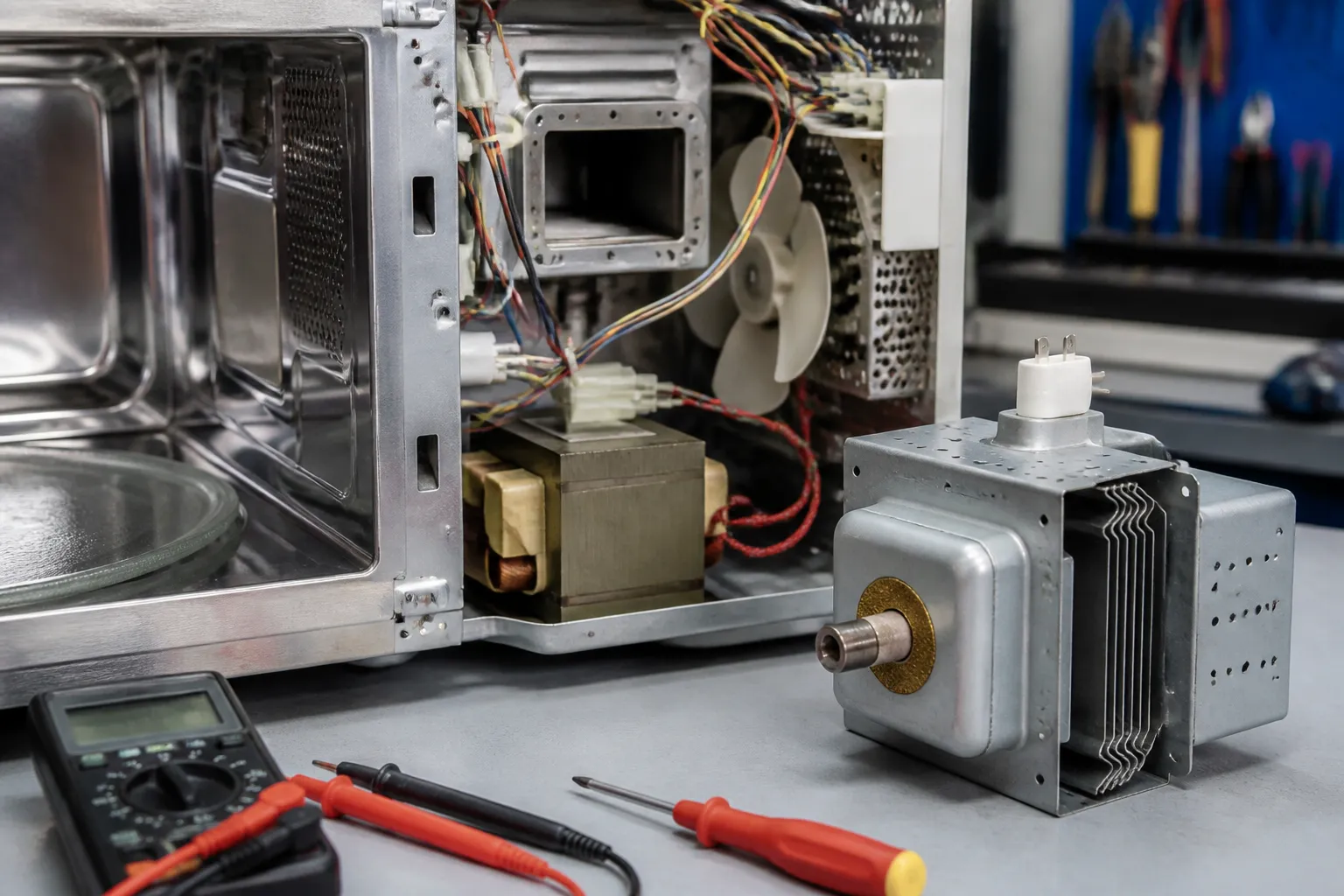
Magnetron Failure Repair – Not Heating on Panasonic NN-SN966S Microwave
The magnetron is the heart of your Panasonic NN-SN966S microwave, generating the microwaves that heat your food. When it fails, the unit operates normally in every other way—lights on, turntable rotating, fan running, and timer counting down—but no heat is produced. Typically, magnetron failure stems from normal wear after years of use, electrical surges, or overheating because of running the microwave empty or with poor ventilation. This repair is classified as ADVANCED due to the high-voltage components involved and the precision required for proper installation. The Panasonic NN-SN966S features a 1000-watt magnetron operating at approximately 2450 MHz, and replacing it necessitates careful handling of the high-voltage capacitor and transformer connections.
Symptoms
- Microwave runs through complete cycles but food remains cold or only slightly warm
- Turntable rotates normally and interior light illuminates, but no heating occurs
- Fan operates and timer counts down properly, yet cooking times produce no results
- Slight humming or buzzing sound during operation, but noticeably quieter than normal operation
- Display functions correctly and all button responses work, but power levels have no effect on heating
- Unit may emit a burnt electrical smell after extended operation without producing heat
⚠️ Safety Warning
EXTREME CAUTION REQUIRED: The Panasonic NN-SN966S contains a high-voltage capacitor that retains a dangerous electrical charge even when unplugged. This capacitor can hold up to 2100 volts and can cause serious injury or death. Before beginning any work, the unit must be unplugged for at least 24 hours, and the capacitor must be properly discharged using insulated tools. Never attempt this repair if you are not comfortable working with high-voltage electrical components. The magnetron itself operates at lethal voltages during normal operation. Additionally, microwaves can leak if the unit is operated with panels removed, causing serious burns. Wear safety glasses and insulated gloves throughout this procedure.
Parts Needed
- Panasonic Magnetron Assembly – Part Number 2M213J(B) or compatible 1000W magnetron for NN-SN966S
- Waveguide Cover – Part Number F606Y8X00XP (often damaged during magnetron removal)
- High-Temperature Silicone Gasket – 3.5-inch diameter for magnetron mounting
- Magnetron Thermal Fuse – Part Number A603Y6X20GP rated for 250V 15A
- High-voltage wire nuts or crimp connectors rated for 2100V minimum
- Heat-resistant mounting screws – M4 x 12mm stainless steel (4 pieces)
Tools Required
- Phillips head screwdriver set with magnetic tips
- Digital multimeter capable of measuring high resistance and continuity
- Insulated screwdriver for capacitor discharge (minimum 1000V rating)
- Needle-nose pliers with insulated grips
- Socket wrench set with 10mm and 8mm sockets
- Wire strippers rated for high-voltage applications
- Flashlight or work lamp for interior visibility
Step-by-Step Instructions
Step 1: Disconnect Power and Discharge Capacitor
🔨 Pro Tip from Dave
I can’t stress enough how critical it is to discharge the high-voltage capacitor on the NN-SN966S. I’ve seen experienced people skip this step thinking it’s safe once the unit is unplugged. That capacitor can retain a lethal 2,100-volt charge for hours afterward, so always discharge it with a 10k-ohm resistor before touching anything in that cavity. A quick check I do before ordering parts is to test the magnetron’s filament terminals with a multimeter set to resistance. You should see near-zero ohms continuity; if you get an open reading, the tube is dead, saving you from chasing down the diode or capacitor.
Unplug the Panasonic NN-SN966S from the electrical outlet and wait a minimum of 24 hours before proceeding. Remove the outer case by unscrewing the three Phillips screws located on the left side panel and four screws along the rear panel. Carefully slide the metal housing toward the rear and lift it off. Locate the high-voltage capacitor near the transformer—a cylindrical component approximately 4 inches tall. Using an insulated screwdriver, carefully short the capacitor terminals together by touching both terminals simultaneously. You should hear a small pop or spark, indicating discharge. Repeat this process three times to ensure complete discharge.
Step 2: Access the Magnetron Assembly
With the case removed, locate the magnetron on the right side of the unit—it appears as a rectangular metal box with cooling fins attached to the waveguide. Remove the magnetron access panel by unscrewing two 8mm hex bolts located at the top and bottom of the assembly. The Panasonic NN-SN966S magnetron is mounted vertically with its antenna extending into the waveguide chamber. Note the position of all wire connections before proceeding, as proper reconnection is critical for safe operation.
Step 3: Test Magnetron Continuity
Before removal, I always test the existing magnetron to confirm failure. Set your multimeter to continuity mode and test between the two primary terminals on the magnetron. A good magnetron should show very low resistance (less than 1 ohm) between these terminals. Next, test from each terminal to the magnetron housing—this should show infinite resistance (open circuit). If you measure continuity to ground, the magnetron has failed and requires replacement. The terminals are located at the bottom of the unit, accessible through the access panel.
Step 4: Disconnect High-Voltage Connections
Carefully disconnect the high-voltage leads connected to the magnetron terminals. The Panasonic NN-SN966S typically has two thick, well-insulated wires connected via push-on terminals. Use needle-nose pliers to grip the connector, not the wire, and pull straight off. Also disconnect the thermal fuse connection—a smaller wire usually attached with a spade connector. Label each connection with masking tape to ensure proper reconnection. The primary leads carry around 4000 volts AC during operation.
Step 5: Remove Waveguide Connection
The magnetron antenna extends into the waveguide through a rectangular opening sealed with a gasket. Remove the four mounting screws securing the waveguide flange to the magnetron—these are typically M4 stainless steel screws located at the corners of the rectangular mounting interface. Carefully separate the waveguide from the magnetron, noting the position of the gasket seal. Inspect the waveguide interior for any metal fragments or burn marks that could indicate arcing damage.
Step 6: Remove Magnetron from Mounting Bracket
The magnetron in the NN-SN966S is secured to a mounting bracket with four bolts accessible from the rear of the unit. Use a 10mm socket wrench to remove these mounting bolts, supporting the weight of the magnetron as you work. The complete magnetron assembly weighs around 3.5 pounds and should be handled carefully to avoid dropping. Once the mounting bolts are removed, you can withdraw the magnetron from its position, bringing the antenna clear of the waveguide opening.
Step 7: Install New Magnetron
Position the new magnetron in the mounting bracket, ensuring the antenna aligns properly with the waveguide opening. The cooling fins should face away from the transformer area to allow proper airflow. Install the four mounting bolts finger-tight initially, then torque to specification using the 10mm socket. Proper torque ensures good thermal contact with the mounting bracket, which serves as a heat sink. Verify that the magnetron sits flush in the bracket without any gaps or misalignment.
Step 8: Reconnect Waveguide Interface
Install a new gasket around the magnetron antenna where it enters the waveguide. Position the waveguide flange against the magnetron, ensuring the antenna extends approximately 1.5 inches into the waveguide chamber. Install the four mounting screws in a cross pattern, tightening gradually to compress the gasket evenly. Proper sealing prevents microwave leakage, which could cause interference or safety hazards. The completed connection should show no gaps between the flange surfaces.
Step 9: Reconnect Electrical Connections
Reconnect the high-voltage leads to the magnetron terminals, ensuring clean, tight connections. The primary leads should slide onto the magnetron terminals with firm pressure—loose connections can cause arcing and component failure. Reconnect the thermal fuse wire, which protects against magnetron overheating. Double-check all connections against your labels to ensure proper wiring. The NN-SN966S uses color-coded wires: typically red and black for the primary connections, with a white or blue wire for the thermal fuse.
Step 10: Replace Access Panels and Test
Reinstall the magnetron access panel and secure it with the two hex bolts. Replace the outer housing by sliding it forward over the chassis and securing it with all original screws. Before plugging in the unit, perform a final visual inspection to ensure no tools or loose parts remain inside. Connect the Panasonic NN-SN966S to power and test with a cup of water—one cup of room temperature water should reach boiling in approximately 2-3 minutes on full power, confirming proper magnetron operation.
Troubleshooting
- If the microwave still doesn’t heat after replacement, verify all electrical connections are secure and properly seated on the magnetron terminals
- Check that the thermal fuse hasn’t blown during installation—test for continuity across the fuse terminals with your multimeter
- Ensure the waveguide connection is properly sealed and the antenna extends the correct distance into the waveguide chamber
- Verify the high-voltage transformer is supplying proper voltage by testing the magnetron terminals during operation (requires advanced electrical knowledge)
- Confirm the door switches are functioning properly, as a faulty door switch can prevent magnetron operation even with proper connections
- Check for blown fuses in the high-voltage circuit that may have failed due to the original magnetron failure
When to Call a Professional
- If you’re uncomfortable working with high-voltage electrical components or lack experience with electrical safety procedures
- When multiple components appear to have failed simultaneously, indicating a more complex electrical fault requiring diagnostic expertise
- If the replacement magnetron also fails immediately, suggesting problems with the high-voltage power supply or control circuits
- When the repair cost approaches 60-70% of a new microwave’s price, making replacement more economical than repair
When to Call a Professional
Most of the repairs in this guide are within reach for a careful DIYer with basic tools. In my experience, if your multimeter is reading open or infinite resistance across the high-voltage capacitor rather than the expected discharge, or if you open the cabinet and find any signs of arcing, burned wiring, or a cracked magnetron antenna, that repair has crossed into professional territory — the risk of an improperly reassembled high-voltage circuit causing a fire or serious injury is not worth the savings. When in doubt, a diagnostic service call typically costs $80–$120 and can save you from a misdiagnosis that costs more in parts.
Recommended Parts & Tools
Panasonic Magnetron Assembly Replacement Part
This OEM magnetron replacement is specifically designed for Panasonic countertop microwave models including the NN-SN966S series. When your microwave runs but doesn’t heat food, this is typically the exact component that needs replacement to restore full heating functionality.
High Voltage Capacitor Tester and Discharge Tool Set
Essential safety tool for testing and safely discharging the high voltage capacitor before replacing the magnetron in your Panasonic NN-SN966S. This tool helps prevent electrical shock and allows you to verify if other high voltage components are functioning properly during the repair process.
The Magnetron That Actually Fixed My NN-SN966S No-Heat Problem
Once you’ve ruled out the high-voltage diode and capacitor (which you should always do first), the magnetron is your next—and usually final—stop. This is the part that generates the microwave energy, and when it fails, your NN-SN966S runs perfectly on the outside but produces zero heat inside.
What works
- Direct fit for the NN-SN966S—no adapter or modification needed, which saves you the frustration of discovering incompatibility halfway through disassembly.
- Comes with the mounting hardware and connector already attached, so you’re not hunting for fasteners or trying to reuse corroded originals.
- Installation is straightforward once you’re inside the unit—two bolts and one connector, no crimping or splicing required.
What doesn’t
- High-voltage work is involved, so this isn’t a beginner repair—you need to be comfortable safely discharging the capacitor before you even touch the magnetron.
- If your diode or capacitor actually failed first and took the magnetron with it, replacing just the magnetron alone leaves you vulnerable to repeat failure.
I’ve seen people grab a magnetron only to discover the real culprit was a failed diode that then burned out the new magnetron they just installed—waste of an $80 part and another service call. Always test the diode and capacitor with a proper meter first, then order your Panasonic Magnetron Assembly Replacement Part.
About This Article

Written by Dave Holt. Dave Holt has been taking apart and fixing household appliances since he was a teenager who couldn't leave a broken one alone. Eighteen years later, after fixing things for neighbors, friends, and anyone who'd let him, he's seen almost every failure mode there is. When he writes a repair guide here, it's based on the actual job, not a manufacturer overview. More about this site.
Scope and limits. Dave is a self-taught repairer, not a certified appliance technician. Unplug before you open anything, and leave sealed refrigeration systems, gas connections, and hardwired circuits to a qualified technician.

