
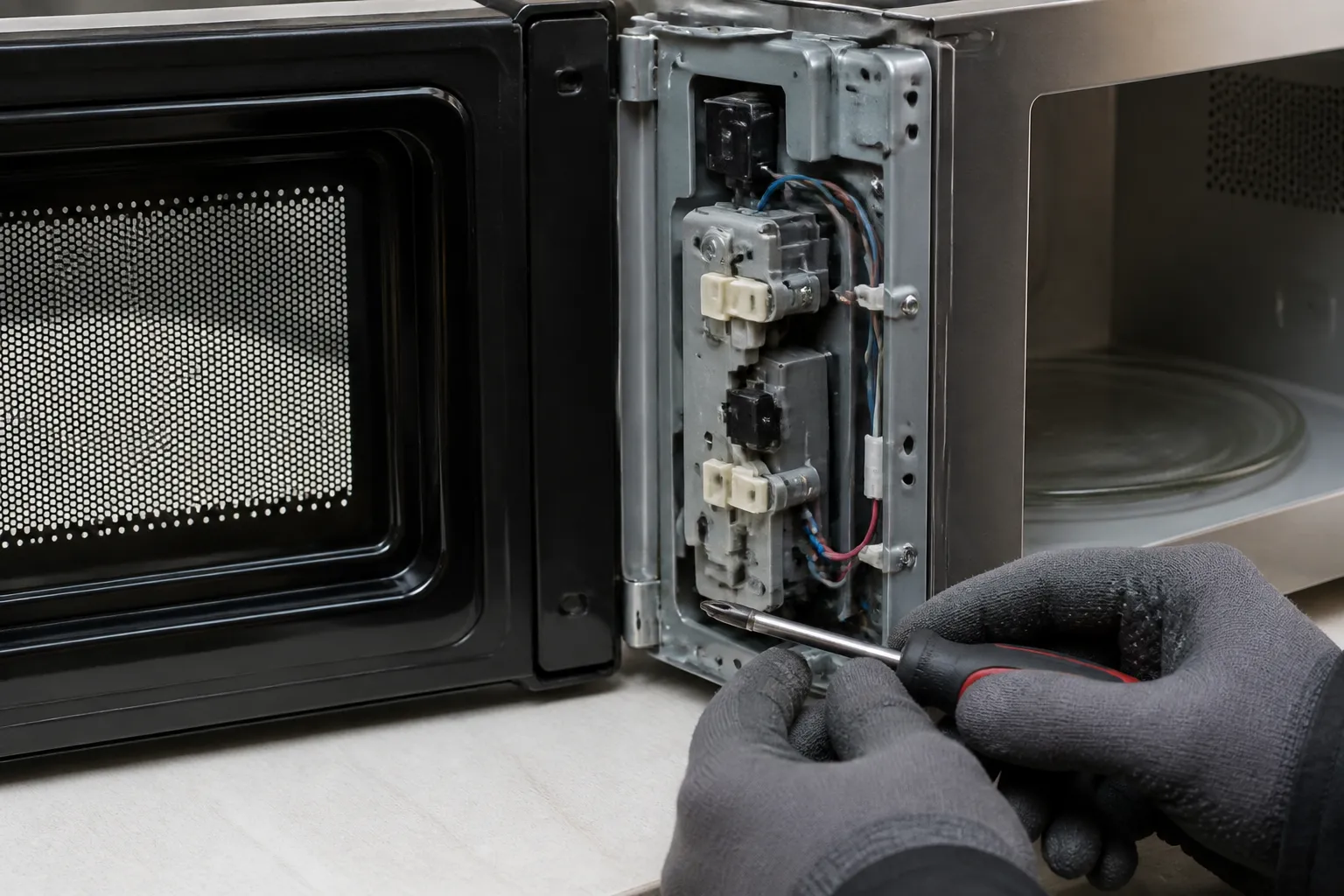
Door Switch Replacement for Panasonic NN-SN966S Countertop Microwave
In the Panasonic NN-SN966S, the door switch system is a crucial safety feature that prevents the magnetron from operating when the door is open. This model is equipped with three door switches: two normally-open switches that must close when the door shuts, and one normally-closed switch that opens when the door closes. If any of these switches fail, the microwave will either refuse to start, start with the door open (which is extremely dangerous), or display error codes. Door switch failures often stem from repeated slamming, food debris accumulation around the door latch, or just normal wear from frequent use. I rate this repair as MODERATE difficulty due to the high-voltage components and the precision required for proper switch alignment.
Symptoms
- Microwave display lights up but unit will not start when START button is pressed, even with the door firmly closed
- Control panel shows “DOOR” error message or door icon flashing on the Panasonic NN-SN966S display
- Interior light remains on continuously, even when the door appears to be properly closed
- Microwave starts operating immediately when plugged in, before the door is closed or any buttons are pressed
- Intermittent operation where the microwave works sometimes but not others, despite the door appearing closed
- Audible arcing sounds from the door area when attempting to start the unit
⚠️ Safety Warning
Microwave repair involves potentially lethal high voltage components. The Panasonic NN-SN966S contains a high-voltage capacitor that can retain a charge of up to 4,000 volts even when unplugged. Before beginning any work, disconnect power and discharge the capacitor using an insulated screwdriver across its terminals. Never attempt to operate the microwave with the cover removed or door switches bypassed. Microwaves can cause severe burns and eye damage. Always test door switch operation before reassembling. If you’re uncomfortable working with high-voltage appliances, contact a qualified service technician. Wear safety glasses and avoid touching any internal components until the capacitor has been properly discharged.
Parts Needed
- Primary Door Switch (Panasonic part number F63018M00XP) – normally-open, activates when the door closes
- Secondary Door Switch (Panasonic part number F630189M00XP) – normally-open, secondary safety switch
- Monitor Switch (Panasonic part number F630179M00XP) – normally-closed, opens when the door closes to prevent magnetron operation with the door open
- Door switch mounting screws if damaged (2x Phillips head, 8mm length, M3 thread)
- Electrical contact cleaner for cleaning switch terminals and connectors
Tools Required
- Phillips head screwdriver set (#1 and #2)
- Flathead screwdriver (insulated handle for capacitor discharge)
- Digital multimeter capable of measuring continuity and resistance
- Needle-nose pliers for connector removal
- Flashlight or work light for interior visibility
- Wire strippers if replacing connectors
- Safety glasses and insulated work gloves
Step-by-Step Instructions
Step 1: Power Disconnection and Safety Preparation
🔨 Pro Tip from Dave
On the NN-SN966S, the monitor switch (the normally-closed one) usually causes the most problems. Here’s what trips up DIYers: if that monitor switch failed while the door was being opened, it likely blew the inline ceramic fuse and possibly the secondary fuse as well. Always replace both fuses when you replace the monitor switch, or you’ll be tearing it apart again before you know it.
Unplug the Panasonic NN-SN966S from the electrical outlet and wait at least 10 minutes for internal components to cool. Place the unit on a stable work surface with adequate lighting. Remove any items from the interior cavity and ensure the turntable and support ring are removed. Put on safety glasses and insulated gloves before proceeding to the next step.
Step 2: Remove the Outer Casing
Locate the ten Phillips head screws around the perimeter of the outer case. Remove two screws from the top-rear edge, three screws along each side panel (located 2 inches from the rear edge), and two screws from the bottom-rear corners. Carefully slide the outer case toward the back of the unit approximately 1 inch, then lift it straight up and away from the microwave chassis. Set the case aside in a safe location.
Step 3: Discharge the High Voltage Capacitor
Locate the large cylindrical capacitor mounted on the right side of the chassis near the transformer. Using an insulated-handle screwdriver, carefully touch both terminals simultaneously to discharge any stored voltage. You may see a small spark – this is normal. Wait 30 seconds and repeat the discharge procedure to ensure the capacitor is completely safe.
Step 4: Access the Door Switch Assembly
The door switch assembly on the Panasonic NN-SN966S is located behind the control panel on the right side of the door frame. Remove the three Phillips head screws securing the control panel – one located at the top-right corner, one at the bottom-right corner, and one in the center-right edge. Gently pivot the control panel forward to reveal the switch assembly.
Step 5: Test the Existing Switches
Before removal, test each switch with your multimeter set to continuity mode. The primary and secondary switches (top and middle positions) should show open circuit (infinite resistance) when the door is open and closed circuit (0 ohms) when the door actuator is pressed. The monitor switch (bottom position) should show the opposite – closed when the door is open, open when the actuator is pressed.
Step 6: Disconnect Switch Wiring
Each door switch has two wire terminals with push-on connectors. The primary switch connects to white and blue wires, the secondary switch connects to brown and orange wires, and the monitor switch connects to red and black wires. Using needle-nose pliers, carefully pull each connector straight off its terminal. Note the wire positions for proper reconnection.
Step 7: Remove the Faulty Switches
Each switch is secured by two Phillips head screws located on the mounting bracket behind the switch assembly. Remove both screws from the defective switch and carefully pull the switch straight out from the front of the microwave. The switches are positioned in a vertical stack with approximately 0.75 inches spacing between centers.
Step 8: Install the New Switch
Insert the replacement switch into the same position, ensuring the actuator button faces toward the door and aligns properly with the door latch mechanism. The switch body should sit flush against the mounting bracket. Secure it with the two original Phillips head screws, tightening to finger-tight plus 1/4 turn.
Step 9: Reconnect the Wiring
Reconnect the wire terminals to the new switch, ensuring proper wire colors match the original configuration. Press each connector firmly onto its terminal until it seats completely. Gently tug each wire to verify secure connection. Clean any corrosion from terminals using electrical contact cleaner if necessary.
Step 10: Test Switch Operation
Using your multimeter, verify the new switch operates correctly. With the door open, manually press the switch actuator while measuring continuity across the terminals. Primary and secondary switches should close (show continuity) when pressed. The monitor switch should open (show no continuity) when pressed.
Step 11: Reassemble the Control Panel
Carefully pivot the control panel back into its original position, ensuring no wires are pinched or damaged. Reinstall the three Phillips head screws that secure the control panel, tightening them evenly to avoid warping the panel. Verify the control panel sits flush and operates smoothly.
Step 12: Final Assembly and Testing
Replace the outer case by reversing the removal process. Slide the case forward until it aligns with the chassis, then secure with all ten original screws. Reinstall the turntable and support ring. Plug in the Panasonic NN-SN966S and test operation by placing a microwave-safe cup of water inside and running a 30-second heating cycle to verify proper operation.
Troubleshooting
- If the microwave still won’t start after switch replacement, verify all wire connections are secure and check for blown fuses in the control circuit
- If the door light stays on continuously, double-check that the monitor switch (normally-closed) is properly connected and functioning
- If you get intermittent operation, inspect the door latch mechanism for proper alignment and ensure the switch actuators are making full contact
- If the display shows error codes after repair, disconnect power for 5 minutes to reset the control board, then test again
- If switches test correctly with multimeter but the microwave doesn’t respond, the main control board may have failed and require professional diagnosis
- If you hear arcing sounds during operation, immediately stop use and verify all switches are properly grounded and no bare wires are exposed
When to Call a Professional
- If you discover multiple components have failed simultaneously, such as switches, fuses, and control circuits
- If the magnetron continues to operate with the door open after switch replacement, indicating a potential control board failure
- If you are uncomfortable working around high-voltage components or lack experience with electrical troubleshooting
- If the Panasonic NN-SN966S shows signs of internal arcing damage or burn marks around electrical components
When to Call a Professional
Most of the repairs in this guide are within reach for a careful DIYer with basic tools. From my experience, if you power up the microwave after switch replacement and blow the new fuse immediately, or if you measure line voltage present on the secondary side of the transformer before the door is even closed, then you’re dealing with a shorted magnetron or a failed triac. At that point, you’re into high-voltage component diagnosis that carries real lethal risk, and the repair cost will likely exceed the value of the unit. That’s when it’s best to call a certified tech or start shopping for a replacement. When in doubt, a diagnostic service call typically costs $80–$120 and can save you from a misdiagnosis that costs more in parts.
Recommended Parts & Tools
Panasonic Microwave Door Switch Assembly Replacement Part
This genuine Panasonic door switch replacement is specifically designed for the NN-SN966S model and other compatible Panasonic countertop microwaves. The switch assembly ensures proper door closure detection and safety operation of your microwave unit.
Screwdriver Set with Phillips and Flathead Bits for Appliance Repair
This precision screwdriver set includes the specific Phillips head and flathead bits needed to safely remove the outer casing and access the door switch mechanism on your Panasonic NN-SN966S microwave. The magnetic tips help prevent dropping screws during the repair process.
The Door Switch Assembly That Actually Stops the NN-SN966S From Refusing to Heat
When the microwave won’t turn on or shuts off mid-cycle on this model, nine times out of ten it’s the door switch assembly failing, not the magnetron or control board — this is the part to start with on the NN-SN966S. You’ll need the exact OEM assembly because the three-switch interlock geometry won’t work with generic aftermarket knock-offs.
What works
- Fits the latch cam and strike post on the NN-SN966S without shimming or modification — alignment is tight but correct out of the box.
- All three switches (the two normally-open and one normally-closed) respond crisply when the door latches, which is the actual test for whether the repair worked.
- The connector and wire harness match the factory routing, so you’re not forced to improvise cable management inside a tight cabinet.
What doesn’t
- If your door frame is warped or the latch striker is bent, even the correct switch won’t solve the problem — you have to address the mechanical binding first.
- The connection clips are fragile; if you force the old harness out by pulling sideways instead of straight back, you’ll damage the receptacle and have a harder installation.
I’ve seen owners order a magnetron or a control board first because the microwave looked completely dead — but a quick continuity check on the door switches would have saved them $80 and two weeks of waiting. Panasonic Microwave Door Switch Assembly Replacement Part
About This Article

Written by Dave Holt. Dave Holt has been taking apart and fixing household appliances since he was a teenager who couldn't leave a broken one alone. Eighteen years later, after fixing things for neighbors, friends, and anyone who'd let him, he's seen almost every failure mode there is. When he writes a repair guide here, it's based on the actual job, not a manufacturer overview. More about this site.
Scope and limits. Dave is a self-taught repairer, not a certified appliance technician. Unplug before you open anything, and leave sealed refrigeration systems, gas connections, and hardwired circuits to a qualified technician.

