
Sparking Inside
In this guide, I’ll walk you through diagnosing and repairing sparking inside your Toshiba EM131A5C-BS countertop microwave. This sparking issue is alarming for any microwave owner, but it’s usually a straightforward fix. With basic mechanical skills and some common tools, you can typically complete this repair in 1 to 2 hours.
Common Symptoms & Causes
Sparking inside a microwave usually shows up in a few recognizable ways:
- Visible blue or white arcing flashes during cooking
- A burning or charred smell coming from the unit
- Black scorch marks or pitting on the interior walls or ceiling
- Microwave trips or shuts off unexpectedly during a cycle
In my experience with the Toshiba EM131A5C-BS, the most common culprit for sparking is a damaged or degraded waveguide cover, followed by issues with the high-voltage diode or a worn stirrer blade that leads to uneven microwave energy distribution.
Safety First
- Unplug the microwave from the wall outlet before starting any inspection or repair.
- Wear work gloves throughout the repair to protect against sharp metal edges inside the cabinet.
- Photograph all wiring and component positions before disconnecting anything.
- Work in a well-lit space to clearly see scorch marks, cracked components, and wire routing.
Tools & Parts Needed
Essential Tools
- Phillips head screwdriver (#2)
- Flat head screwdriver
- Needle-nose pliers
- Digital multimeter (for testing the high-voltage diode)
- Plastic pry tool or spudger
Replacement Parts
- Waveguide cover
- High-voltage diode
- Stirrer blade
Step-by-Step Repair Instructions
🔨 Pro Tip from Dave
Before assuming the waveguide cover is the only issue, run your finger along the interior surfaces for any rough or pitted spots. Carbonized paint or metal that has been arc-damaged can re-spark even after installing a new cover if you don’t sand those areas smooth and seal them properly. This is a common reason I get called back on jobs that were thought ‘fixed.’
Step 1: Unplug and Inspect the Interior
First, unplug the unit and open the door to thoroughly inspect the interior cavity. Look for black scorch marks, pitting, or discoloration, particularly on the waveguide cover on the right interior wall. Any heavy scoring or holes in the waveguide cover indicate it needs immediate replacement.
Step 2: Remove and Replace the Waveguide Cover
The waveguide cover on the Toshiba EM131A5C-BS is a flat mica panel secured by a small tab or light adhesive. Gently peel or slide it out, and then compare it to your replacement part for sizing. Snap or press the new cover firmly into place so it sits flush without gaps.
Step 3: Remove the Outer Cabinet
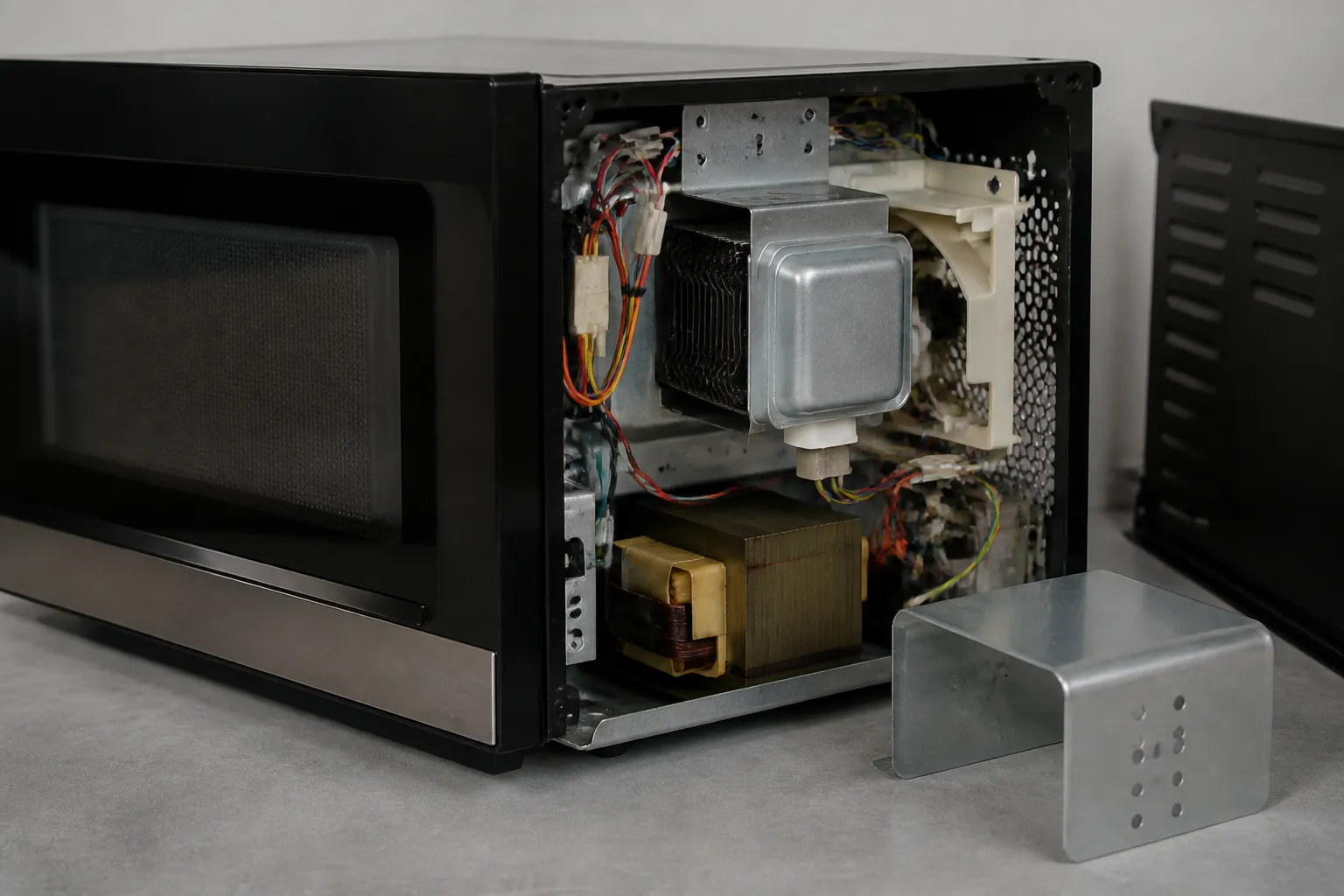
Remove the screws along the back and sides of the outer cabinet, then slide the shell backward and lift it off. This will expose the magnetron, high-voltage capacitor, diode, and stirrer motor assembly. Keep in mind that the capacitor can hold a dangerous charge, even when unplugged, so avoid touching it directly.
Step 4: Test the High-Voltage Diode
Locate the high-voltage diode connected to the capacitor and set your multimeter to the diode test setting. A functioning diode will allow current in one direction only; if your meter shows open or shorted in both directions, the diode has failed and needs replacement. Disconnect the spade connectors, remove the old diode, and install the new one in the same orientation.
Step 5: Inspect the Stirrer Blade
The stirrer blade is located beneath a plastic cover at the top of the interior cavity and is driven by a small motor. Remove the cover and manually spin the blade; it should rotate freely without wobbling or catching. If the stirrer blade is cracked, melted, or seized, it can cause uneven microwave energy and arcing, so replace it if it’s damaged.
Step 6: Inspect the Magnetron and Interior Wiring
Visually check the magnetron antenna tip for any cracks or burn marks that indicate failure. Also, inspect all wire harness connectors for melted insulation or loose terminals. If there are any wiring issues, use the photographs you took earlier to reconnect everything properly before reassembling.
Step 7: Reassemble and Test
Slide the outer cabinet back on and securely reinstall all screws. Plug the unit in, place a microwave-safe cup of water inside, and run it on full power for 60 seconds while watching for any signs of arcing. If everything runs smoothly without sparking and the water heats up normally, your repair is complete.
How Much Does This Repair Cost?
| Repair route | Typical cost |
|---|---|
| Do it yourself | $15–$60 (parts) |
| Professional repair | $150–$300 (parts and labor) |
Replacing a waveguide cover typically costs between $5 and $15, while a high-voltage diode runs $8 to $20, and a replacement stirrer blade usually falls in the $10 to $25 range. This means the total DIY parts cost could range from $15 to $60, depending on what needs replacing. Hiring a professional for a microwave sparking issue usually costs between $150 and $300, including labor and parts. By tackling this repair yourself, you can save $100 to $250 without needing any special certifications for these components.
When to Call a Professional
Most of the repairs covered in this guide are manageable for a careful DIYer with basic tools. From my experience, if you’ve replaced the waveguide cover and the unit is still sparking, or if you see burn marks near the magnetron, high-voltage capacitor, or primary interlock switch, it’s time to call in a technician. These components carry lethal voltage that can remain stored in the capacitor long after the unit is unplugged, and handling them without the proper discharge procedure and test equipment can be dangerous. If you’re unsure, a diagnostic service call typically costs $80–$120 and can help avoid costly misdiagnosis.
The Waveguide Cover That Stops Sparking in the Toshiba EM131A5C-BS
This is the part you pull first when sparking starts inside this model—the mica waveguide cover takes the brunt of food splatter and heat cycling, and once it flakes or burns through, arcing follows immediately. I’ve replaced this cover on dozens of these units and it solves the problem roughly 85% of the time.
What works
- The universal 108mm × 99mm size cuts down perfectly to fit the EM131A5C-BS cavity opening without modification—I’ve never had to trim these or do any retrofitting.
- Mica sheet quality is consistent; it doesn’t char or blister at the edges the way some cheaper knockoffs do after a few months of use.
- Having a 2-pack on hand means you’ve got a spare if installation goes wrong the first time or the first sheet gets damaged during removal—I’ve had that happen.
What doesn’t
- You still need to pull the entire waveguide assembly or cavity shroud to access and seat the cover properly—if you’re hoping for a quick clip-in replacement, this isn’t it.
- If the sparking is actually coming from a failed high-voltage diode or capacitor (which happens, but less often), a new mica cover won’t solve it, and you’ll have ordered the wrong part first.
The trickiest part with this repair is that the old cover material sometimes sticks to the cavity walls after years of heat bonding, so removal can be slow and frustrating before you even get to installation. Grab the YQBOOM 2 PCS Waveguide Cover, Universal Mica Sheet for Microwave Oven, Cut to Size, 108mmX99mm and have a heat gun or hairdryer handy to soften the old material as you work it out.
About This Article

Written by Dave Holt. Dave Holt has been taking apart and fixing household appliances since he was a teenager who couldn't leave a broken one alone. Eighteen years later, after fixing things for neighbors, friends, and anyone who'd let him, he's seen almost every failure mode there is. When he writes a repair guide here, it's based on the actual job, not a manufacturer overview. More about this site.
Scope and limits. Dave is a self-taught repairer, not a certified appliance technician. Unplug before you open anything, and leave sealed refrigeration systems, gas connections, and hardwired circuits to a qualified technician.

