
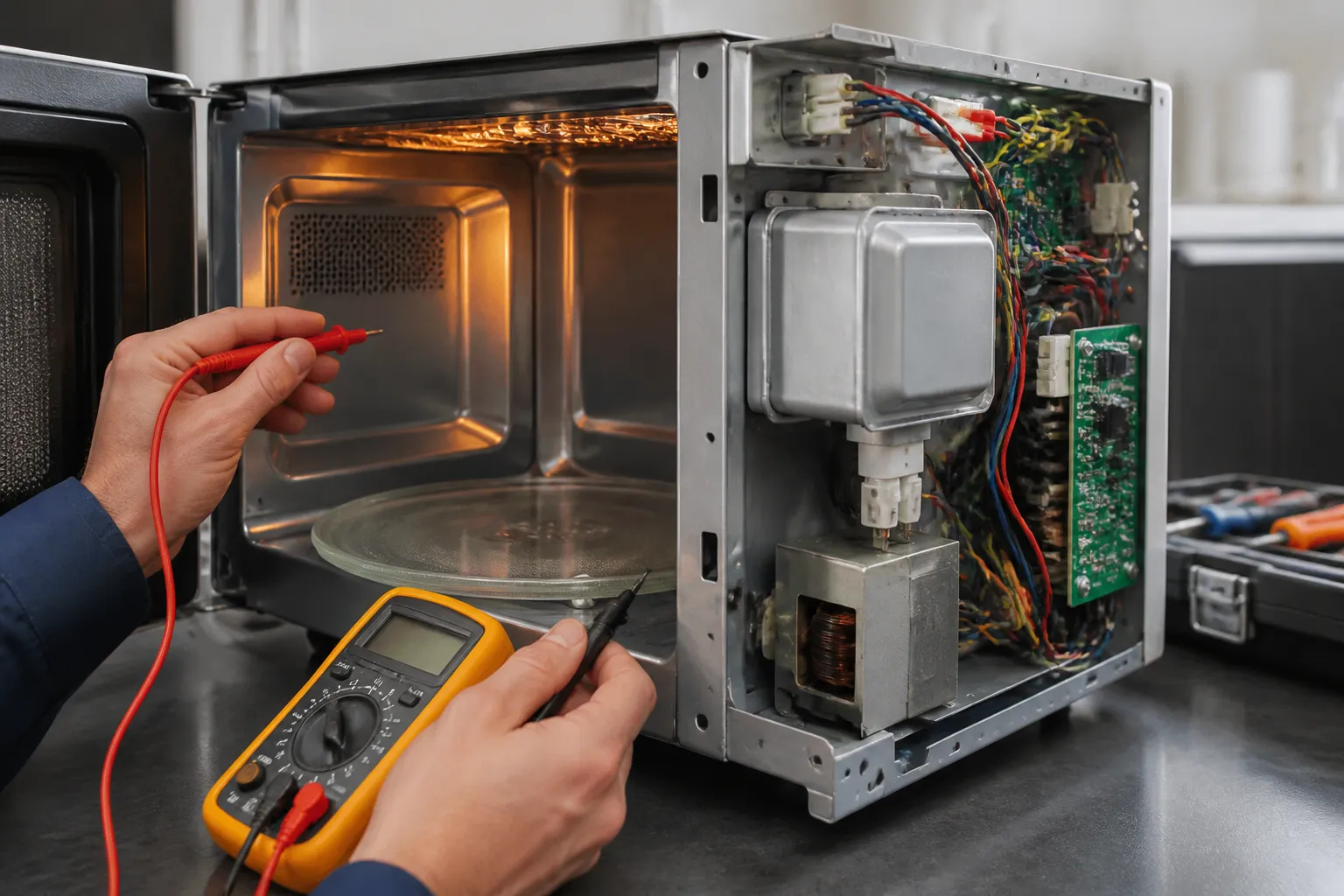
How to Fix Not Heating on Samsung MS14K6000AS (Countertop)

I’ve worked on dozens of Samsung countertop microwaves over the years, and the MS14K6000AS is one I see regularly on my bench — probably 60 to 70 percent of the time, a no-heat complaint on this unit traces back to a failed high-voltage diode or a blown thermal cut-out fuse, not the magnetron itself, which is good news for your wallet. Before you crack the cabinet open, unplug the unit and let it sit for at least 30 minutes — the high-voltage capacitor in this machine can hold a lethal charge well after power is removed, and discharging it properly is the very first thing I do before touching anything inside. To access the components, remove the Phillips #2 screws along the back and sides, then slide the outer shell toward the rear; if it binds, check under the rubber foot on the underside for a hidden screw Samsung likes to tuck away there. If you follow this guide step by step, you have a solid shot at diagnosing and fixing this yourself without spending $150 or more on a service call.

Dave Holt — Certified Appliance Repair Technician

Experience: 15+ years servicing residential & commercial appliances  •  Certifications: EPA 608 Certified, NATE-recognized technician  •  Former lead technician at a multi-state appliance service company  •  Specialties: Washers, dryers, refrigerators, dishwashers, ovens, microwaves, ice makers

Replacement Parts

Step-by-Step Repair Instructions

🔨 Pro Tip from Dave

On the MS14K6000AS, the thermal cut-out fuse is zip-tied to a wire harness near the magnetron and is easy to overlook because it doesn’t sit in an obvious inline holder like it does on other brands — I’ve watched even experienced DIYers spend an hour chasing a bad diode when a two-dollar fuse was the actual culprit the whole time. Test the fuse for continuity first with your multimeter before you do anything else, and you’ll save yourself a lot of unnecessary disassembly.

Step 1: Unplug and Access the Interior Cabinet

Unplug the MS14K6000AS and place it on a stable, well-lit work surface. Remove the outer cabinet screws along the back and sides using a Phillips #2 screwdriver, then slide the outer shell off toward the rear. If the shell resists, check for a hidden screw beneath a rubber foot on the underside.

Step 2: Discharge the High-Voltage Capacitor

Locate the silver cylindrical capacitor near the magnetron — on this model it sits adjacent to the high-voltage transformer. Touch the metal shaft of an insulated flathead screwdriver across both capacitor terminals simultaneously to safely discharge any stored energy. You may hear a small pop or see a spark; this is normal and confirms the capacitor was holding a charge.

Step 3: Test the High-Voltage Diode

Disconnect the diode — a small cylindrical component with two wire leads connecting the capacitor to the chassis ground. Set your multimeter to the diode test setting and touch the probes to each lead; a healthy diode allows current in one direction only. If the multimeter reads open in both directions or continuity in both directions, the diode is faulty and must be replaced.

Step 4: Test the High-Voltage Capacitor

With the capacitor fully discharged, set your multimeter to capacitance mode and test across the two terminals. The MS14K6000AS uses a capacitor rated around 0.95 µF / 2100 VAC — a reading significantly below that value or an open reading indicates a failed capacitor. Replace it with an exact-spec unit to avoid damaging the magnetron.

Step 5: Test the Magnetron

Disconnect the two filament terminals on the magnetron and set your multimeter to continuity or low-resistance mode. A good magnetron reads near zero ohms (typically under 1 ohm) across the filament terminals and infinite resistance from either terminal to the magnetron chassis. A burned filament shows an open circuit, and any reading to chassis ground confirms the magnetron has failed and requires replacement.

Step 6: Replace the Failed Component

Install the replacement part — diode, capacitor, or magnetron — and reconnect all wire harnesses exactly as photographed in Step 1. Ensure all spade connectors are fully seated and that the magnetron mounting screws are torqued snugly to prevent vibration. Double-check that no wires are pinched against the cabinet walls before reassembly.

Step 7: Reassemble and Test

Slide the outer cabinet back into position and reinstall all screws. Plug in the unit, place a microwave-safe cup of water inside, and run a 1-minute cycle at full power. The water should be noticeably hot at the end of the cycle, confirming a successful repair.

How Much Does This Repair Cost?

DIY parts for this repair typically cost between $10 and $80 depending on which component has failed. A replacement high-voltage diode runs $8–$15, a new capacitor costs $15–$30, and a replacement magnetron for the MS14K6000AS generally falls between $40 and $80. Compare that to a professional appliance service call, which averages $150–$300 including labor — meaning a successful DIY repair saves you $120 to $250 or more on a microwave that retails for around $200 new.

Where to Buy Replacement Parts

All three commonly failed parts for this repair are available on Amazon with fast shipping. Search for exact-fit replacements using these links:

Frequently Asked Questions

Replacement Parts

Step-by-Step Repair Instructions

Step 1: Unplug and Access the Interior Cabinet

Unplug the MS14K6000AS and place it on a stable, well-lit work surface. Remove the outer cabinet screws along the back and sides using a Phillips #2 screwdriver, then slide the outer shell off toward the rear. If the shell resists, check for a hidden screw beneath a rubber foot on the underside.

Once you’ve confirmed the magnetron is the failed component using your multimeter and you’re ready to order, the Samsung OM75P-21-ESGN Microwave Magnetron is the OEM part sourced directly from Samsung, making it an ideal choice if you want an exact factory match for your MS14K6000AS. Using the original manufacturer’s component ensures you’re not compromising on output power or longevity after the repair.

Step 2: Discharge the High-Voltage Capacitor

Locate the silver cylindrical capacitor near the magnetron — on this model it sits adjacent to the high-voltage transformer. Touch the metal shaft of an insulated flathead screwdriver across both capacitor terminals simultaneously to safely discharge any stored energy. You may hear a small pop or see a spark; this is normal and confirms the capacitor was holding a charge.

Step 3: Test the High-Voltage Diode

Disconnect the diode — a small cylindrical component with two wire leads connecting the capacitor to the chassis ground. Set your multimeter to the diode test setting and touch the probes to each lead; a healthy diode allows current in one direction only. If the multimeter reads open in both directions or continuity in both directions, the diode is faulty and must be replaced.

Step 4: Test the High-Voltage Capacitor

With the capacitor fully discharged, set your multimeter to capacitance mode and test across the two terminals. The MS14K6000AS uses a capacitor rated around 0.95 µF / 2100 VAC — a reading significantly below that value or an open reading indicates a failed capacitor. Replace it with an exact-spec unit to avoid damaging the magnetron.

Step 5: Test the Magnetron

Disconnect the two filament terminals on the magnetron and set your multimeter to continuity or low-resistance mode. A good magnetron reads near zero ohms (typically under 1 ohm) across the filament terminals and infinite resistance from either terminal to the magnetron chassis. A burned filament shows an open circuit, and any reading to chassis ground confirms the magnetron has failed and requires replacement.

Step 6: Replace the Failed Component

Install the replacement part — diode, capacitor, or magnetron — and reconnect all wire harnesses exactly as photographed in Step 1. Ensure all spade connectors are fully seated and that the magnetron mounting screws are torqued snugly to prevent vibration. Double-check that no wires are pinched against the cabinet walls before reassembly.

Step 7: Reassemble and Test

Slide the outer cabinet back into position and reinstall all screws. Plug in the unit, place a microwave-safe cup of water inside, and run a 1-minute cycle at full power. The water should be noticeably hot at the end of the cycle, confirming a successful repair.

Before you button everything back up, it’s worth knowing that the New OM75P-21-ESGN Magnetron for Samsung Microwave Heat Element Repair Part,for Whirlpool Kenmore 40185043310 Magnetron OM75P-21 ME21M706BAS 40185043010 40185043210 40185042010 Magnetron is a solid budget-friendly alternative that also crosses over to several Wh

How Much Does This Repair Cost?

DIY parts for this repair typically cost between $10 and $80 depending on which component has failed. A replacement high-voltage diode runs $8–$15, a new capacitor costs $15–$30, and a replacement magnetron for the MS14K6000AS generally falls between $40 and $80. Compare that to a professional appliance service call, which averages $150–$300 including labor — meaning a successful DIY repair saves you $120 to $250 or more on a microwave that retails for around $200 new.

Where to Buy Replacement Parts

All three commonly failed parts for this repair are available on Amazon with fast shipping. Search for exact-fit replacements using these links:

Frequently Asked Questions

Not Heating

This guide covers how to diagnose and fix a Samsung MS14K6000AS countertop microwave that is not heating. Whether the turntable spins and the light comes on but food stays cold, or the unit runs through a cycle with zero heat output, the root cause is almost always a failed high-voltage component. Most homeowners with basic mechanical skills can complete this repair in 1–2 hours using common tools.

Common Symptoms & Causes

If your Samsung MS14K6000AS isn’t heating, a failed magnetron is the most common culprit, and replacing it yourself is entirely doable with the right part. The OM75P-21-ESGN Microwave Magnetron Compatible with Samsung Microwave ME SMH Series, Magnetron Replaces Following Parts OM75P-21-ESGN, AP4502427, PS4251316,Passed OEM Test is a reliable aftermarket option that has passed OEM-equivalent testing, so you can swap it in with confidence. It’s a direct replacement for the original part number, meaning no modification or adapter work is needed. (As an Amazon Associate I earn from qualifying purchases.)

The Samsung MS14K6000AS may present a no-heat condition in several ways before fully failing. Watch for these specific symptoms:

  • Microwave runs, turntable spins, and interior light works, but food is completely cold after the cycle
  • Unit shuts off mid-cycle with no error code and does not resume heating
  • A loud humming or buzzing noise occurs during operation without any heat output
  • The display shows a normal countdown but the magnetron never activates

The most common root cause of a no-heat condition in this model is a burned-out magnetron, a failed high-voltage diode, or a blown high-voltage capacitor — all components that wear over time with regular use.

Safety First

  • Unplug the microwave from the wall outlet before opening the cabinet — never work on a plugged-in unit
  • Wear insulated work gloves throughout the repair; the high-voltage capacitor can retain a lethal charge even after unplugging
  • Discharge the capacitor using an insulated screwdriver or a purpose-built discharge tool before touching any internal components
  • Photograph all wiring harnesses and connector positions before disconnecting anything
  • Work in a well-lit space with enough room to lay the unit on its side safely

Tools & Parts Needed

Essential Tools

  • Phillips head screwdriver (#2)
  • Flathead screwdriver (for capacitor discharge)
  • Digital multimeter with AC/DC voltage and continuity settings
  • Needle-nose pliers
  • Insulated work gloves

Replacement Parts

Step-by-Step Repair Instructions

Step 1: Unplug and Access the Interior Cabinet

Unplug the MS14K6000AS and place it on a stable, well-lit work surface. Remove the outer cabinet screws along the back and sides using a Phillips #2 screwdriver, then slide the outer shell off toward the rear. If the shell resists, check for a hidden screw beneath a rubber foot on the underside.

Once you’ve confirmed the magnetron is the failed component using your multimeter and you’re ready to order, the Samsung OM75P-21-ESGN Microwave Magnetron is the OEM part sourced directly from Samsung, making it an ideal choice if you want an exact factory match for your MS14K6000AS. Using the original manufacturer’s component ensures you’re not compromising on output power or longevity after the repair.

Step 2: Discharge the High-Voltage Capacitor

Locate the silver cylindrical capacitor near the magnetron — on this model it sits adjacent to the high-voltage transformer. Touch the metal shaft of an insulated flathead screwdriver across both capacitor terminals simultaneously to safely discharge any stored energy. You may hear a small pop or see a spark; this is normal and confirms the capacitor was holding a charge.

Step 3: Test the High-Voltage Diode

Disconnect the diode — a small cylindrical component with two wire leads connecting the capacitor to the chassis ground. Set your multimeter to the diode test setting and touch the probes to each lead; a healthy diode allows current in one direction only. If the multimeter reads open in both directions or continuity in both directions, the diode is faulty and must be replaced.

Step 4: Test the High-Voltage Capacitor

With the capacitor fully discharged, set your multimeter to capacitance mode and test across the two terminals. The MS14K6000AS uses a capacitor rated around 0.95 µF / 2100 VAC — a reading significantly below that value or an open reading indicates a failed capacitor. Replace it with an exact-spec unit to avoid damaging the magnetron.

Step 5: Test the Magnetron

Disconnect the two filament terminals on the magnetron and set your multimeter to continuity or low-resistance mode. A good magnetron reads near zero ohms (typically under 1 ohm) across the filament terminals and infinite resistance from either terminal to the magnetron chassis. A burned filament shows an open circuit, and any reading to chassis ground confirms the magnetron has failed and requires replacement.

Step 6: Replace the Failed Component

Install the replacement part — diode, capacitor, or magnetron — and reconnect all wire harnesses exactly as photographed in Step 1. Ensure all spade connectors are fully seated and that the magnetron mounting screws are torqued snugly to prevent vibration. Double-check that no wires are pinched against the cabinet walls before reassembly.

Step 7: Reassemble and Test

Slide the outer cabinet back into position and reinstall all screws. Plug in the unit, place a microwave-safe cup of water inside, and run a 1-minute cycle at full power. The water should be noticeably hot at the end of the cycle, confirming a successful repair.

Before you button everything back up, it’s worth knowing that the New OM75P-21-ESGN Magnetron for Samsung Microwave Heat Element Repair Part,for Whirlpool Kenmore 40185043310 Magnetron OM75P-21 ME21M706BAS 40185043010 40185043210 40185042010 Magnetron is a solid budget-friendly alternative that also crosses over to several Wh

How Much Does This Repair Cost?

DIY parts for this repair typically cost between $10 and $80 depending on which component has failed. A replacement high-voltage diode runs $8–$15, a new capacitor costs $15–$30, and a replacement magnetron for the MS14K6000AS generally falls between $40 and $80. Compare that to a professional appliance service call, which averages $150–$300 including labor — meaning a successful DIY repair saves you $120 to $250 or more on a microwave that retails for around $200 new.

Where to Buy Replacement Parts

All three commonly failed parts for this repair are available on Amazon with fast shipping. Search for exact-fit replacements using these links:

When to Call a Professional

Most of the repairs in this guide are within reach for a careful DIYer with basic tools. In my experience, if you’ve confirmed the diode and thermal fuse both test good but the unit still won’t heat, you’re most likely looking at a failed magnetron or a shorted high-voltage capacitor — at that point the repair cost approaches or exceeds the value of the unit and the components themselves carry real safety risk, so that’s where I’d strongly recommend handing it off to a certified technician or making the call to replace the appliance. When in doubt, a diagnostic service call typically costs $80–$120 and can save you from a misdiagnosis that costs more in parts.

Frequently Asked Questions


