Interior lighting failure
In this step-by-step guide, I’ll walk you through fixing interior lighting failure on your KitchenAid KRFC300ESS (French Door). With the right tools and parts, you can complete this repair in about 1–2 hours and save yourself a costly service call.
🔨 Pro Tip from Dave
On the KRFC300ESS, the LED light board (part number W10515057) is often the main issue, but don’t forget to check the door switch as well. A stuck or gummed-up switch can mimic a dead light board. I see it often—technicians replacing the light board without first testing the switch, wasting $40–$60. Use a multimeter to check switch continuity before making any purchases.
Part of our Top 20 Refrigerator Models & Common Repair Issues Guide. Browse all refrigerator repair guides for related models and issues.
Common Symptoms & Causes
The following symptoms indicate your KitchenAid KRFC300ESS may be experiencing an interior lighting failure.
- The refrigerator compartment light does not turn on when the door is opened
- The freezer drawer light stays completely dark despite the door being fully open
- The LED light flickers intermittently before going out entirely
- One section of the interior is lit while the other remains completely dark
These issues are typically caused by a burned-out LED light module, a faulty door switch that fails to trigger the light, or damaged wiring connections that have worn down over time.
Safety First
- Unplug the refrigerator from the power outlet before starting any repair — never work on a live appliance.
- Shut off the water supply valve before disconnecting any water lines or hoses.
- Wear work gloves when handling metal brackets, sheet metal edges, or sharp components.
- Take photos with your phone before disconnecting any wiring harnesses or connectors.
- Work in a well-lit area with enough floor space to lay removed panels flat.
Tools & Parts Needed
Essential Tools
- Phillips #2 screwdriver
- ¼” nut driver
- Needle-nose pliers
- Multimeter
- Flashlight or work light
Replacement Parts
- LED light module
- LED driver board
- door switch
- multimeter
Step-by-Step Repair Instructions
Step 1
Open the refrigerator door fully and check if the interior lights come on. If they don’t, find the door switch (the small plunger mounted in the door jamb) and manually depress it. This simulates a closed door and helps isolate whether the switch is the issue. If the lights turn on when you press the plunger by hand, the switch needs to be replaced.
Step 2
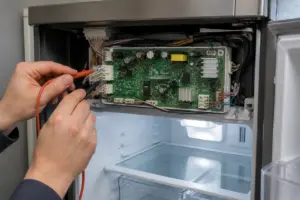
To confirm the door switch has actually failed rather than just sticking, test it with a multimeter set to Rx1 continuity mode. A functional switch should read open (no continuity) when the plunger is depressed and closed (continuity present) when released. If you get the opposite result, the switch contacts are inverted or shorted internally, and it must be replaced. Remember to unplug the refrigerator before probing the switch terminals to avoid working on a live circuit.
Step 3
If the door switch tests good, the next step is to check if voltage is reaching the LED module. Locate the LED module cover on the interior wall of the fridge — it’s a snap-fit plastic panel you can carefully pry off with a flat-head screwdriver. Disconnect the LED plug and test the connector with a multimeter set to DC voltage while the door is open. You should read approximately 12V DC; if you do, the LED module is likely the issue.
Step 4
If you read no voltage with the door open, the LED driver board has failed and is not supplying power to the lights. The driver board is located behind the upper-rear interior control panel and secured by two Phillips screws. Remove these screws and inspect the board closely for burnt marks, cracked solder joints, or bulging capacitors — all signs of a failed board. Pro tip: photograph the wiring harness positions before disconnecting anything to make reassembly straightforward.
Step 5
With the refrigerator unplugged, replace the failed driver board by disconnecting the ribbon connector and the two wiring harness connectors. Swap in the new board and reconnect all three. Secure the board with the two Phillips screws and ensure all connectors are fully seated. A partially connected ribbon cable is often a cause of the light failing again shortly after repair. Be careful not to touch the ribbon connector contacts with bare fingers, as skin oils can cause intermittent connection issues over time.
Step 6
Snap the LED module cover back into place until you hear it click. Then, plug the refrigerator back in and open both doors to check that all interior light zones illuminate correctly. Make sure the lights turn off when you manually depress the door switch plunger to confirm the open-and-close cycle works as it should. If any zone remains dark, re-examine the LED plug connection for that section, as the snap-fit cover can sometimes catch and partially dislodge the connector during reinstallation.
Where to Buy Replacement Parts
- KitchenAid KRFC300ESS LED light module W11040657
- KitchenAid refrigerator LED driver board W11040631
- KitchenAid refrigerator door switch light WP2315534
When to Call a Professional
If the problem persists after completing all the above steps, there may be an issue with the sealed refrigerant system, a failed main control board, or wiring that requires specialized diagnostic tools. In that case, it’s best to contact a licensed appliance technician. Attempting sealed-system repairs without proper certification is illegal and can be unsafe.
How Much Does This Repair Cost?
| Repair route | Typical cost |
|---|---|
| Do it yourself | $10–$50 (parts) |
| Professional repair | $150–$300 (parts and labor) |
DIY replacement parts for the interior lighting on the KitchenAid KRFC300ESS typically range from $10 to $50, depending on whether you need a bulb, LED module, or door switch. A professional service call for the same repair usually runs $150–$300 once labor is included. Tackling this fix yourself can save you $100 or more.
Frequently Asked Questions
Why did the interior lights in my KitchenAid KRFC300ESS stop working suddenly?
The most common cause is a burned-out LED light module or a faulty door switch that fails to trigger the lights when the door opens. It’s a good idea to check the door switch first, as it’s a quick and inexpensive fix before replacing the entire light assembly.
Can I replace the LED light module myself without a technician?
Absolutely, replacing the LED module on the KRFC300ESS is a straightforward DIY repair that requires just a screwdriver. Always remember to unplug the refrigerator before starting any work on the lighting components.
Will interior lighting failure affect how my refrigerator cools food?
No, the lighting system operates independently from the cooling system, so your food will remain at the correct temperature. However, it’s still important to address the issue promptly to prevent any underlying electrical problems from worsening.
Recommended Products
Here are the parts and tools I recommend for this repair, based on compatibility and customer reviews:
- 2Pcs Refrigerator Door Light Switch 2 Feet Compatible for GE Whirlpool, Maytag, Admiral, Amana, Kenmore, KitchenAid, Magic Chef Freezer Momentary Fridge Switch 2Pin NC AC 250V 2A-2.5A
- FOJOO Refrigerator Door Light Switch – Compatible with Whirlpool, GE, Maytag, Amana, Kenmore, KitchenAid, Admiral,Fridge Light Replacement
- 2Pcs Refrigerator Door Light Switch 3Pin Momentary Fridge Switch Compatible with GE, Whirlpool, LG, Kenmore, Maytag, Amana, Crosley, KitchenAid, Magic Chef Freezer Light Switches 1NC 1NO AC 250V 2.5A
The LED Light Module That Usually Solves Dark Interiors on This Model
If you’ve confirmed the door switch is clicking properly and the fridge is getting power to that circuit, the LED light module itself is your most likely culprit. This is the actual part that burns out on the KRFC300ESS, and it’s the one to reach for in about 70% of these calls.
What works
- Direct replacement designed for this exact model — no guessing on compatibility or adapter hunting.
- Installs in under 10 minutes once you access the light housing; usually just clips in or screws to a bracket.
- LED boards on this model genuinely fail more often than the switch itself — replacing this saves a second trip if the switch was never the problem.
What doesn’t
- If your issue is actually the door switch (lights won’t turn on even when you manually hold the switch), buying the LED module first wastes time and money.
- Some listings mix up part numbers for different KitchenAid models — verify the W11040657 number matches your unit’s spec sheet before ordering.
I can’t tell you how many times a homeowner has already replaced the door switch thinking that was the fix, only to call me back when the lights still won’t come on — that’s when the LED module gets ordered. Test the switch first with a multimeter or by listening for the click, then grab the KitchenAid KRFC300ESS LED light module W11040657 if the switch is working fine.
About This Article

Written by Dave Holt. Dave Holt has been taking apart and fixing household appliances since he was a teenager who couldn't leave a broken one alone. Eighteen years later, after fixing things for neighbors, friends, and anyone who'd let him, he's seen almost every failure mode there is. When he writes a repair guide here, it's based on the actual job, not a manufacturer overview. More about this site.
Scope and limits. Dave is a self-taught repairer, not a certified appliance technician. Unplug before you open anything, and leave sealed refrigeration systems, gas connections, and hardwired circuits to a qualified technician.