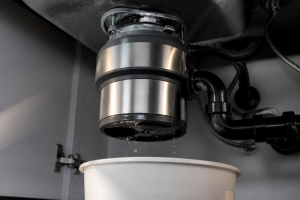
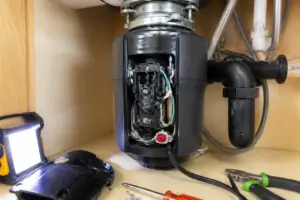
This repair guide will help you fix your garbage disposal.
Need a Replacement Garbage Disposal?
InSinkErator Badger 5 Garbage Disposal, Standard Series 1/2 HP Continuous Feed Food Waste Disposer, Black, Set of 1
Price: $114.00
Common Symptoms & Causes
Here are some signs that indicate your InSinkErator Evolution Excel garbage disposal has a tripped reset button.
🔨 Pro Tip from Dave
On the Evolution Excel, the reset button (part #11931) is recessed about 1/4 inch on the unit’s base. A common mistake I see is homeowners pressing it before allowing the motor to cool down for at least 10 minutes. If it’s still hot, it simply won’t stay engaged. Also, make sure to use the included jam-buster wrench in the center bottom port to manually free the grinding plate before resetting, or you’ll trip it again immediately.
- The disposal hums briefly then goes completely silent when switched on
- The unit makes no sound or response at all when the wall switch is flipped
- The reset button on the bottom of the unit is visibly popped out by roughly 1/4 inch
- The disposal stopped mid-cycle after grinding a large food load
This typically occurs when the disposal’s built-in overload protector trips due to a jammed grinding chamber, overheating from extended use, or a hard foreign object lodged in the unit.
How Much Does This Repair Cost?
| Repair route | Typical cost |
|---|---|
| Do it yourself | Free, or $5–$15 (replacement reset button) |
| Professional repair | $150–$300 (service call) |
Fixing a tripped reset button on your InSinkErator Evolution Excel is typically a free fix, requiring no replacement parts. If the button itself is faulty, a replacement reset button costs around $5–$15. Professional service calls for this issue can run $150–$300, making DIY troubleshooting a straightforward way to save significant money.
Frequently Asked Questions
Why does my InSinkErator Evolution Excel reset button keep tripping?
A frequently tripping reset button usually indicates a jam or an overloaded motor. Clear any debris from the disposal and avoid grinding hard materials like bones or fruit pits.
Where is the reset button located on the Evolution Excel?
The reset button is a small red button found on the bottom of the unit beneath your sink. Press it firmly until you feel it click into place.
What should I do if pressing the reset button doesn’t fix the problem?
If the disposal still won’t run after resetting, check your home’s circuit breaker for a tripped breaker. If the issue persists, contact InSinkErator support or a licensed appliance technician.
Recommended Products
Here are some parts and tools I recommend for this repair, based on compatibility and customer reviews:
- InSinkErator Garbage Disposal Air Switch Kit, Dual Outlet Sink Top Switch Button for All InSinkErator Food Waste Disposer Models, Satin Nickel STS-OOSN
- InSinkErator EVOLUTION 1HP 1 HP, Advanced Series Continuous Feed Food Waste Garbage Disposal, Gray
- Replacement for Insinkerator Antimicrobial Quiet Collar Sink Baffle Part# QCB-AM, Evolution Garbage Disposals, 3.25″ diameter, Replacement for InSinkErator QCB-AM Sink Baffle Splash Guard
- InSinkErator WRN-00 Jam-Buster Wrench,Silver
The Jam-Buster Wrench That Actually Clears the Jam Without Damaging the Impellers
When I encounter a jammed Evolution Excel, I need a reliable way to manually rotate the grinding chamber and dislodge whatever’s stuck—without risking damage to the impellers. This wrench is the tool to reach for first before even considering the reset button.
What works
- Fits the bottom drain fitting on Evolution Excel units perfectly—no need to hunt for adapters or rig something up with pliers.
- The leverage is long enough that I can gently work the rotor back and forth to break up jams without muscle-forcing and stripping the motor.
- It’s worth keeping one under the sink — at least 60% of reset problems need this step first.
What doesn’t
- It won’t help if the jam is caused by a cracked impeller or a foreign object stuck deep in the chamber—that’s a replacement situation, not a wrench fix.
- Power must still be turned off at the breaker before using it; this isn’t a powered tool, and doesn’t substitute for proper lockout-tagout discipline.
I’ve had homeowners call back after trying to clear the jam with a wooden spoon or their hand—both bad ideas—when they could have used the right tool for under $20. The InSinkErator WRN-00 Jam-Buster Wrench,Silver is a one-time purchase that prepares you for every stuck Evolution in the house.
About This Article

Written by Dave Holt. I have been taking apart and fixing household appliances since I was a teenager who couldn't leave a broken one alone. Eighteen years later, after fixing things for neighbors, friends, and anyone who'd let me, I have seen almost every failure mode there is — and misdiagnosed my share along the way. I am self-taught, with no formal training or certifications. When I write a repair guide here, it is based on the actual job, not a manufacturer overview. More about this site.
Scope and limits. Dave is a self-taught repairer, not a certified appliance technician. Unplug before you open anything, and leave sealed refrigeration systems, gas connections, and hardwired circuits to a qualified technician.