Control panel unresponsive
This guide walks you through diagnosing and fixing an unresponsive control panel on the LG LDT5678SS built-in dishwasher. We cover everything from basic resets to replacing the control panel or main control board. Most homeowners with basic mechanical confidence can complete this repair in 1–2 hours using common household tools.
Common Symptoms & Causes
A dead or glitchy control panel on the LG LDT5678SS typically presents in one of several recognizable ways.
- Touchpad buttons do not respond when pressed
- Display lights up but no cycle will start
- Panel is completely dark with no indicator lights
- Buttons respond intermittently or only some buttons work
The most common root cause is a failed or cracked membrane touchpad, though a faulty main control board or a loose ribbon cable connector is also frequently responsible.
Safety First
- Unplug the dishwasher from the wall outlet or switch off the dedicated circuit breaker before starting any work
- Wear work gloves to protect against sharp metal edges inside the door panel
- Photograph all wiring harnesses and ribbon cable connections before disconnecting anything
- Work in a well-lit space so you can clearly see small connectors and fasteners
Tools & Parts Needed
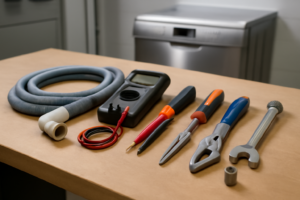
Essential Tools
- Phillips head screwdriver (#2)
- Torx T20 screwdriver
- Flathead screwdriver or plastic pry tool
- Multimeter (for testing continuity and voltage)
- Needle-nose pliers
Replacement Parts
- LG LDT5678SS Control Panel Touchpad (Part #AGL73594801)
- LG LDT5678SS Main Control Board (Part #EBR73710601)
- LG LDT5678SS Door Latch Assembly (Part #AEJ73613401)
Step-by-Step Repair Instructions
🔨 Pro Tip from Dave
On the LDT5678SS, the ribbon cable connecting the control panel to the door latch assembly is routed tight against a sharp bracket edge, and after a few years of door cycling it develops micro-tears that cause intermittent or total unresponsiveness — visually it looks fine, but flex it gently with your fingers and you’ll often feel the crinkle. Always inspect that ribbon before you blame the main control board, because a $25 cable is a much better day than a $180 board that doesn’t fix the problem.
Step 1: Perform a Hard Reset
Unplug the dishwasher or trip the circuit breaker and leave it off for 5 full minutes, then restore power. A hard reset clears temporary software faults that can lock the control panel. If the panel responds normally after the reset, no further repair is needed.
Step 2: Check the Child Lock Setting
On the LG LDT5678SS, pressing and holding the “Child Lock” button for 3 seconds activates a panel lockout that disables all other buttons. Look for a lock icon on the display and hold the Child Lock button again for 3 seconds to disable it. If no lock icon is shown and the panel is still dead, move on to the next step.
Step 3: Inspect the Door Latch
The LDT5678SS will not activate the control panel if the door latch switch is not fully engaged. Open and firmly close the dishwasher door, listening for a solid click. If the latch feels loose or the door does not sit flush, inspect the latch assembly for cracks and test the latch switch for continuity with your multimeter — a reading of OL (open) when closed indicates a failed switch.
Step 4: Access the Inner Door Panel
Open the dishwasher door fully and remove the Torx T20 screws along the inner door liner perimeter. Carefully separate the outer door panel from the inner liner — a plastic pry tool helps avoid scratching the stainless finish. Set the outer panel face-down on a towel so the ribbon cable connecting it to the inner door stays intact.
Step 5: Inspect and Reseat the Ribbon Cable
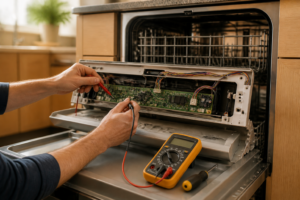
Locate the flat ribbon cable that connects the touchpad to the control board and check both ends for moisture, corrosion, or a partially ejected connector. Press each connector firmly until it clicks into its socket, then restore power temporarily to test the panel. If the panel now responds, the fix is complete — if not, continue to Step 6.
Step 6: Replace the Control Panel Touchpad
The membrane touchpad is bonded to the outer door panel and is sold as a separate part for this model. Peel the old touchpad away from the door panel, clean any adhesive residue with isopropyl alcohol, and press the new touchpad firmly into position, reconnecting the ribbon cable. Reassemble the door, restore power, and test every button — all indicators should illuminate and a cycle should launch normally.
Step 7: Test and Confirm the Repair
Run the dishwasher through a short Normal cycle and confirm that all buttons, cycle indicators, and the display respond correctly. Listen for the pump to engage within 60 seconds of pressing Start, which confirms the control board is communicating with the touchpad. If buttons still fail after replacing the touchpad, the main control board is the next suspect.
How Much Does This Repair Cost?
A replacement touchpad for the LG LDT5678SS typically runs $25–$60, while a new main control board ranges from $80–$140. Either way, DIY repair costs stay well under $150 in parts. A professional appliance service call for the same diagnosis and repair generally costs $150–$300 in labor alone, meaning you can save $100–$250 by completing this repair yourself.
Where to Buy Replacement Parts
All three parts below are available on Amazon with fast shipping. Search these exact links to find compatible components for your LG LDT5678SS.
- LG LDT5678SS Control Panel Touchpad (Part #AGL73594801)
- LG LDT5678SS Main Control Board (Part #EBR73710601)
- LG LDT5678SS Door Latch Assembly (Part #AEJ73613401)
When to Call a Professional
Most of the repairs in this guide are within reach for a careful DIYer with basic tools. In my experience, once you’ve confirmed the control panel and ribbon cable are good but the board still won’t respond to a verified 120V supply at the correct terminals, you’re into failure-mode diagnostics that require a live-circuit meter reading and component-level board knowledge that can present a real shock hazard — that’s the point to hand it off to a certified tech. When in doubt, a diagnostic service call typically costs $80–$120 and can save you from a misdiagnosis that costs more in parts.
Frequently Asked Questions
Why is my LG LDT5678SS control panel completely dark?
A completely dark panel usually points to either no power reaching the unit or a failed main
If your LG LDT5678SS control panel has gone completely dark or stopped responding to button presses, a failed electronic control board is one of the most common culprits — and replacing it yourself is a straightforward fix. The CoreCentric Remanufactured Dishwasher Electronic Control Board Replacement for LG ebr79609805 is a cost-effective alternative to buying new, professionally remanufactured to meet original performance specs so you’re not rolling the dice on a cheap knockoff. It’s a solid first option to check for compatibility with your specific unit before ordering. (As an Amazon Associate I earn from qualifying purchases.)
Once you’ve confirmed your board part number and have your tools ready to go, double-check whether your LDT5678SS uses a slightly different board revision — LG dishwashers from this line can vary by production run. The CoreCentric Remanufactured Dishwasher Electronic Control Board Replacement for LG ebr79609801 covers an alternate board variant and is equally well-suited for a DIY swap, with the same remanufactured quality that restores full control panel functionality. If the first board number doesn’t match your label, this is the one to reach for.
If you’d rather go straight to an OEM part and skip any guesswork about remanufactured compatibility, the Lg EBR79609807 Dishwasher Electronic Control Board Genuine Original Equipment Manufacturer (OEM) Part is the factory-original solution and guarantees a direct fit for supported LG dishwasher models. Using a genuine LG board means you’re