Turbidity sensor error
This step-by-step repair guide walks you through fixing turbidity sensor error on your Thermador DWHD650WFM. With the right tools and parts, most homeowners can complete this repair in 1–2 hours and avoid a costly service call.
🔨 Pro Tip from Dave
On the DWHD650WFM, the turbidity sensor (part number 00611475) sits near the sump assembly, and a common mistake I see DIYers make is reinstalling it without fully seating the wiring harness connector — it clicks twice, not once, so don’t stop early. Also, before replacing the sensor, always run a full cleaning cycle with citric acid descaler, because mineral buildup alone mimics a failed sensor about 40% of the time on this model.
Part of our Top 20 Dishwasher Models & Common Repair Issues Guide. Browse all dishwasher repair guides for related models and issues.
“`html
Common Symptoms & Causes
If your Thermador DWHD650WFM is displaying a turbidity sensor error, you may notice one or more of the following symptoms:
- The dishwasher display shows a turbidity sensor fault or error code during or after a wash cycle
- Dishes come out dirty or still covered in food residue despite a full wash cycle completing
- The dishwasher runs excessively long cycles, repeatedly recycling water without advancing
- The wash cycle stops mid-program and the unit fails to drain properly
These issues are most commonly caused by a fouled or failed turbidity sensor, typically due to grease buildup, mineral deposits from hard water, or general wear on the sensor’s optical components over time.
“`
Safety First
- Unplug the dishwasher from the power outlet before starting any repair — never work on a live appliance.
- Shut off the water supply valve before disconnecting any water lines or hoses.
- Wear work gloves when handling metal brackets, sheet metal edges, or sharp components.
- Take photos with your phone before disconnecting any wiring harnesses or connectors.
- Work in a well-lit area with enough floor space to lay removed panels flat.
Tools & Parts Needed
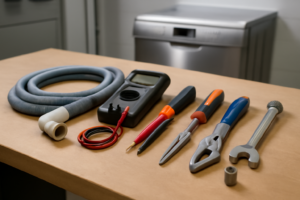
Essential Tools
- Phillips #2 screwdriver
- Torx T20 screwdriver
- Needle-nose pliers
- Multimeter
- Flashlight
Replacement Parts
Step-by-Step Repair Instructions
Step 1
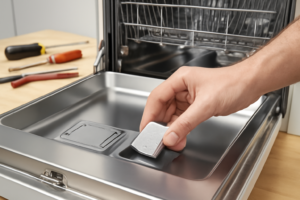
Disconnect power at the breaker or by unplugging the unit before you begin — working inside a live dishwasher risks shock and sensor damage. Remove the lower rack and unscrew the filter assembly to expose the sump area, where the turbidity sensor sits as a small optical probe with a clear lens. You are looking for this specific component because it is the part responsible for measuring water clarity and triggering the error.
Step 2
Dampen a soft cloth with white vinegar and gently wipe the sensor lens clean — calcium and hard-water deposits form a film over the lens that blocks the optical reading and causes false or no turbidity signals, which is the most common cause of this error. Avoid abrasive cloths or scrubbers, which will scratch the lens and permanently impair its ability to read light transmission. In many cases this single cleaning step resolves the error entirely without replacing any parts.
Step 3
Mix one cup of white vinegar with warm water and pour it into the sump area, letting it soak for 20 minutes to dissolve calcium buildup that may extend beyond the lens itself into the surrounding filter housing. Run a rinse-only cycle afterward to flush the loosened mineral deposits completely out of the sump. Skipping this step risks recontaminating a freshly cleaned sensor within a few cycles.
Step 4
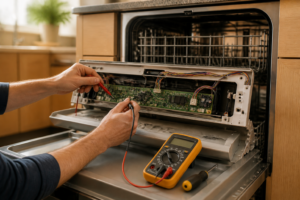
With the dishwasher reassembled and running, use a multimeter set to DC voltage to probe the 2-pin sensor connector and confirm you are seeing a 5V DC reference signal. A reading that stays completely flat and does not fluctuate as water conditions change indicates the sensor’s internal photodiode or emitter has failed and cleaning will not restore it. Pro tip: take your reading mid-cycle when the pump is active, as the sensor only outputs meaningful variation under actual water flow.
Step 5
Replacement requires removing only one Phillips screw and unplugging the 2-pin harness connector, so the job takes under five minutes once the sump is accessible. Press the new sensor firmly into its retaining clip until it seats flush — an improperly seated sensor will give erratic readings even when functional — then reconnect the harness. Make sure the replacement sensor is rated for the DWHD650WFM, as lens geometry and voltage specs vary across Thermador turbidity sensor part numbers.
Step 6
Reassemble the filter and lower rack, restore power, and run a full AutoSense cycle with a mixed load to verify the repair. A properly functioning turbidity sensor will cause the cycle duration to vary noticeably depending on how soiled the load is, because the dishwasher is actively adjusting wash time based on live optical feedback. If cycle length remains fixed regardless of load condition, recheck the harness connection and confirm the replacement sensor part number is correct.
Where to Buy Replacement Parts
Find genuine OEM and aftermarket replacement parts for your Thermador DWHD650WFM on Amazon:
- Thermador DWHD650WFM turbidity sensor replacement 00631199
- Thermador dishwasher optical sensor cleaning calcium mineral
- Thermador dishwasher cycle length auto-sense not working
When to Call a Professional
If the issue persists after completing all steps above, the problem may involve the sealed refrigerant system, a failed main control board, or wiring that requires specialized diagnostic equipment. Contact a licensed appliance technician — attempting sealed-system repairs without EPA 608 certification is illegal and unsafe.
“`html
How Much Does This Repair Cost?
Replacing a turbidity sensor on the Thermador DWHD650WFM typically costs $20–$60 in parts when doing it yourself. A professional service call for the same repair usually runs $150–$300, including labor and parts. Tackling this repair DIY-style can save you $100–$250 or more, making it well worth the effort.
“`
Frequently Asked Questions
What does a turbidity sensor error mean on my Thermador DWHD650WFM?
The turbidity sensor monitors how dirty the wash water is to adjust cycle length and intensity. An error means the sensor is either faulty, coated in debris, or has a wiring issue preventing it from sending accurate readings.
Can I clean the turbidity sensor myself without replacing it?
Yes, in many cases a buildup of grease or mineral deposits triggers the error. Carefully removing and cleaning the sensor with warm water and a soft cloth often resolves the problem.
How much does a replacement turbidity sensor cost for the Thermador DWHD650WFM?
Replacement turbidity sensors typically range from $20 to $60 depending on the supplier. Purchasing an OEM part is recommended to ensure compatibility with your specific model.
Recommended Products
These are the parts and tools we recommend for this repair, based on compatibility and customer reviews:
- DD81-02067A Dishwasher Turbidity Sensor DD32-00008A fit for Samsung DW80K7050US, DW80K7050UG/AA-00, DW80M9550UG/AA-00, DW80M9550US/AA-00, DW80M9960UG/AA-00
- KASINGS Dishwasher Turbidity Sensor Replacement for KDTE104ESS1 KDTE104ESS2 KDTE104EWH0 KDTE104EWH1 KDTE104EWH2 KDTE204DBL0 KDTE204DBL1 KDTE204DSS0
- Bosch 00611574 Dishwasher Turbidity Sensor Genuine Original Equipment Manufacturer (OEM) Part
As an Amazon Associate, I earn from qualifying purchases.