OC overflow error
In this guide, I’ll walk you through the steps to fix the OC overflow error on your Samsung DW80CG5451SR. With the right tools and parts, you can typically complete this repair in 1–2 hours, saving yourself from a pricey service call.
🔨 Pro Tip from Dave
Before diving into replacements, I recommend pulling the bottom kick plate to check the float assembly (part DD67-00055A). It often gets gummed up with soap scum, causing it to stick in the raised position and sending a false OC signal. Many people overlook this simple fix and rush to replace the inlet valve.
Part of our Top 20 Dishwasher Models & Common Repair Issues Guide. Browse all dishwasher repair guides for related models and issues.
Common Symptoms & Causes
If your Samsung DW80CG5451SR is throwing the OC overflow error, you’ll likely notice some of these symptoms:
- The display shows the “OC” error code during operation
- Water pools at the bottom of the tub and won’t drain
- The unit stops mid-cycle, and the door locks unexpectedly
- Water leaks onto the floor beneath the appliance
The OC error is generally caused by a faulty water inlet valve that fails to shut off, a clogged drain filter or hose, or a float switch that no longer detects water levels accurately.
Safety First
- Unplug the dishwasher before starting any repairs — working on a live appliance is dangerous.
- Shut off the water supply valve before disconnecting any hoses.
- Wear work gloves to protect against sharp components.
- Take photos before disconnecting wires to aid reassembly.
- Work in a well-lit area with space to lay out any removed panels.
Tools & Parts Needed
Essential Tools
- Phillips #2 screwdriver
- Torx T20 screwdriver
- Needle-nose pliers
- Multimeter
- Flashlight
Replacement Parts
- Overflow/float switch
- Water inlet valve
- Dry towels
- Multimeter
Step-by-Step Repair Instructions
Step 1
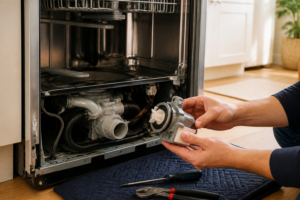
Before doing anything, disconnect power at the breaker. Remove the kick plate using a T20 Torx driver (two screws) and inspect the base pan. The OC error is triggered when the overflow sensor detects standing water in this pan, so it’s crucial to dry it thoroughly before moving on.
Step 2
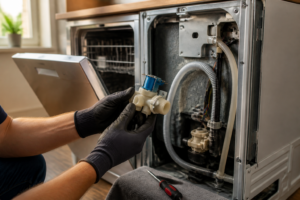
The inlet valve is often the main suspect for the OC error. If it fails to shut off at the end of the fill cycle, water can continue trickling in until it overflows. Use your multimeter set to Rx1 to test the solenoid terminals. A healthy valve should read between 200–500Ω; if it falls outside that range or keeps dripping after the fill, it’s time for a replacement.
Step 3
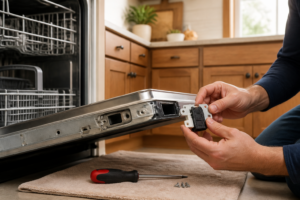
Next, check the float switch. This sensor tells the control board when there’s water in the base pan. If it’s stuck or faulty, it may trigger a false OC error. Manually lift the float to simulate high water levels, then test the switch terminals. It should open when the float is raised. If it doesn’t, replace the switch.
Step 4
Sometimes, high household water pressure can prevent the inlet valve from sealing properly, causing it to fill continuously. Check your supply line pressure; if it exceeds 120 PSI, consider installing a pressure reducing valve on the supply line to resolve this issue.
Step 5
Before you restore power, ensure the base pan is completely dry and that the float is in its resting position. A wet pan or raised float will re-trigger the OC error. Reconnect power and run a Quick Wash cycle while monitoring the base pan for any new water. Catching a new drip during the cycle can help confirm whether the root cause has been addressed.
Step 6
The OC error code will clear once the base pan is dry and the control board no longer detects the float switch triggered. There’s no separate reset required. If the error pops up again after your repair, re-examine the base pan during a live cycle as multiple failure points can exist at once.
Where to Buy Replacement Parts
- Samsung DW80CG5451SR overflow sensor replacement DD82-01032A
- Samsung dishwasher water inlet valve solenoid 1611001
- Samsung dishwasher anti-flood float switch replacement
When to Call a Professional
If you’ve completed all the steps and the issue persists, it may be time to consult a professional. Problems like a failed main control board, a seized pump, or wiring issues typically require specialized tools and expertise. Remember to shut off the water supply valve before any repairs that involve the fill or drain circuits.
How Much Does This Repair Cost?
| Repair route | Typical cost |
|---|---|
| Do it yourself | $10–$80 (parts) |
| Professional repair | $150–$300 (parts and labor) |
If you’re doing this repair yourself, expect to spend between $10–$80 on parts, depending on what you need. A professional service call usually ranges from $150–$300 when you factor in labor and parts markups. Tackling this repair yourself can save you $100 or more.
Frequently Asked Questions
What causes the OC overflow error on the Samsung DW80CG5451SR?
The OC error typically occurs when the dishwasher detects excess water in the base pan, often due to a faulty water inlet valve, a clogged drain, or a damaged door gasket. Catching these issues early can prevent further damage.
Can I reset the OC error without calling a technician?
Yes, you can try resetting the dishwasher by powering it off, tilting it to let any trapped water drain, and restarting it. However, if the error returns, that indicates a deeper issue that needs professional attention.
Is it safe to keep using the dishwasher while the OC error is active?
No, you should stop using the appliance immediately to avoid electrical hazards or further water damage. Addressing the repair is crucial before running another cycle.
Recommended Products
Here are the parts and tools I recommend for this repair, based on compatibility and customer reviews:
- Upgrade DC97-15459H Water Inlet Valve For Samsung Washing Machines WA50R5200AW/US WA45H7000AW/A2 WA45M7050AW WA422PRHDWR/AA WA45H7000AW/AA WA45H7000AP/A2 WA50R5400AV/US – 5 YEARS WARRANTY by Micnce
- Washing Machine Water Inlet Valve For Samsung WA45H7000AW/A2 WA422PRHDWR/AA WA45H7000AW/AA WA45M7050AW/A4 WA45H7000AP/A2 WA50R5200AW/US WA50R5400AV/US WA50R5400AW/US WA45T3400AP WA400PJHDWR/AA
- Upgrade DC97-15459H Water Inlet Valve Fit for Samsung Washer, Replaces AP5621731, PS4220862, EAP4220862, For WA45H7000AW/A2 WA45M7050AW/A4 WA400PJHDWR/AA WA50R5400AV/US – 5 Years Warranty by Beaquicy
- D.I.Accessa DD81-02238A Base Floating with float switch DD81-02239A Compatible for Samsung Dishwasher DW80R2031 Series (Match For DD81-02243A Cover- Floating)
The Float Switch That Actually Stops the OC Overflow Error on This Samsung
If you’ve narrowed down the problem to the float switch itself—it’s not triggering, it’s stuck, or it’s waterlogged—this is the part that’ll solve it. I’ve pulled plenty of these switches from DW80CG5451SR units where water was sitting in the basin because the switch never told the control board to shut the inlet valve off.
What works
- Direct fit for the DW80CG5451SR—no adapter needed, and installation takes about 15 minutes once you access the lower panel.
- The switch mechanism is responsive and doesn’t stick or hang like the original units I’ve seen fail; it moves freely through the full range of motion.
- Replacing it actually stops the OC error cold if the float itself is the culprit—the error code clears immediately after a test cycle.
What doesn’t
- If your overflow error is actually caused by a faulty water inlet valve, swapping the float switch won’t help—you’ll replace one part and still see the OC code.
- The assembly sits in a tight spot under the lower tub, so you need to work carefully with the dishwasher partially disassembled; rushing the install can damage the bracket.
I’ve seen people order this switch first without testing whether the inlet valve was actually shutting off, so they waited a week for a part that wasn’t the real problem—always verify the valve is working before you commit to the float switch. Grab the Overflow/float switch if your diagnosis points here.
About This Article

Written by Dave Holt. Dave Holt has been taking apart and fixing household appliances since he was a teenager who couldn't leave a broken one alone. Eighteen years later, after fixing things for neighbors, friends, and anyone who'd let him, he's seen almost every failure mode there is. When he writes a repair guide here, it's based on the actual job, not a manufacturer overview. More about this site.
Scope and limits. Dave is a self-taught repairer, not a certified appliance technician. Unplug before you open anything, and leave sealed refrigeration systems, gas connections, and hardwired circuits to a qualified technician.