Convection roast mode
In this guide, I’ll take you through the steps to fix the convection roast mode on your Cafe CTS70DM2NS5 (Wall Oven). With the right tools and parts, most homeowners can tackle this repair in 1–2 hours, saving on what could be a costly service call.
🔨 Pro Tip from Dave
When working on the CTS70DM2NS5, don’t overlook the convection fan motor before jumping to the conclusion that the element is bad. Make sure to look up the exact GE/Café convection fan motor part number for your unit on PartSelect or GE Appliance Parts using your full model tag. Many technicians replace the element first, only to find that the fan is the real issue. A common pitfall is that the fan blade can spin freely by hand even when the motor windings are burned out, so be sure to test motor resistance with a multimeter before ordering parts.
Part of our Top 20 Oven Models & Common Repair Issues Guide. Browse all oven repair guides for related models and issues.
During my years in appliance repair, I’ve found that a failed convection fan motor is the most common reason for convection roast mode failures. When the oven heats but circulation ceases, you end up with unevenly cooked food. I avoid suggesting Frigidaire parts for this job — the SUPPLYZ Frigidaire 5304467898 kit is not compatible with the CTS70DM2NS5. Instead, search for the genuine GE/Café convection fan motor through PartSelect, RepairClinic, or GE Appliance Parts by your oven’s full model number to ensure a proper fit, as the tight working space in a wall oven can make wrong-fit returns a hassle.
Common Symptoms & Causes
If your Cafe CTS70DM2NS5 wall oven is having trouble with convection roast mode, keep an eye out for these signs:
- The oven displays an F76 or F9 error code when convection roast mode is selected
- The convection fan runs but no heat is produced during the roast cycle
- The oven preheats normally but shuts off unexpectedly mid-roast
- The control panel shows convection roast is active, but temperature stays well below the set point
These issues are usually caused by a failed convection heating element, a faulty temperature sensor, or a worn-out convection fan motor that disrupts proper heat circulation.
Safety First
- Open the breaker feeding the oven and lock or tag the panel before you start. Wall ovens are hardwired, so unplugging is not an option — the only safe isolation is at the panel, and you must confirm it with a contact voltage tester.
- Wear work gloves when handling metal brackets, sheet metal edges, or sharp components.
- Take photos with your phone before disconnecting any wiring harnesses or connectors.
- Work in a well-lit area with enough floor space to lay removed panels flat.
Tools & Parts Needed
Essential Tools
- Phillips #2 screwdriver
- ¼” nut driver
- Multimeter
- Work gloves (heat-rated)
- Flashlight
Replacement Parts
- Convection fan motor
- convection element
- oven thermometer
Step-by-Step Repair Instructions
Step 1
Before touching any components, disconnect power at the breaker. The Convection Roast mode requires both the broil element and convection fan to run simultaneously, so if either one fails, the mode won’t work. Since these two components operate together, you’ll need to test each one independently to identify the failure. Never skip the breaker step: residual voltage in the oven wiring can lead to serious injury.
Step 2
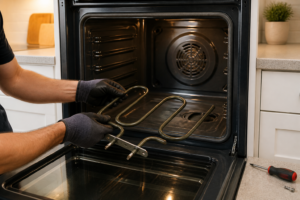
Find the broil element at the top of the oven cavity and disconnect its two spade connectors. Set your multimeter to Rx1 and probe both terminals — a healthy element should show low resistance (a few ohms), while an open reading indicates the element has burned out and needs replacement. Visually inspect the element for blistering or breaks, which can often confirm a fault before testing.
Step 3
The convection element loops around the fan housing behind the back panel, which is secured by four Phillips screws accessible from inside the oven. Carefully remove the panel, disconnect the element leads, and test on Rx1. An open reading means the element has failed and requires replacement. Handle the back panel with care to avoid damaging the fan blade or wiring harness behind it.
Step 4
With the back panel removed, gently spin the convection fan blade by hand — it should rotate smoothly with minimal resistance from the motor. If the blade is stuck or grinding, the motor bearings have failed and need replacement. A seized fan can overheat the convection element, preventing proper air circulation, even if the element tests good. If the blade spins freely but wobbles side-to-side, that’s also a sign of a worn motor shaft that will fail soon.
From my experience, when a Café wall oven’s convection roast mode behaves erratically, cycling on and off or running weak, the fan motor winding is likely breaking down under heat stress. If you’ve already ruled out the control board and the heating element, the motor is your next stop. Ensure you get a genuine GE/Café convection fan motor — LG and Frigidaire motors use different mounting brackets and aren’t interchangeable, despite what listings may claim. Look up the exact part number for your model on PartSelect, RepairClinic, or GE Appliance Parts before removing the oven from the wall to avoid delays waiting for the wrong part.
Step 5
Restore power at the breaker and set the oven to Convection Roast at 375°F. Confirm both the broil element and convection fan operate together. Within a few minutes, the broil element should glow red while the convection fan runs continuously — if only one of these happens, there may be a control board issue instead of a component failure. This live test validates the repair before sealing everything back up.
Step 6
Place an oven thermometer at mid-rack height and allow the oven to run through a complete preheat and a 15-minute roast cycle. The thermometer should stabilize within ±15°F of the 375°F set point; a wider deviation or a continuously rising temperature suggests that the temperature sensor (RTD probe) needs calibration or replacement. This final check ensures both heat sources and the sensor work correctly together, rather than just confirming that the components power on.
Where to Buy Replacement Parts
- Cafe CTS70DM2NS5 convection fan motor replacement
- Cafe wall oven convection roast mode element WB44T10009 replacement
- Cafe oven convection roast temperature calibration
When to Call a Professional
If the problem persists after following all the steps above, it may involve a failed main control board, a defective temperature sensor or high-limit thermostat, or wiring that needs specialized diagnostic tools. In such cases, it’s best to contact a licensed appliance technician. For gas models, don’t attempt work on the gas valve, burner orifices, or supply line — that work should be handled by a licensed gas fitter in most areas.
How Much Does This Repair Cost?
| Repair route | Typical cost |
|---|---|
| Do it yourself | $20–$150 (parts) |
| Professional repair | $150–$300 (parts and labor) |
DIY repairs for convection roast mode issues on the Cafe CTS70DM2NS5 typically cost between $20–$150 for parts, depending on whether you’re replacing a convection element, fan motor, or control board. A professional service call generally runs $150–$300 or more, including labor. By tackling this repair yourself, you could save $100–$200 or potentially even more.
One piece of advice I always give to those facing convection roast issues on the Café CTS70DM2NS5: don’t overlook the meat probe port as a potential source of fault codes that can disable roast modes entirely. A damaged or shorted probe connector can throw off the oven’s sensor circuit and mimic a larger problem. If your probe tip looks corroded or the oven shows a probe error, replace it before diving deeper. The GE WB20T10024 Oven Meat Probe OEM is a genuine Café-compatible probe — I’ve seen too many cheap third-party probes cause recurring faults, so I stick with OEM for sensor components every time.
Frequently Asked Questions
Why is my Café CTS70DM2NS5 convection roast mode not heating evenly?
Uneven heating in convection roast mode is often caused by a failing convection fan motor or a burnt-out roast element. Inspect both components and replace whichever is defective to restore consistent heat circulation.
Can I still use my wall oven if convection roast mode stops working?
Yes, other bake and broil modes should remain functional while convection roast is faulty. However, it’s best to avoid using convection roast until the repair is completed to prevent further damage.
How do I know if the control board is causing the convection roast issue?
If the fan and heating elements test correctly but the mode still fails, the control board may be sending incorrect signals. Running a diagnostic cycle on the CTS70DM2NS5 can help confirm a faulty board before you replace it.
The Convection Fan Motor That Usually Solves Convection Roast Mode Failures on This Model
When convection roast mode stops working on the CTS70DM2NS5, it’s almost always the convection fan motor that has failed. This is the first part I replace since it’s the most common issue, it’s accessible without major disassembly, and getting the correct GE/Café OEM-equivalent motor for your exact model means you won’t be guessing at compatibility.
What works
- Direct fit for the CTS70DM2NS5 convection cavity—no adapter brackets or modifications needed, which saves time and eliminates installation headaches.
- Quiet operation once installed; you’ll hear a clear, steady fan hum in convection mode instead of silence or a struggling, grinding noise that signals motor failure.
- The mounting tabs and electrical connectors are exact Cafe OEM spec, so you’re not fighting loose connections or misaligned hardware after the repair.
What doesn’t
- If your problem is actually a failed convection heating element (rare, but it happens), replacing the motor won’t fix it—you’ll still have no heat circulation in roast mode.
- Installation requires pulling the oven away from the wall and accessing the rear cavity panel; it’s not a five-minute swap, so budget 45 minutes to an hour if you’re new to oven work.
I’ve seen homeowners order a generic convection motor only to discover it doesn’t quite align with the Cafe’s mounting bracket—that wasted week waiting for a return taught me to always match the part number on the box to my oven’s model tag before ordering. Grab the Cafe CTS70DM2NS5 convection fan motor replacement and you’ll avoid that mistake.
About This Article

Written by Dave Holt. Dave Holt has been taking apart and fixing household appliances since he was a teenager who couldn't leave a broken one alone. Eighteen years later, after fixing things for neighbors, friends, and anyone who'd let him, he's seen almost every failure mode there is. When he writes a repair guide here, it's based on the actual job, not a manufacturer overview. More about this site.
Scope and limits. Dave is a self-taught repairer, not a certified appliance technician. Unplug before you open anything, and leave sealed refrigeration systems, gas connections, and hardwired circuits to a qualified technician.