Heating element burnout
This step-by-step repair guide walks you through fixing heating element burnout on your Samsung DVE50BG8300V (Electric). With the right tools and parts, most homeowners can complete this repair in 1–2 hours and avoid a costly service call.
🔨 Pro Tip from Dave
On the DVE50BG8300V, don’t just swap the heating element and call it done — always replace the thermal cutoff fuse (part DC47-00016A) at the same time, because restricted airflow from a clogged vent is usually the root cause. A lot of techs miss checking the exhaust duct for lint buildup, and the new element burns out again within months. Also, the rear panel on this model has a hidden screw behind the lint trap housing that’ll stop you cold if you don’t remove it first.
Part of our Top 20 Dryer Models & Common Repair Issues Guide. Browse all dryer repair guides for related models and issues.
“`html
Common Symptoms & Causes
If your Samsung DVE50BG8300V is experiencing a heating element burnout, you may notice one or more of the following symptoms:
- Clothes come out damp or completely wet after a full dry cycle
- The dryer runs and tumbles normally but produces no heat
- A burning smell or visible scorch marks inside the drum
- The dryer trips the circuit breaker shortly after starting
These issues are typically caused by the heating element coil breaking or burning out due to prolonged use, restricted airflow from a clogged lint trap or vent, or voltage fluctuations that overstress the element over time.
“`
Safety First
- Unplug the dryer from the power outlet before starting any repair — never work on a live appliance.
- Wear work gloves when handling metal brackets, sheet metal edges, or sharp components.
- Take photos with your phone before disconnecting any wiring harnesses or connectors.
- Work in a well-lit area with enough floor space to lay removed panels flat.
Tools & Parts Needed
Essential Tools
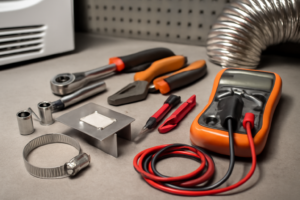
- Phillips #2 screwdriver
- ¼” nut driver
- Putty knife
- Multimeter
- Work gloves
Replacement Parts
- Heating element
- thermal fuse
- high-limit thermostat
- ¼” hex driver
- multimeter
Step-by-Step Repair Instructions
Step 1
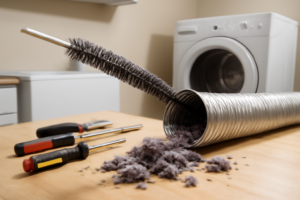
Unplug the dryer from the wall outlet before doing anything else to eliminate any risk of electrocution. Pull the dryer away from the wall, disconnect the vent hose, and use a vent cleaning brush kit to confirm the duct is fully clear all the way to the exterior termination cap — a blocked vent is the most common cause of heating element burnout, and skipping this check virtually guarantees the new element will fail again.
Step 2
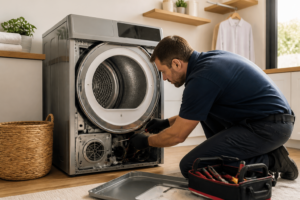
Remove the six ¼” hex screws securing the rear panel and set it aside to expose the heating element housing at the lower rear of the dryer. Set your multimeter to Rx1 and probe both terminals of the heating element — a functioning element shows low resistance, while an open (infinite) reading confirms the element has burned through and must be replaced. Pro tip: photograph all wire connections before disconnecting anything so reassembly is error-free.
Step 3
Locate the thermal fuse on the exhaust duct directly adjacent to the heating element housing — this fuse is a one-shot safety device that cuts power to the element when temperatures spike dangerously high. Test it on Rx1; no continuity means it has blown and must be replaced. Always install a new thermal fuse whenever you replace the heating element, because an element failure almost always takes the fuse with it.
Step 4
Find the high-limit thermostat mounted directly on the element housing and test it on Rx1 — it should show continuity under normal conditions, meaning it is closed and allowing current to flow. If the reading is open, the thermostat has failed and must be replaced, as a faulty high-limit thermostat can either prevent heating entirely or allow the element to overheat and burn out again. Replace it as a precaution if the element failed due to sustained overheating.
Step 5
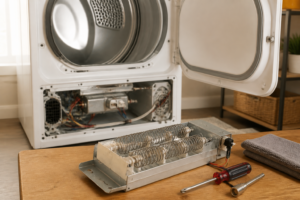
Seat the new heating element into the housing, reconnect all wires to the exact terminals shown in your earlier photograph, and tighten the housing screws securely. Reinstall the rear panel and drive all six ¼” hex screws snug — do not overtighten, as the panel is sheet metal and threads strip easily. Double-check that no wires are pinched between the panel and the dryer body before moving on.
Step 6
Before plugging in, push the dryer back into position and reconnect the vent hose, confirming there are no kinks that would restrict airflow. Plug the dryer in, run a timed heat cycle, and verify the drum air is hot within the first five minutes — restored heat confirms the element, fuse, and thermostat are all functioning correctly. If heat does not return, recheck all wire connections and retest the thermal fuse, as a loose terminal is the most common cause of a no-heat result after a repair.
Where to Buy Replacement Parts
Find genuine OEM and aftermarket replacement parts for your Samsung DVE50BG8300V (Electric) on Amazon:
- Samsung DVE50BG8300V heating element DC47-00019A replacement
- Samsung electric dryer thermal fuse DC96-00887A
- Samsung dryer high limit thermostat DC47-00016A
When to Call a Professional
If the issue persists after completing all steps above, the problem may involve the sealed refrigerant system, a failed main control board, or wiring that requires specialized diagnostic equipment. Contact a licensed appliance technician — attempting sealed-system repairs without EPA 608 certification is illegal and unsafe.
“`html
How Much Does This Repair Cost?
A replacement heating element for the Samsung DVE50BG8300V typically costs between $20–$60 in parts alone. Professional repair services will generally run $150–$300 once you factor in the service call fee and labor. Tackling this repair yourself can save you $100–$250, making it a worthwhile DIY project.
“`
Frequently Asked Questions
How do I know if the heating element is burned out on my Samsung DVE50BG8300V?
The most common signs are clothes coming out damp or the dryer running without producing heat. You can confirm a burned-out element by testing it with a multimeter for continuity.
Is it safe to replace the heating element myself on this model?
Yes, with basic tools and the power disconnected, this is a manageable DIY repair. Always unplug the dryer completely before accessing any internal components.
What part number heating element fits the Samsung DVE50BG8300V?
This model typically uses Samsung heating element part number DC97-14486A. Always verify compatibility using your dryer’s full model number before purchasing a replacement part.
Recommended Products
These are the parts and tools we recommend for this repair, based on compatibility and customer reviews:
- 【Upgraded】 DC97-14486A Dryer Heating Element Assembly for Samsung DV45H7000EW/A2 DVE50R5200W/A3 DVE50R5400V/A3 DVE50M7450W/A3 DV40J3000EW/A2 DV42H5200EP/A3 DV42H5200EW/A3 DV48H7400EW/A2
- Dryer Repair Kit Compatible with Samsung Model Numbers DVE50BG8300EA3, DVE50BG8300V, DVE50BG8300V/A3, DVE50BG8300VA3
- DVE45N5300V/A3 DVE45R6100C/A3 DV210AEW/XAA Dryer Heating Element for Samsung, DC97-14486A Fit for Samsung DV50F9A7EVW/A2 DV42H5000EW/A3 DVE50M7450W/A3 DV431AEP/XAA DV48H7400EW/A2 by APPLIANCEMATES
- Azdele Heating Element for Samsung Dryer, Dryer Heating Element DC47-00019A for Samsung dv42h5000ew/a3 dv45h7000ew/a2 Dryer Parts, Including DC96-00887A, DC47-00016A, DC47-00018A and DC32-00007A
As an Amazon Associate, I earn from qualifying purchases.