IE error — inlet water issue
This step-by-step repair guide walks you through fixing ie error — inlet water issue on your LG WT7300CW (Top Load). With the right tools and parts, most homeowners can complete this repair in 1–2 hours and avoid a costly service call.
🔨 Pro Tip from Dave
On the LG WT7300CW, the dual inlet water valve assembly (part number ACU72949803) has two solenoid ports — one for hot, one for cold — and a lot of DIYers replace only one side when both screens are clogged. Before ordering a full new valve, pull both screens and soak them in white vinegar for 20 minutes; hardwater buildup is often the real villain, not a failed valve.
Part of our Top 20 Washing machine Models & Common Repair Issues Guide. Browse all washing machine repair guides for related models and issues.
“`html
Common Symptoms & Causes
If your LG WT7300CW is displaying an IE error, you may notice one or more of the following signs before or during a wash cycle.
- The washer display shows the “IE” error code shortly after starting a cycle
- The drum remains empty and does not fill with water within the first few minutes
- Water fills extremely slowly, triggering a timeout before the cycle begins
- The washer pauses mid-cycle and displays IE after detecting insufficient water pressure
This error is most commonly caused by a kinked or frozen inlet hose, clogged inlet valve screens, low household water pressure, or a faulty water inlet valve that has worn out over time.
“`
Safety First
- Unplug the washing machine from the power outlet before starting any repair — never work on a live appliance.
- Shut off the water supply valve before disconnecting any water lines or hoses.
- Wear work gloves when handling metal brackets, sheet metal edges, or sharp components.
- Take photos with your phone before disconnecting any wiring harnesses or connectors.
- Work in a well-lit area with enough floor space to lay removed panels flat.
Tools & Parts Needed
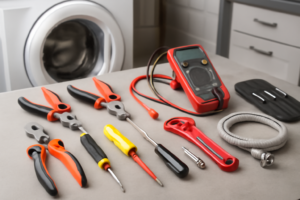
Essential Tools
- Phillips #2 screwdriver
- ¼” nut driver
- Torx T20 screwdriver
- Multimeter
- Bucket and towels
Replacement Parts
- Water inlet valve
- inlet hose screen filters
- inline pressure gauge
- Phillips screwdriver
Step-by-Step Repair Instructions
Step 1
Confirm both supply valves at the wall are fully open and check the hoses for kinks, because a partially closed valve or pinched hose restricts flow enough to trigger an IE error even when everything else is working correctly. A kinked hose is one of the most common and easily overlooked causes of this fault, so inspect the full length of each hose before moving on.
Step 2
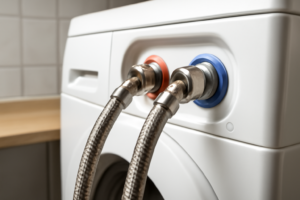
Shut off the water supply, then disconnect the hoses at the washer inlet ports with a bucket ready to catch residual water. Pull the mesh inlet screens out with needle-nose pliers and inspect them — sediment and debris clog these screens over time, choking off flow to the valve; rinse them thoroughly under running water and reinstall before reconnecting the hoses. Pro tip: if the screens are torn or deformed, replace them rather than reinstalling damaged mesh that can pass debris into the valve.
Step 3
Test your household water pressure, because LG requires between 14.5 and 116 PSI for the WT7300CW to fill correctly — pressure outside this range will cause an IE error even with a perfectly functioning washer. Homes on well systems are especially prone to low-pressure faults, particularly after periods of heavy water use; a standard pressure gauge threaded onto a hose bib will give you an accurate reading in seconds.
Step 4
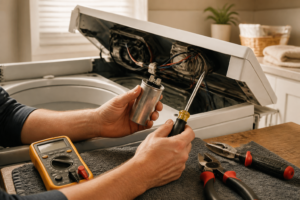
Unplug the washer before testing the water inlet valve — working on live appliances risks serious injury. Remove the rear panel (four quarter-inch hex screws), locate the inlet valve solenoid coils, and test each one with a multimeter set to Rx1; a healthy coil reads between 120 and 500 ohms, while a reading of infinity (open circuit) means the coil has failed and the entire valve assembly needs to be replaced.
Step 5
If the inlet valve tests good but the drum still won’t fill, the water level pressure switch may be the culprit — this component senses tub water level through a small hose running from the tub up to the control board, and if it fails it can incorrectly signal that the tub is already full. Listen for an audible click from the switch as water enters the tub; no click indicates the switch is not responding to pressure changes and should be replaced. Handle the pressure switch hose carefully, as a cracked or disconnected hose will mimic a failed switch.
Step 6
Reconnect all hoses firmly by hand and then a quarter-turn with pliers to prevent leaks, restore power, and run a Quick Wash cycle to confirm the repair. The drum should begin filling within 30 seconds of the cycle starting; if IE returns immediately, the issue is likely electrical rather than mechanical and the main control board or wiring harness should be inspected next.
Where to Buy Replacement Parts
Find genuine OEM and aftermarket replacement parts for your LG WT7300CW (Top Load) on Amazon:
- LG WT7300CW water inlet valve AGM73029603
- LG top load washer inlet hose screens cleaning
- LG washer inlet valve solenoid multimeter test
When to Call a Professional
If the issue persists after completing all steps above, the problem may involve the sealed refrigerant system, a failed main control board, or wiring that requires specialized diagnostic equipment. Contact a licensed appliance technician — attempting sealed-system repairs without EPA 608 certification is illegal and unsafe.
“`html
How Much Does This Repair Cost?
DIY repairs for an IE error on the LG WT7300CW typically cost between $10–$80, depending on whether you need a new inlet valve, hose, or screen filter. A professional service call for the same issue usually runs $150–$300 including labor. Tackling this repair yourself can save you $100 or more with just basic tools and a little time.
“`
Frequently Asked Questions
What causes the IE error on my LG WT7300CW?
The IE error typically means the washer isn’t receiving enough water, often due to a kinked supply hose, closed water valve, or a clogged inlet screen filter. Check these simple issues before replacing any parts.
How do I clean the inlet valve screen on the LG WT7300CW?
Turn off the water supply, disconnect the hoses, and use needle-nose pliers to remove the mesh screens from the inlet valve. Rinse them under running water to clear any sediment buildup.
Can I still run my washer if the IE error keeps returning?
No — continuing to run the machine with an active IE error can damage the pump and motor. Resolve the water supply issue before starting another wash cycle.
Recommended Products
These are the parts and tools we recommend for this repair, based on compatibility and customer reviews:
- AJU75152602 Washer Inlet Valve Assembly compatible with lg WT7100CW, WT7150CW, WT7300CV, WT7300CW, WT7400CW, WT7800CW, WT7900HBA, WT7305CV, WT7400CV, WT7800CV WT7155CW, WT7405CV, WT7405CW etc Series
- AJU75152602 Washer Inlet Valve Assembly for LG Washing Machine WT7405CW WT7305CV WT7305CW WT7150CW 31452 WT7250CW WT7880HWA WT7300CW WT7900HBA WT7060CV WT7800CW WT7300CV WT7060CW WT7100CW
- Upgraded AJU75152602 Washer Water Inlet Valve Assembly Fit for LG Washing Machine WT7100CW, WT7150CW, WT7300CV, WT7300CW, WT7400CV, WT7405CW WT7800CV, Replaces 5221EA1008S PD00060681
- AJU73213301 AJU75152601 5221EA1008F Washer Water Inlet Valve (0EM part) with 10-year GUARANTEE 2025 UPGRADED Water Valve fits for Kenmore LG Washers WT7200CW, WT5001c*, 79631522211, WT1201CW
As an Amazon Associate, I earn from qualifying purchases.